 PH
PHNOTE: This is only for OPEN MENU DEVICES! THIS IS NOT FREE!
– All iPhone models are supported.
What is Open Menu?
— Ito po yung iPhone na naoopen / naaacess nyo pa yung phone pero walang access sa icloud.
— Alam nyo yung passcode pero hindi malogout yung iCloud kasi hindi nyo alam yung iCloud password.
Our Unlock Services
We offer two services: PREMIUM and STANDARD.
Standard Service Eligibility Check
To determine if your phone is eligible for the Standard service, follow these steps:
1. Go to Settings.
2. Tap on your iCloud Profile.
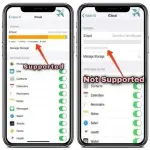
3. Select iCloud and tap "Show All." Check if iCloud storage is visible. If not, your device is not eligible for the Standard service.
4. Find Game Center.
5. Toggle it off and on 5 times.
Important Note:
If you're prompted for your iCloud password during this process, your device requires the Premium service, which supports Game Center.
– All iPhone models are supported.
What is Open Menu?
— Ito po yung iPhone na naoopen / naaacess nyo pa yung phone pero walang access sa icloud.
— Alam nyo yung passcode pero hindi malogout yung iCloud kasi hindi nyo alam yung iCloud password.
Our Unlock Services
We offer two services: PREMIUM and STANDARD.
Standard Service Eligibility Check
To determine if your phone is eligible for the Standard service, follow these steps:
1. Go to Settings.
2. Tap on your iCloud Profile.
3. Select iCloud and tap "Show All." Check if iCloud storage is visible. If not, your device is not eligible for the Standard service.
4. Find Game Center.
5. Toggle it off and on 5 times.
Important Note:
If you're prompted for your iCloud password during this process, your device requires the Premium service, which supports Game Center.