❓ Help No audio after reformatting

Status
Not open for further replies.

XxxAsmodeusxxX

Enthusiast
can anyone please help
i reformat my desktop recently but sadly after there is no audio
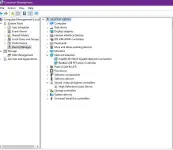
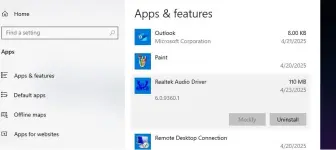
already tried uninstalling then restart pc to reinstall the driver
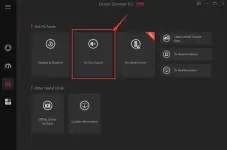
already update all drivers using iobit driver booster
already check using driveridentifier
download all posible audio drivers and reinstall
any other solution for this? hope someone can help me

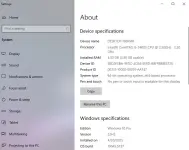
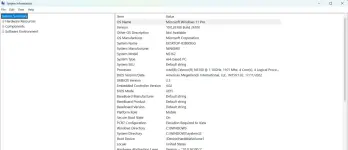
OS: windows 10 pro 2009 22h2 64bit spectre edition
(already tried using different windows 10 home OS - same result)

pc specs:
processor : intel core i5-2400s cpu @ 2.50ghz
ram : 4 gb


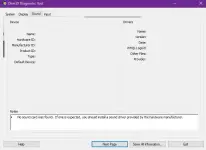
audio1.webp

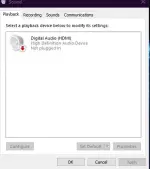
audio2.webp

audio3.webp

audio4.webp

audio5.webp
 
I'm sorry to hear about the audio issue you're facing after reformatting your desktop. It seems like you've already tried several troubleshooting steps to fix the problem. Here are some additional solutions you can try:

1. Check Audio Services:
- Press Windows key + R, type services.msc, and press Enter.
- Make sure that Windows Audio service is running. Right-click on it, select Start if it's not running, and set the startup type to Automatic.

2. Check Sound Settings:
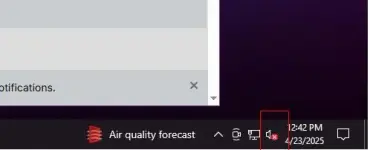
- Right-click on the speaker icon in the taskbar, select Open Sound settings.
- Under Output, ensure the correct output device is selected.

3. Windows Troubleshooter:
- Go to Settings > Update & Security > Troubleshoot.
- Run the Playing Audio troubleshooter to automatically detect and fix audio problems.

4. BIOS Settings:
- Enter your BIOS settings during boot (usually by pressing Del or F2 key) and ensure that onboard audio is enabled.

5. Check for Windows Updates:
- Make sure your Windows 10 is up to date by checking for any pending updates in Settings > Update & Security.

6. Direct Sound Test:
- Press Windows key + R, type dxdiag, and press Enter.
- Go to the Sound tab and test the sound to see if it's working.

7. Manufacturer Website:
- Visit the manufacturer's website of your motherboard or sound card to download the latest audio drivers specific to your hardware.

If none of these steps resolve the issue, there might be a hardware problem with the audio components on your desktop. In that case, you may need to consider getting the hardware checked by a professional technician or contacting the manufacturer's support for further assistance.
 
Nawala driver


Nawala boss yung driver kahit yellow mark wala


Nawala boss yung driver kahit yellow mark wala

Nag try narin ako manual install driver using realtek kaso yellow mark naman at yung iba version like intel nag blue screen loop naman
try mo sir yung driver magician or any software na pang download ng driver.
 
Pag uodate ko blue screen sya at yung iba naman driver downloader iba lang yung na update wala yung audio driver
anong ano OS mo? kung win11 or win10 tas medyo luma na yung laptop/desktop mo possible yan na hindi compatible sa os na gamit mo dahil walang ginawang driver para dyan. kung tama ang hinala ko ang solusyon dyan ay downgrade ng OS
 
anong ano OS mo? kung win11 or win10 tas medyo luma na yung laptop/desktop mo possible yan na hindi compatible sa os na gamit mo dahil walang ginawang driver para dyan. kung tama ang hinala ko ang solusyon dyan ay downgrade ng OS
windows 11 sya then ok naman lahat wala problema kaso medyo nagibatan ako sa w11 nag install ako windows 10 kaso ayun nga nawala audio kasama narin touchpad driver

anong ano OS mo? kung win11 or win10 tas medyo luma na yung laptop/desktop mo possible yan na hindi compatible sa os na gamit mo dahil walang ginawang driver para dyan. kung tama ang hinala ko ang solusyon dyan ay downgrade ng OS
ningmei brand laptop gamit ko

1748030758502.webp
 
Status
Not open for further replies.

About this Thread

  • 20
    Replies
  • 840
    Views
  • 9
    Participants
Last reply from:
ayaOmO

Trending Topics

Online now

Members online
937
Guests online
1,541
Total visitors
2,478

Forum statistics

Threads
2,272,873
Posts
28,946,022
Members
1,236,448
Latest member
woww989
Back
Top