 PH
PH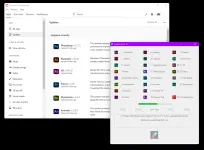 How to use GenP:
If you want to ρá†ch all Adobe apps in default location:
Press ‘Search Files’ – wait until GenP finds all files.
Press ‘Pill Button’ – wait until GenP do it’s job.
One Adobe app at a time
 ress ‘Custom path’ – select folder that you want [depending upon the app you want to ρá†ch]Press ‘Search Files’ – wait until GenP finds all files.
Press ‘Pill Button’ – wait until GenP do it’s job.
Changelog:
v3.6.2 Changelog:
– Popup Tools -> Runtime Installer section updated.
It was brought to my attention that some apps or versions may not like their RuntimeInstaller.dll file being renamed
(deleting or renaming the file removed popups). This rename method was added in v3.6.0/1 due to After Effects and
Premiere Pro packing their files with custom UPX, so the new ρá†ch/pattern from @xanax could not be found.
As of v3.6.2, I have added a custom UPX binary to unpack these files and the Popup Tools -> Runtime Installer ->
Unpack button will now automate this process (instead of simply renaming the file). After unpacking the file(s),
they can be patched with AdobeGenP to apply the xanax popup ρá†ch (or any other patches) to the file.
DOWNLOAD LINK:
You do not have permission to view the full content of this post. Log in or register now.