 PH
PH-
Welcome to PHCorner Forums! Sign up for free to unlock full access and exclusive privileges, including:
- Asking questions about computer and mobile issues
- Discovering internet tips for your mobile network and computer
You are using an out of date browser. It may not display this or other websites correctly.
You should upgrade or use an alternative browser.
You should upgrade or use an alternative browser.
❓ Help Need help! Windows 11 update problem
- Status
- Not open for further replies.
🤖
🤖
Para ma-update ang iyong Windows 10 to Windows 11, dapat sundin mo ang mga sumusunod na hakbang:
1. Siguraduhing ang iyong computer ay tugma sa Windows 11 system requirements:
- 64-bit processor with at least 1 GHz clock speed and 2 or more cores
- 4 GB RAM
- 64 GB storage
- DirectX 12 compatible graphics / WDDM 2.x
- Secure Boot capable
- TPM version 2.0
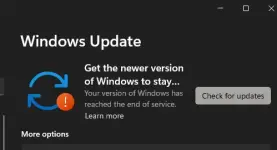
2. I-check ang Windows Update sa iyong computer:
- Buksan ang Settings > Update & Security > Windows Update
- I-click ang "Check for updates" at siguraduhing ang lahat ng available updates ay na-install
3. Kung wala pa ring Windows 11 update:
- Pumunta sa official Windows 11 website at i-download ang Windows 11 Installation Assistant
- Sundan ang mga tagubilin sa pag-install ng Windows 11 sa iyong computer
4. Siguraduhing mag-backup ng mahahalagang files bago mag-upgrade sa Windows 11 upang maiwasan ang data loss.
Kung may mga errors o hindi mo ma-update ang iyong Windows 10, maaari mong i-search ang specific error message sa Google para makuha ang mga posibleng solusyon.
1. Siguraduhing ang iyong computer ay tugma sa Windows 11 system requirements:
- 64-bit processor with at least 1 GHz clock speed and 2 or more cores
- 4 GB RAM
- 64 GB storage
- DirectX 12 compatible graphics / WDDM 2.x
- Secure Boot capable
- TPM version 2.0
2. I-check ang Windows Update sa iyong computer:
- Buksan ang Settings > Update & Security > Windows Update
- I-click ang "Check for updates" at siguraduhing ang lahat ng available updates ay na-install
3. Kung wala pa ring Windows 11 update:
- Pumunta sa official Windows 11 website at i-download ang Windows 11 Installation Assistant
- Sundan ang mga tagubilin sa pag-install ng Windows 11 sa iyong computer
4. Siguraduhing mag-backup ng mahahalagang files bago mag-upgrade sa Windows 11 upang maiwasan ang data loss.
Kung may mga errors o hindi mo ma-update ang iyong Windows 10, maaari mong i-search ang specific error message sa Google para makuha ang mga posibleng solusyon.
- Status
- Not open for further replies.
Similar threads
-
🔒 Closed Ghost spectre windows 11 need help
- Started by sym0nr26
- Replies: 1
-
❓ Help Ghost spectre windows 11 -cant open any apps. Need help
- Started by sym0nr26
- Replies: 8
-
-
About this Thread
-
3Replies
-
497Views
-
3Participants
Last reply from:
mryou
mryou
New Topics
-
Booting Issue - FA506NFR
- Started by Impossible
- Replies: 0
- ❓ Computer Discussion & Support
-
Acrobat Pro DC ρá†ch. Need Help
- Started by skullkrasher99
- Replies: 3
- ❓ Computer Discussion & Support
-
Enlighten me please with these two
- Started by Jeii
- Replies: 4
- ❓ Computer Discussion & Support
-
Win 10 Home keys
- Started by Ali246
- Replies: 6
- ❓ Computer Discussion & Support
-
Windows 11 26H2
- Started by tholitz
- Replies: 1
- ❓ Computer Discussion & Support
-
Help po !!!! My account got häçked Facebook and steam
- Started by bujoy20
- Replies: 8
- ❓ Computer Discussion & Support
-
Mga bossing patulong po nahäçk account ko due to carelessness
- Started by Jeii
- Replies: 4
- ❓ Computer Discussion & Support
-
Computer parts na cheap
- Started by bjenjay1
- Replies: 4
- ❓ Computer Discussion & Support
-
PC APPS - remote or auto saved type and auto audio
- Started by babyzero
- Replies: 1
- ❓ Computer Discussion & Support
Trending Topics
Online now
- Members online
- 1,128
- Guests online
- 6,645
- Total visitors
- 7,773