My account has been häçked
I'm sorry to hear that your account has been häçked. Here are some steps you can take to try to recover your account:
1. Change your password immediately: If you still have access to your account, change your password to something strong and unique. Make sure it's not a password you've used before.
2. Secure your account: Check for any suspicious activity, such as unauthorized changes to your account settings or information. Update your security settings and enable two-factor authentication if available.
3. Contact the platform's support: Reach out to the platform's support team to report the issue. Provide as much information as you can about the häçk, including when you first noticed it and any unusual activity you observed.
4. Check for unauthorized access: Review your account activity logs to see if there have been any unauthorized logins or actions taken on your account. This information can help you and the platform's support team investigate the häçk further.
5. Scan your devices for malware: Run a full antivirus scan on any devices you use to access your account to check for malware or other security threats that could have led to the häçk.
Remember to stay vigilant and regularly monitor your account for any unusual activity even after you have recovered it. I hope these steps help you regain control of your häçked account. If you need further assistance, feel free to ask.
 PH
PH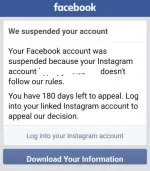 bigla
bigla