🛠️ Tools Windows 11/10 Remove Bloatware (Autounattend Install)

salieri

Elite

Para sa mga windows users na umai na sa bloatware sa windows 11/10, eto ung tip para mawala lahat ng bloatware sa windows installation nyo, no need modified version ng windows, original iso lng sapat na.

Requirements
  • Original Windows ISO from Microsoft website
  • Rufus (Bootable USB Tool)
  • Your customized autounattend.xml file

Steps
Step 1.
Go to You do not have permission to view the full content of this post. Log in or register now..

You do not have permission to view the full content of this post. Log in or register now.

Step 2.
Customized your own unattended file.

Step 3.
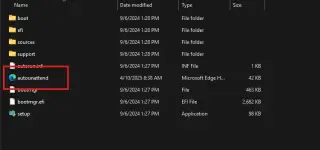
Download your autounattend.xml and put it in your windows usb installer
p8.webp
Step 4.
You are good to go.
 

About this Thread

  • 9
    Replies
  • 263
    Views
  • 10
    Participants
Last reply from:
DareDeviI

Online now

Members online
397
Guests online
1,817
Total visitors
2,214

Forum statistics

Threads
2,314,550
Posts
29,178,774
Members
1,184,192
Latest member
darkwa
Back
Top