 PH
PHReadEra Premium APK is the best ρáíd reading app for Android. The application can be used offline and is compatible with many different book formats. This is definitely the application you need on your device if you are passionate about reading and do not have much time.
Introduce about ReadEra Premium
Reading app that can be used offline with impressive compatibility!
What is ReadEra Premium?
ReadEra Premium is a book reader that allows reading books for free, allowing offline use. It is compatible with many different document formats such as Ebook, PDF, Kindle Book or Word.
What features does ReadEra Premium offer in its 30-day free version?
Before deciding to upgrade to a premium version of this reading app, you can try it out for up to 30 days and enjoy many of the app’s basic features.
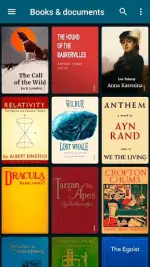
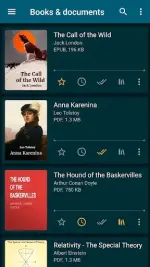
The first is the ability to read books in a variety of formats, from Microsoft Word documents, PDF files to Kindle formats. And not only files that are specified or added directly by you, ReadEra Premium has the ability to automatically recognize books and documents, so any file that can be read when downloaded from the Internet will automatically appear in the list.
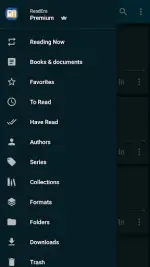
In this list, you can group documents according to your liking such as by author, genre, specialty… ReadEra Premium is also a useful tool for you to manage book documents online. The app’s management toolkit also includes a Bookshelf feature. The bookshelf will help you create your own personal themes. A book can be on multiple Bookshelves at the same time.
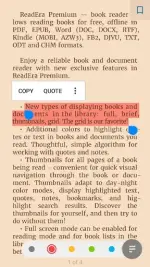
In addition, ReadEra Premium is very easy to use and flexible. As you can freely save the page while reading, the option to quickly access a certain page, zoom in and out, choose the color modes when reading, adjust the brightness, adjust the page margins, adjust the font, the degree highlight rows, edit excerpts and audio recordings, and add personal notes to selected documents.
Features only available in ReadEra Premium
You may be quite satisfied with the reading ability in the free version of the application, but if you want the outstanding features of ReadEra Premium, you will need the Premium version. Document sync with users’ Google Drive to read books on all devices, Quote & Note feature to centralize excerpts, notes and bookmarks in one place.
In case you want to customize more, there are also many support tools such as the My Font feature that allows you to upload the font you like to the application for later use, can change the color of text quotes in books or documents. And there are many other handy features, mostly to bring the highest comfort to the reading process.
You do not have permission to view the full content of this post. Log in or register now.
Introduce about ReadEra Premium
Reading app that can be used offline with impressive compatibility!
What is ReadEra Premium?
ReadEra Premium is a book reader that allows reading books for free, allowing offline use. It is compatible with many different document formats such as Ebook, PDF, Kindle Book or Word.
What features does ReadEra Premium offer in its 30-day free version?
Before deciding to upgrade to a premium version of this reading app, you can try it out for up to 30 days and enjoy many of the app’s basic features.
The first is the ability to read books in a variety of formats, from Microsoft Word documents, PDF files to Kindle formats. And not only files that are specified or added directly by you, ReadEra Premium has the ability to automatically recognize books and documents, so any file that can be read when downloaded from the Internet will automatically appear in the list.
In this list, you can group documents according to your liking such as by author, genre, specialty… ReadEra Premium is also a useful tool for you to manage book documents online. The app’s management toolkit also includes a Bookshelf feature. The bookshelf will help you create your own personal themes. A book can be on multiple Bookshelves at the same time.
In addition, ReadEra Premium is very easy to use and flexible. As you can freely save the page while reading, the option to quickly access a certain page, zoom in and out, choose the color modes when reading, adjust the brightness, adjust the page margins, adjust the font, the degree highlight rows, edit excerpts and audio recordings, and add personal notes to selected documents.
Features only available in ReadEra Premium
You may be quite satisfied with the reading ability in the free version of the application, but if you want the outstanding features of ReadEra Premium, you will need the Premium version. Document sync with users’ Google Drive to read books on all devices, Quote & Note feature to centralize excerpts, notes and bookmarks in one place.
In case you want to customize more, there are also many support tools such as the My Font feature that allows you to upload the font you like to the application for later use, can change the color of text quotes in books or documents. And there are many other handy features, mostly to bring the highest comfort to the reading process.
You do not have permission to view the full content of this post. Log in or register now.

