❓ Help Difference between Intel(R) Display Audio vs. High Definition Audio Device?

Status
Not open for further replies.

Rectify

#c94c4c
Legendary
1743707122880.webp


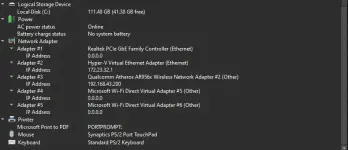
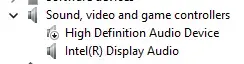
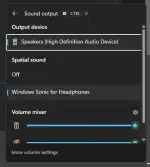
Ayan lang silang dalawa sa Device Manager ko, pero pag option si High Definition Audio Device lang lang ang available?
1743707200130.webp


any thoughts po sa nakakaalam ng ganito, iisang driver lang ba sila o magkaiba driver. I try reinstalling both driver, restarting my lapy, still the same.
Wala din update sa mga Driver Updater (iObit Driver Booster e.g)


*Gusto ko sana malaman kung ang may issue ba front speaker ko kasi ayaw gumana, sa baba lang meron tunog, tsaka tunog lata pa. walang trebble or base puro twiter.


salamat po sa makakasagot, ive search everything sa internet pero wala talaga ako mahanap na sagot.. Good morning po sainyo)


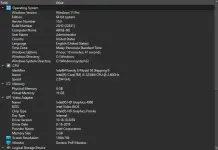
My operating system: HP Envy Notebook TS 15 (j057cl) - 2013
1743707454986.webp
1743707483370.webp
 
Solution
🤖
Difference between Intel(R) Display Audio vs. High Definition Audio Device? are they both same driver from Intel?
Intel(R) Display Audio and High Definition Audio Device are both audio drivers produced by Intel, but they serve different functions.

1. Intel(R) Display Audio: This driver is specifically designed to carry audio signals through DisplayPort connections. It is commonly used for transmitting audio over HDMI or DisplayPort connections when you are using an Intel integrated graphics card. The Intel Display Audio driver allows audio to be transmitted alongside video signals through the same cable, typically to a monitor or TV that supports audio over DisplayPort.

2. High Definition Audio Device: This driver...
Hello! How can I assist you today regarding the topic "Difference between Intel(R) Display Audio vs. High Definition Audio Device?" Let me know if you have any questions or need more information.
 
Hello! How can I assist you today regarding the topic "Difference between Intel(R) Display Audio vs. High Definition Audio Device?" Let me know if you have any questions or need more information.
Difference between Intel(R) Display Audio vs. High Definition Audio Device? are they both same driver from Intel?
 
Difference between Intel(R) Display Audio vs. High Definition Audio Device? are they both same driver from Intel?
Intel(R) Display Audio and High Definition Audio Device are both audio drivers produced by Intel, but they serve different functions.

1. Intel(R) Display Audio: This driver is specifically designed to carry audio signals through DisplayPort connections. It is commonly used for transmitting audio over HDMI or DisplayPort connections when you are using an Intel integrated graphics card. The Intel Display Audio driver allows audio to be transmitted alongside video signals through the same cable, typically to a monitor or TV that supports audio over DisplayPort.

2. High Definition Audio Device: This driver, on the other hand, is a general audio driver that is used for standard audio output on your computer. It provides support for audio playback and recording on your system. The High Definition Audio Device driver is used for audio output through your computer's speakers, headphones, or external audio devices that are connected via audio jacks.

In summary, while both drivers are related to audio functions, Intel(R) Display Audio is specifically tailored for audio output through DisplayPort connections, while High Definition Audio Device is a general audio driver for standard audio output on your computer.
 
Solution
Intel(R) Display Audio and High Definition Audio Device are both audio drivers produced by Intel, but they serve different functions.

1. Intel(R) Display Audio: This driver is specifically designed to carry audio signals through DisplayPort connections. It is commonly used for transmitting audio over HDMI or DisplayPort connections when you are using an Intel integrated graphics card. The Intel Display Audio driver allows audio to be transmitted alongside video signals through the same cable, typically to a monitor or TV that supports audio over DisplayPort.

2. High Definition Audio Device: This driver, on the other hand, is a general audio driver that is used for standard audio output on your computer. It provides support for audio playback and recording on your system. The High Definition Audio Device driver is used for audio output through your computer's speakers, headphones, or external audio devices that are connected via audio jacks.

In summary, while both drivers are related to audio functions, Intel(R) Display Audio is specifically tailored for audio output through DisplayPort connections, while High Definition Audio Device is a general audio driver for standard audio output on your computer.
Ahh so si Intel DA, para lang pala sa mga external output tulad ng jack 3.5mm while si HD Audio device ay built in sa mga computer at mostly sa speaker,mic?
 
Ahh so si Intel DA, para lang pala sa mga external output tulad ng jack 3.5mm while si HD Audio device ay built in sa mga computer at mostly sa speaker,mic?
Tama ka diyan! Ang Intel Display Audio driver ay karaniwang ginagamit para sa external audio output tulad ng HDMI o DisplayPort connections, habang ang High Definition Audio Device driver ay karaniwang built-in sa computer para sa standard audio output na ginagamit sa mga built-in speakers, headphones, at iba pang audio devices na konektado sa audio jacks ng computer.

Kung ikaw ay gumagamit ng Intel integrated graphics card at gusto mong magpadala ng audio sa iyong monitor o TV gamit ang HDMI o DisplayPort connection, dapat mo gamitin ang Intel Display Audio driver. Sa kabilang banda, kung ikaw ay gumagamit ng standard audio output tulad ng speakers o headphones na konektado sa audio jacks ng iyong computer, ang High Definition Audio Device driver ang kadalasang ginagamit para dito.

Narito ang pagkakaiba sa pagitan ng dalawang driver na ito at kung saan sila karaniwang ginagamit para sa iba't ibang uri ng audio output. Sana ay malinaw na sa iyo ang kanilang pagkakaiba! Kung may iba ka pang katanungan, huwag kang mag-atubiling magtanong.
 
Tama ka diyan! Ang Intel Display Audio driver ay karaniwang ginagamit para sa external audio output tulad ng HDMI o DisplayPort connections, habang ang High Definition Audio Device driver ay karaniwang built-in sa computer para sa standard audio output na ginagamit sa mga built-in speakers, headphones, at iba pang audio devices na konektado sa audio jacks ng computer.

Kung ikaw ay gumagamit ng Intel integrated graphics card at gusto mong magpadala ng audio sa iyong monitor o TV gamit ang HDMI o DisplayPort connection, dapat mo gamitin ang Intel Display Audio driver. Sa kabilang banda, kung ikaw ay gumagamit ng standard audio output tulad ng speakers o headphones na konektado sa audio jacks ng iyong computer, ang High Definition Audio Device driver ang kadalasang ginagamit para dito.

Narito ang pagkakaiba sa pagitan ng dalawang driver na ito at kung saan sila karaniwang ginagamit para sa iba't ibang uri ng audio output. Sana ay malinaw na sa iyo ang kanilang pagkakaiba! Kung may iba ka pang katanungan, huwag kang mag-atubiling magtanong.
edi may sira pala ulo ng laptop ko hahaha ---hardware issue sa speaker na pala. ok ok thanks!
 
edi may sira pala ulo ng laptop ko hahaha ---hardware issue sa speaker na pala. ok ok thanks!
Walang anuman! Sana ay magawa mo nang maayos ang issue sa speaker ng iyong laptop. Kung kailangan mo ng karagdagang tulong o impormasyon, huwag kang mag-atubiling magtanong dito sa forum. Maraming salamat at sana maayos agad ang problema sa iyong laptop!
 
Status
Not open for further replies.

About this Thread

  • 7
    Replies
  • 387
    Views
  • 1
    Participants
Last reply from:
Unknown user

Trending Topics

Online now

Members online
1,093
Guests online
1,228
Total visitors
2,321

Forum statistics

Threads
2,273,226
Posts
28,948,382
Members
1,235,672
Latest member
claitoh10
Back
Top