 PH
PH-
Welcome to PHCorner Forums! Sign up for free to unlock full access and exclusive privileges, including:
- Asking questions about computer and mobile issues
- Discovering internet tips for your mobile network and computer
You are using an out of date browser. It may not display this or other websites correctly.
You should upgrade or use an alternative browser.
You should upgrade or use an alternative browser.
❓ Help Pc boot problem
- Thread starter ashcrow
- Start date
- Status
- Not open for further replies.
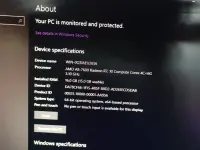
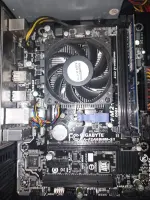
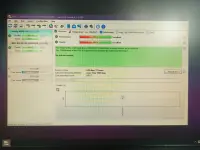
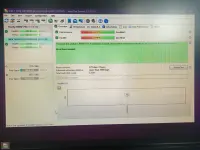
🤖
🤖
Hello! It sounds like you're experiencing some issues with your PC crashing during boot and sometimes failing to boot properly. There could be several reasons for this behavior. Here are a few possible causes and solutions to consider:
1. Hardware Issues: Check if all your hardware components are properly connected and functioning correctly. Issues with RAM, hard drive, or power supply could cause crashes during boot. You can try reseating the RAM modules and checking the hard drive's health using tools like CrystalDiskInfo.
2. Overheating: Overheating can cause system instability and crashes. Make sure your CPU and GPU are not overheating by checking the temperatures using software like HWMonitor. Ensure that the fans are working correctly and that the PC is not clogged with dust.
3. Software Problems: Corrupted system files or problematic drivers can also cause crashes during boot. Try booting into Safe Mode to see if the problem persists. If it doesn't, it might be a driver-related issue. You can use tools like Driver Verifier to identify faulty drivers.
4. Virus or Malware: Malware can also cause system instability. Run a full scan using a trusted antivirus program to check for any infections.
5. Windows Updates: Ensure that your Windows OS is up to date with the latest updates. Sometimes, outdated software can cause system instability.
6. BIOS Settings: Check your BIOS settings to ensure they are set correctly. Resetting the BIOS to default settings can sometimes resolve boot issues.
7. Power Supply: A failing power supply can cause intermittent crashes and boot problems. Consider testing with a known good power supply to rule out this possibility.
If you've tried these steps and the issue persists, it might be a more complex problem that requires further troubleshooting. If you're not comfortable with technical troubleshooting, it's best to consult with a professional technician who can diagnose and fix the issue for you.
I hope these suggestions help you resolve the boot problem with your PC. Let me know if you need further assistance!
1. Hardware Issues: Check if all your hardware components are properly connected and functioning correctly. Issues with RAM, hard drive, or power supply could cause crashes during boot. You can try reseating the RAM modules and checking the hard drive's health using tools like CrystalDiskInfo.
2. Overheating: Overheating can cause system instability and crashes. Make sure your CPU and GPU are not overheating by checking the temperatures using software like HWMonitor. Ensure that the fans are working correctly and that the PC is not clogged with dust.
3. Software Problems: Corrupted system files or problematic drivers can also cause crashes during boot. Try booting into Safe Mode to see if the problem persists. If it doesn't, it might be a driver-related issue. You can use tools like Driver Verifier to identify faulty drivers.
4. Virus or Malware: Malware can also cause system instability. Run a full scan using a trusted antivirus program to check for any infections.
5. Windows Updates: Ensure that your Windows OS is up to date with the latest updates. Sometimes, outdated software can cause system instability.
6. BIOS Settings: Check your BIOS settings to ensure they are set correctly. Resetting the BIOS to default settings can sometimes resolve boot issues.
7. Power Supply: A failing power supply can cause intermittent crashes and boot problems. Consider testing with a known good power supply to rule out this possibility.
If you've tried these steps and the issue persists, it might be a more complex problem that requires further troubleshooting. If you're not comfortable with technical troubleshooting, it's best to consult with a professional technician who can diagnose and fix the issue for you.
I hope these suggestions help you resolve the boot problem with your PC. Let me know if you need further assistance!
- Status
- Not open for further replies.
Similar threads
-
-
-
❓ Help TIME AND DATE ERROR EVERY PC BOOT
- Started by Nellieyod
- Replies: 5
-
-
🤖 Android Realme 8 5G Rom Problem
- Started by bossgab29
- Replies: 5
About this Thread
-
1Replies
-
267Views
-
1Participants
Last reply from:
Unknown user
Unknown user
New Topics
-
Acrobat Pro DC ρá†ch. Need Help
- Started by skullkrasher99
- Replies: 1
- ❓ Computer Discussion & Support
-
Enlighten me please with these two
- Started by Jeii
- Replies: 4
- ❓ Computer Discussion & Support
-
Win 10 Home keys
- Started by Ali246
- Replies: 6
- ❓ Computer Discussion & Support
-
Windows 11 26H2
- Started by tholitz
- Replies: 1
- ❓ Computer Discussion & Support
-
Help po !!!! My account got häçked Facebook and steam
- Started by bujoy20
- Replies: 8
- ❓ Computer Discussion & Support
-
Mga bossing patulong po nahäçk account ko due to carelessness
- Started by Jeii
- Replies: 4
- ❓ Computer Discussion & Support
-
Computer parts na cheap
- Started by bjenjay1
- Replies: 4
- ❓ Computer Discussion & Support
-
PC APPS - remote or auto saved type and auto audio
- Started by babyzero
- Replies: 1
- ❓ Computer Discussion & Support
-
Data Recovery May Chance pa bato
- Started by tambay28
- Replies: 3
- ❓ Computer Discussion & Support
Trending Topics
Online now
- Members online
- 1,201
- Guests online
- 7,283
- Total visitors
- 8,484