 PH
PHChococakelover
Established
Blum Console Inject Script
Steps?
Copy the code in SCRIPT BELOW
Copy what's inside the code
Open Blum and Press F12 to open Developer Tools and then go to CONSOLE TAB
Paste the script and enjoy, and if there's a warning that you can't paste just type allow paste and then paste it again
SCRIPT
Why can't I open Developer Tools?
Open settings —> Advanced —> Expiremental Settings —> Enable Web View Inspecting
... after wards just close Blum and then start it again and you can now access Developer Tools
Screenshot when used.
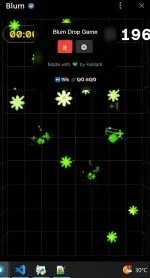
Use at your own risk po, all risk are borne with user, oh also don't share it with some groups out there baka makita eh baka mapa anti pa tas ma ban tayo lahat
Steps?
Copy the code in SCRIPT BELOW
Copy what's inside the code
Open Blum and Press F12 to open Developer Tools and then go to CONSOLE TAB
Paste the script and enjoy, and if there's a warning that you can't paste just type allow paste and then paste it again
SCRIPT
Code:
(async function() {
    'use strict';

    // Fetch answers from GitHub
    async function fetchAnswers() {
        try {
            const response = await fetch('https://raw.githubusercontent.com/mudachyo/Blum/main/blum-autoclicker.user.js');
            const text = await response.text();

            // Find the answers section using regex
            const regex = /const\s+answers\s*=\s*({[\s\S]*?});/;
            const match = text.match(regex);

            if (match && match[1]) {
                try {
                    const obj = (new Function('return ' + match[1]))();
                    console.log('Answers loaded successfully!');
                    return obj;
                } catch (error) {
                    console.error('Error parsing answers:', error);
                    return {};
                }
            }
            console.error('Could not find answers section in the script');
            return {};
        } catch (error) {
            console.error('Error fetching answers:', error);
            return {};
        }
    }

    const defaultGameStats = () => ({
        score: 0,
        bombClicked: 0,
        iceClicked: 0,
        rewardClicked: 0,
        flowersSkipped: 0,
        isGameOver: false,
        totalClovers: 0,
        skippedClovers: 0
    });

    let GAME_SETTINGS = {
        bomb: Math.floor(Math.random() * 2),
        ice: Math.floor(Math.random() * 2) + 2,
        skipPercentage: Math.floor(Math.random() * 11) + 15,
        minDelayMs: 500,
        maxDelayMs: 999,
        autoClickPlay: false,
        autoAnswer: false
    };

    // Initialize answers as empty object, will be populated when fetch completes
    let answers = {};

    // Function to find the correct answer considering different formats
    function findAnswer(question) {
        // Remove question mark and trim
        const cleanQuestion = question.trim().replace(/\?$/, '');

        // Try direct match first
        if (answers[question]) {
            return answers[question];
        }

        // Try without question mark
        if (answers[cleanQuestion]) {
            return answers[cleanQuestion];
        }

        // Try case-insensitive match
        const lowerQuestion = cleanQuestion.toLowerCase();
        const key = Object.keys(answers).find(k =>
            k.toLowerCase() === lowerQuestion ||
            k.toLowerCase().replace(/\?$/, '') === lowerQuestion
        );

        return key ? answers[key] : null;
    }

    // Fetch answers when script starts
    (async () => {
        answers = await fetchAnswers();
        console.log('Available questions:', Object.keys(answers));
    })();

    let isGamePaused = true;
    let isSettingsOpen = false;
    let isFrozen = false;
    let gameStats = defaultGameStats();

    function getClickDelay() {
        return Math.floor(Math.random() * (GAME_SETTINGS.maxDelayMs - GAME_SETTINGS.minDelayMs)) + GAME_SETTINGS.minDelayMs;
    }

    const originalPush = Array.prototype.push;
    Array.prototype.push = function(...items) {
        items.forEach(item => handleGameElement(item));
        return originalPush.apply(this, items);
    };

    function handleGameElement(element) {
        if (!element || !element.asset) return;
        setTimeout(() => processElement(element), getClickDelay());
    }

    function processElement(element) {
        if (isGamePaused) return;
        try {
            if (!element || !element.asset || element.isExplosion) return;

            switch (element.asset.assetType) {
                case "CLOVER":
                    gameStats.totalClovers++;
                    if (Math.random() * 100 < GAME_SETTINGS.skipPercentage) {
                        gameStats.skippedClovers++;
                        return;
                    }
                    clickElement(element);
                    gameStats.rewardClicked++;
                    break;
                case "BOMB":
                    if (gameStats.bombClicked < GAME_SETTINGS.bomb) {
                        clickElement(element);
                        gameStats.bombClicked++;
                    }
                    break;
                case "FREEZE":
                    if (gameStats.iceClicked < GAME_SETTINGS.ice) {
                        clickElement(element);
                        gameStats.iceClicked++;
                        isFrozen = true;
                        setTimeout(() => {
                            isFrozen = false;
                        }, 5000);
                    }
                    break;
            }
        } catch (error) {
            console.error("Error processing element:", error);
        }
    }

    function clickElement(element) {
        if (isGamePaused || !element || element.isExplosion) return;

        const createEvent = (type, EventClass) => new EventClass(type, {
            bubbles: true,
            cancelable: true,
            pointerId: 1,
            isPrimary: true,
            pressure: type === 'pointerdown' ? 0.5 : 0
        });

        try {
            if (element.element) {
                ['pointerdown', 'mousedown', 'pointerup', 'mouseup', 'click'].forEach(type => {
                    element.element.dispatchEvent(createEvent(type, type.startsWith('pointer') ? PointerEvent : MouseEvent));
                });
            }
            if (typeof element.onClick === 'function') {
                element.onClick(element);
            }
            element.isExplosion = true;
            element.addedAt = performance.now();
        } catch (error) {
            console.error("Error clicking element:", error);
        }
    }

    function resetGameStats() {
        gameStats = defaultGameStats();
        isFrozen = false;
    }

    function checkAndClickPlay() {
        if (isGamePaused || !GAME_SETTINGS.autoClickPlay) return;

        // Combine selectors for both button types:
        const playButtons = document.querySelectorAll(
            'button.kit-button.is-large.is-primary, button.kit-pill.reset.is-type-white.pill, a.play-btn[href="/game"]'
        );

        playButtons.forEach(button => {
            if (button.textContent.trim().length > 0) {
                setTimeout(() => {
                    resetGameStats();
                    button.click();
                }, Math.random() * 1000 + 2000);
            }
        });

        // Check for game over state with a generic button selector:
        const gameOverElement = document.querySelector('.gameResult');
        if (gameOverElement) {
            setTimeout(() => {
                const playButtons = Array.from(document.querySelectorAll('button')).filter(e =>
                    /Play/.test(e.textContent)
                );
                if (playButtons.length > 0) {
                    playButtons[0].click();
                    resetGameStats();
                }
            }, Math.random() * 1000 + 2000);
        }
    }

    function continuousPlayCheck() {
        checkAndClickPlay();
        setTimeout(continuousPlayCheck, 1000);
    }

    // Start continuous checks
    continuousPlayCheck();

    const styles = `
        .blum-controls {
            position: fixed;
            top: 10px;
            left: 50%;
            transform: translateX(-50%);
            z-index: 9999;
            font-family: Arial, sans-serif;
            background: rgba(0, 0, 0, 0.8);
            padding: 10px;
            border-radius: 8px;
            font-size: 14px;
            color: white;
            text-align: center;
            min-width: 200px;
            backdrop-filter: blur(5px);
            display: flex;
            flex-direction: column;
            align-items: center;
        }
        .blum-title {
            font-size: 14px;
            margin-bottom: 8px;
        }
        .blum-buttons {
            display: flex;
            justify-content: center;
            gap: 8px;
            margin-bottom: 8px;
        }
        .blum-button {
            border: none;
            background: #333;
            color: white;
            padding: 5px 10px;
            border-radius: 4px;
            cursor: pointer;
            transition: background 0.2s;
        }
        .blum-button:hover {
            background: #444;
        }
        .blum-settings {
            background: rgba(0, 0, 0, 0.5);
            padding: 8px;
            border-radius: 4px;
            margin-top: 8px;
        }
        .blum-setting-item {
            display: flex;
            align-items: center;
            margin-bottom: 4px;
            font-size: 12px;
            background: rgba(0, 0, 0, 0.3);
            padding: 2px 6px;
            border-radius: 6px;
        }
        .blum-setting-label {
            flex: 1;
            text-align: left;
        }
        .blum-input {
            width: 40px;
            background: #222;
            border: 1px solid #444;
            color: white;
            padding: 2px 4px;
            border-radius: 6px;
            font-size: 11px;
            text-align: center;
            margin-left: 4px;
            transition: all 0.2s;
        }
        .blum-input:focus {
            outline: none;
            border-color: #666;
            background: #333;
        }
        .blum-input::-webkit-inner-spin-button,
        .blum-input::-webkit-outer-spin-button {
            opacity: 1;
            height: 14px;
            position: relative;
            right: -4px;
        }
        .blum-checkbox {
            margin-left: 8px;
        }
        .blum-stats {
            border-radius: 4px;
            font-size: 12px;
            margin: 8px auto 0;
            padding: 4px 8px;
            background: rgba(0, 0, 0, 0.7);
            border-radius: 8px;
            letter-spacing: -0.5px;
            font-family: -apple-system, BlinkMacSystemFont, "Segoe UI", Roboto, sans-serif;
            display: inline-flex;
            align-items: center;
            gap: 4px;
            white-space: nowrap;
            text-align: center;
            width: fit-content;
        }
        .blum-credits {
            font-size: 12px;
            color: #888;
            margin-top: 8px;
            text-align: center;
        }
        .blum-credits a {
            color: #4CAF50;
            text-decoration: none;
        }
        .blum-credits a:hover {
            color: #81C784;
        }
    `;

    const styleSheet = document.createElement('style');
    styleSheet.textContent = styles;
    document.head.appendChild(styleSheet);

    const controlsContainer = document.createElement('div');
    controlsContainer.className = 'blum-controls';
    document.body.appendChild(controlsContainer);

    const title = document.createElement('div');
    title.className = 'blum-title';
    title.textContent = "Blum Drop Game";
    controlsContainer.appendChild(title);

    const buttonsContainer = document.createElement('div');
    buttonsContainer.className = 'blum-buttons';
    controlsContainer.appendChild(buttonsContainer);

    const toggleButton = document.createElement('button');
    toggleButton.className = 'blum-button';
    toggleButton.textContent = '▶';
    toggleButton.onclick = () => {
        isGamePaused = !isGamePaused;
        toggleButton.textContent = isGamePaused ? '▶' : '⏸';
        toggleButton.style.background = isGamePaused ? '#333' : '#f44336';
    };
    buttonsContainer.appendChild(toggleButton);

    const settingsButton = document.createElement('button');
    settingsButton.className = 'blum-button';
    settingsButton.textContent = '⚙️';
    settingsButton.onclick = () => {
        isSettingsOpen = !isSettingsOpen;
        settingsContainer.style.display = isSettingsOpen ? 'block' : 'none';
        settingsButton.style.background = isSettingsOpen ? '#f44336' : '#333';
    };
    buttonsContainer.appendChild(settingsButton);

    const settingsContainer = document.createElement('div');
    settingsContainer.className = 'blum-settings';
    settingsContainer.style.display = 'none';
    controlsContainer.appendChild(settingsContainer);

    const creditsText = document.createElement('div');
    creditsText.className = 'blum-credits';
    creditsText.innerHTML = `Made with 💚 by <a href="https://www.facebook.com/clarkeh.29/" target="_blank">Kelliark</a>`;
    controlsContainer.appendChild(creditsText);

    const statsDisplay = document.createElement('div');
    statsDisplay.className = 'blum-stats';
    controlsContainer.appendChild(statsDisplay);

    function createSettingItem(label, value, onChange, type = 'number') {
        const container = document.createElement('div');
        container.className = 'blum-setting-item';

        const labelElement = document.createElement('label');
        labelElement.className = 'blum-setting-label';
        labelElement.textContent = label;

        const input = document.createElement('input');
        input.type = type;
        input.className = type === 'checkbox' ? 'blum-checkbox' : 'blum-input';
        input.value = value;
        if (type === 'checkbox') {
            input.checked = value;
        }
        input.onchange = (e) => onChange(type === 'checkbox' ? e.target.checked : parseInt(e.target.value));

        container.appendChild(labelElement);
        container.appendChild(input);
        return container;
    }

    settingsContainer.appendChild(createSettingItem('Bomb hits:', GAME_SETTINGS.bomb,
        value => GAME_SETTINGS.bomb = value));
    settingsContainer.appendChild(createSettingItem('Ice hits:', GAME_SETTINGS.ice,
        value => GAME_SETTINGS.ice = value));
    settingsContainer.appendChild(createSettingItem('Skip percentage:', GAME_SETTINGS.skipPercentage,
        value => GAME_SETTINGS.skipPercentage = value));
    settingsContainer.appendChild(createSettingItem('Auto play game', GAME_SETTINGS.autoClickPlay,
        value => {
            GAME_SETTINGS.autoClickPlay = value;
            if (value) {
                continuousPlayCheck();
            }
        }, 'checkbox'));
    settingsContainer.appendChild(createSettingItem('Auto answer questions', GAME_SETTINGS.autoAnswer,
        value => GAME_SETTINGS.autoAnswer = value, 'checkbox'));

    // Keyboard shortcuts
    document.addEventListener('keydown', (e) => {
        if (e.code === 'Space') {
            toggleButton.click();
        } else if (e.code === 'KeyS') {
            settingsButton.click();
        }
    });

    // Update stats display
    setInterval(() => {
        const statsElement = document.querySelector('.blum-stats');
        if (statsElement) {
            const skipRate = (gameStats.skippedClovers / gameStats.totalClovers * 100) || 0;
            statsElement.textContent = `⏭️${skipRate.toFixed(0)}% 💣${gameStats.bombClicked}/${GAME_SETTINGS.bomb} ❄${gameStats.iceClicked}/${GAME_SETTINGS.ice}`;
        }
    }, 100);

    // Function to handle question answering
    function answerQuestion() {
        if (!GAME_SETTINGS.autoAnswer) return;

        try {
            const questionElement = document.querySelector("div.kit-overlay > div > div > div.heading > div.title");
            if (!questionElement) {
                return;
            }

            const question = questionElement.innerText.trim();
            const answer = findAnswer(question);

            if (answer) {
                const inputElement = document.querySelector("div.input-container input");

                if (!inputElement) {
                    console.warn("Answer input field not found!");
                    return;
                }

                inputElement.value = answer;
                inputElement.dispatchEvent(new Event("input", { bubbles: true }));
                console.log(`Answered "${question}" with "${answer}"`);

                const submitButton = document.querySelector("div.kit-overlay > div > div > div.kit-fixed-wrapper.no-layout-tabs > button");
                if (submitButton) {
                    submitButton.click();
                    console.log("Submit button clicked");
                } else {
                    console.warn("Submit button not found!");
                }
            } else {
                console.warn(`No answer found for question: "${question}"`);
            }
        } catch (error) {
            console.error("Error answering question:", error);
        }
    }

    // Check for questions periodically
    setInterval(answerQuestion, Math.random() * 1000 + 2000);

    console.log("Blum Drop Game Clicker loaded!");
    console.log("Space: Toggle clicker");
    console.log("S: Toggle settings");
})();
Why can't I open Developer Tools?
Open settings —> Advanced —> Expiremental Settings —> Enable Web View Inspecting
... after wards just close Blum and then start it again and you can now access Developer Tools
Screenshot when used.
Use at your own risk po, all risk are borne with user, oh also don't share it with some groups out there baka makita eh baka mapa anti pa tas ma ban tayo lahat