 PH
PHKamusta po kayong lahat! 
 Gusto mo ng Studio Ghibli vibes sa mga images mo yung parang galing mismo sa Spirited Away o My Neighbor Totoro?
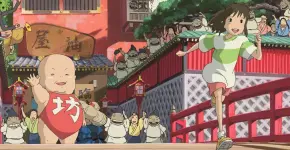
Ang ganda kaya ng art style ni Hayao Miyazaki—dreamy, magical, at nostalgic! At tsaka trending ngayon yung Ghibli-style images - lalo na yung gawa ni ᑕᕼᗩTGᑭT!
Share ko lang sa inyo 'yung super easy na way para makagawa ng Ghibli-style images without using ᑕᕼᗩTGᑭT.
Gamit natin dito ang Grok AI (yes, 'yung bagong AI ni Elon Musk!). Eto ang step-by-step:
2. Sign up using your email/X (Twitter) account.
3. Log in sa website or app nila.
2. Piliin mo 'yung image na gusto mong i-transform into Ghibli style!
Halimbawa, ginamit ko yung picture ni tatay D sa baba.
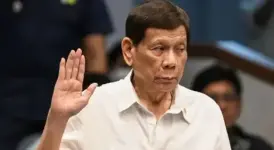
nakuha ko lang tong picture ni tatay Digong sa Google.
 "Render this in a Hayao Miyazaki style image."
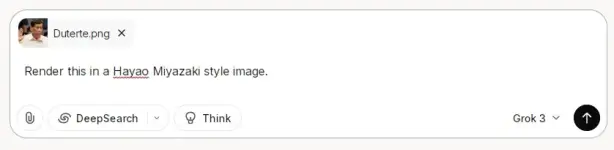
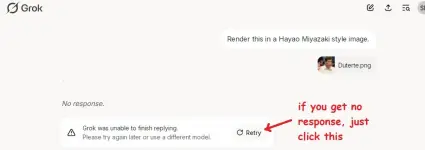
Tapos hit enter at hintayin mo lang—BOOM! Ghibli-fied na 'yung picture mo!
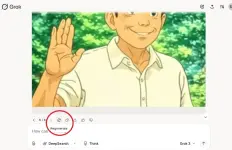
- Pwede rin i-edit 'yung image para mas personalized!
Sample Output:
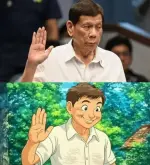
Try niyo na tas share niyo dito 'yung results! Sino sa inyo ang first time makakagawa ng Ghibli art?
PS: Kung may iba pa kayong tips for AI art, comment na rin!
Gusto mo ng Studio Ghibli vibes sa mga images mo yung parang galing mismo sa Spirited Away o My Neighbor Totoro?Ang ganda kaya ng art style ni Hayao Miyazaki—dreamy, magical, at nostalgic! At tsaka trending ngayon yung Ghibli-style images - lalo na yung gawa ni ᑕᕼᗩTGᑭT!
Share ko lang sa inyo 'yung super easy na way para makagawa ng Ghibli-style images without using ᑕᕼᗩTGᑭT.
Gamit natin dito ang Grok AI (yes, 'yung bagong AI ni Elon Musk!). Eto ang step-by-step:
STEP 1: Gumawa ng Grok Account
1. Punta ka sa [You do not have permission to view the full content of this post. Log in or register now.]2. Sign up using your email/X (Twitter) account.
3. Log in sa website or app nila.
STEP 2: Upload Your Image
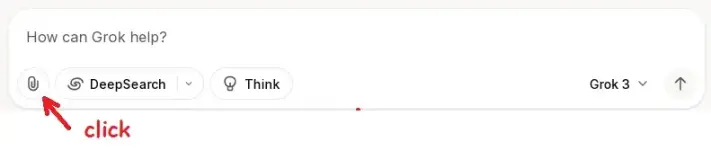
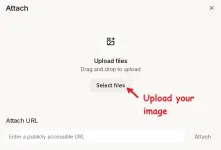
1. Click mo 'yung paper clip icon (upload button).2. Piliin mo 'yung image na gusto mong i-transform into Ghibli style!
Halimbawa, ginamit ko yung picture ni tatay D sa baba.
nakuha ko lang tong picture ni tatay Digong sa Google.
STEP 3: Sabihin kay Grok ang Magic Words!
Type mo lang sa prompt: "Render this in a Hayao Miyazaki style image."Tapos hit enter at hintayin mo lang—BOOM! Ghibli-fied na 'yung picture mo!
Optional: Not Satisfied? No Problem!
- Pwede mo i-click 'yung regenerate button para subukan ulit.- Pwede rin i-edit 'yung image para mas personalized!
Sample Output:
Try niyo na tas share niyo dito 'yung results!
Sino sa inyo ang first time makakagawa ng Ghibli art?PS: Kung may iba pa kayong tips for AI art, comment na rin!

