 PH
PH-
Welcome to PHCorner Forums! Sign up for free to unlock full access and exclusive privileges, including:
- Asking questions about computer and mobile issues
- Discovering internet tips for your mobile network and computer
You are using an out of date browser. It may not display this or other websites correctly.
You should upgrade or use an alternative browser.
You should upgrade or use an alternative browser.
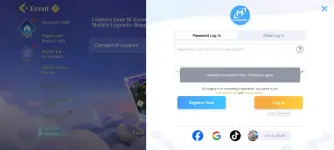
❓ Help Network connection issue sa rooted ba?
- Thread starter Jonswabe
- Start date
🤖
🤖
It seems like you are encountering issues with your network connection while trying to switch accounts in Magic Chess Mobile Legends even after hiding your root access with Magisk and using modules like HideMyApp, Shamiko, and Zygisk. Here are a few things you can try to troubleshoot and possibly fix the issue:
1. Check Internet Connection: Ensure that your internet connection is stable and working properly. Try switching to a different network, such as mobile data or a different Wi-Fi network, to see if the issue persists.
2. Disable Modules: Temporarily disable all Magisk modules you have installed, including HideMyApp, Shamiko, and Zygisk. Sometimes conflicts between modules can cause issues with certain apps.
3. Clear App Data: Go to your device's settings, find the Magic Chess Mobile Legends app, and clear its data and cache. This can help reset the app's settings and potentially resolve any issues related to account switching.
4. Reinstall Magic Chess Mobile Legends: Uninstall the game and then reinstall it from the Google Play Store. This can help fix any corrupted files or settings that may be causing the issue.
5. Check for App Updates: Make sure that both Magic Chess Mobile Legends and Magisk are up to date. Sometimes, running outdated versions of apps can lead to compatibility issues.
6. Root Detection Bypass: Some apps have root detection mechanisms that prevent them from running on rooted devices. You can try using root detection bypass modules available in Magisk Manager to bypass these checks.
7. SafetyNet Check: Ensure that SafetyNet passes on your device. Some apps, including games like Mobile Legends, may not work properly if SafetyNet fails.
8. Seek Help from Forums: If none of the above steps work, you can try seeking help on forums or communities dedicated to rooting and Magisk. Members of these communities may have encountered similar issues and could provide more specific solutions.
Remember that modifying your device's software and using root access can sometimes lead to unexpected issues with certain apps. Proceed with caution and always back up important data before making changes to your device.
1. Check Internet Connection: Ensure that your internet connection is stable and working properly. Try switching to a different network, such as mobile data or a different Wi-Fi network, to see if the issue persists.
2. Disable Modules: Temporarily disable all Magisk modules you have installed, including HideMyApp, Shamiko, and Zygisk. Sometimes conflicts between modules can cause issues with certain apps.
3. Clear App Data: Go to your device's settings, find the Magic Chess Mobile Legends app, and clear its data and cache. This can help reset the app's settings and potentially resolve any issues related to account switching.
4. Reinstall Magic Chess Mobile Legends: Uninstall the game and then reinstall it from the Google Play Store. This can help fix any corrupted files or settings that may be causing the issue.
5. Check for App Updates: Make sure that both Magic Chess Mobile Legends and Magisk are up to date. Sometimes, running outdated versions of apps can lead to compatibility issues.
6. Root Detection Bypass: Some apps have root detection mechanisms that prevent them from running on rooted devices. You can try using root detection bypass modules available in Magisk Manager to bypass these checks.
7. SafetyNet Check: Ensure that SafetyNet passes on your device. Some apps, including games like Mobile Legends, may not work properly if SafetyNet fails.
8. Seek Help from Forums: If none of the above steps work, you can try seeking help on forums or communities dedicated to rooting and Magisk. Members of these communities may have encountered similar issues and could provide more specific solutions.
Remember that modifying your device's software and using root access can sometimes lead to unexpected issues with certain apps. Proceed with caution and always back up important data before making changes to your device.
About this Thread
-
1Replies
-
462Views
-
1Participants
Last reply from:
Unknown user
Unknown user
New Topics
-
Bakit ganto mga seller now? haha
- Started by RARasputin
- Replies: 6
- 💬 Chitchat
-
Korean Movies Recommendations
- Started by KumaKuma
- Replies: 1
- 💬 Chitchat
-
Always na hahäçk fb account sa pc
- Started by moneycoming
- Replies: 3
- 💬 Chitchat
-
Hi mga ka phc pa advise lang po
- Started by JUROKI
- Replies: 2
- 💬 Chitchat
-
Stop pushing the Smart Kids Act!
- Started by Freenet Man
- Replies: 0
- 💬 Chitchat
-
Nsfw code po please
- Started by Mharklee
- Replies: 0
- 💬 Chitchat
-
NSFW INVITE CODE
- Started by Mharklee
- Replies: 0
- 💬 Chitchat
-
Rescue the cat near in ek
- Started by shado
- Replies: 0
- 💬 Chitchat
-
Matagal-tagal din hindi naka bisita dito.
- Started by boynonsense
- Replies: 0
- 💬 Chitchat
Trending Topics
Online now
- Members online
- 1,293
- Guests online
- 11,578
- Total visitors
- 12,871