PH
PHKyla Marquez
Eternal Poster
Spotify Lifetime Free Premium
âš ï¸ Must have Spotify application installed. It doesn’t work on the web.
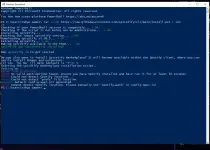
âž¡ï¸ Step 1: Press Windows + R and type Powershell and hit Enter.
âž¡ï¸ Step 2: Now paste this line there:
iwr -useb You do not have permission to view the full content of this post. Log in or register now. | iex
âž¡ï¸ Step 3: Hit Enter when it says to install Marketplace.
âž¡ï¸ Step 4: Go to Marketplace and search for "adblockify" and enable it.
âž¡ï¸ Step 5: Restart your Spotify and BOOM! You got Premium!
📊 Pros and Cons 📊
✅ You have full access to every feature of premium.
✅ You can install custom themes.
✅ You can install custom plugins.
✅ You can import your own custom slowed and remix songs.
⌠You can use it only on PC.
⌠On PC, you can only use it on the application, not on the web.
⌠You have to repeat the whole method when the Spotify app updates!
Update!!!
Pasok sa banga