PH
PHChococakelover
Established
Bless Network
---
Register here: You do not have permission to view the full content of this post. Log in or register now.
---
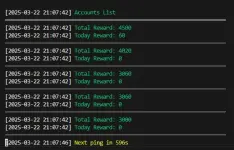
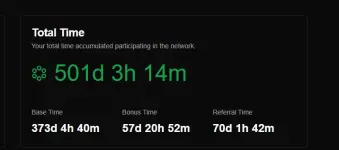
Ito gawin nyu sa mga gustong mag 5 nodes running saka pwede din ito sa mga mag self referral jan para boosting earnings, gaya saakin oh
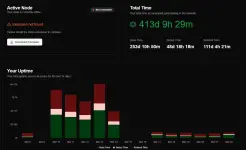
kaya madaming walang ano, ngayun paako naka kita ng updated one using curl-cliff hahaha
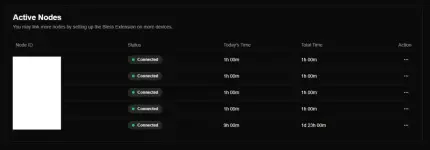
Tutorials and Installation sa script
So unang gawin nyu bago mag set up sa lahat, ito muna gagawin nyu bali install delete install delete lang kayo ng extension 5 times or 4 times it depends if yung isa is ikaw na ang mag ru-run pero if gusto mo yung script na edi 5 times na tas wag kana mag add ulet, since 5 lang max nun so bali ang gagawin mo is after installing the extension, right click ka sa extension tas inspect element and then punta ka sa Console tas i pa-paste mo ito
If mag warning type lang kayu allow pasting tas paste nyu ulet at may makikita kayung ganto
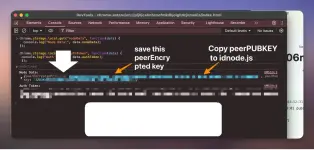
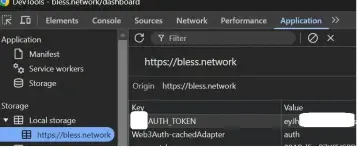
tas right click nyulang yang Node Data bali ibaba nyan tas copy value nyu tas ilagay nyulang sa Notepad para ma save yung NodeId nyu, yung public ah tapos nyan repeat nyulang like 4-5 times, until ma save mo lahat and then last step is punta kayu sa dashboard ni Bless Network and then inspect element tas punta kayu sa Application Tab tas may makikita kayung AUTH_TOKEN jan kagaya nitong pic, bali click nyu yan tas nasa ibaba nyan control a tas control c para ma copy and then ilagay nyulang dun sa accounts.json saka yung mga pubkey node id
Script Installation
Gawa kayu folder or ket saan nyu gusto pwede din ito sa termux eh
- Clone This Repo
- Go To Folder
- Install Dependencies
- Before running the script configure first which is yung sa accounts.json where you store all your data including token and pubkey nodeid
-
---
Tas after configuration, wag kalimotan mag lagay ng proxy ah, dapat maglagay kayo proxy for safety purposes :>> pero nasaiyo padin yun if you will take the risk without using any proxies hahaha tas after nyan lahat type lahat
Run bot.
Use at your own risk, All risk are borne with the user.
---
Register here: You do not have permission to view the full content of this post. Log in or register now.
---
Ito gawin nyu sa mga gustong mag 5 nodes running saka pwede din ito sa mga mag self referral jan para boosting earnings, gaya saakin oh
kaya madaming walang ano, ngayun paako naka kita ng updated one using curl-cliff hahaha
Tutorials and Installation sa script
So unang gawin nyu bago mag set up sa lahat, ito muna gagawin nyu bali install delete install delete lang kayo ng extension 5 times or 4 times it depends if yung isa is ikaw na ang mag ru-run pero if gusto mo yung script na edi 5 times na tas wag kana mag add ulet, since 5 lang max nun so bali ang gagawin mo is after installing the extension, right click ka sa extension tas inspect element and then punta ka sa Console tas i pa-paste mo ito
Code:
chrome.storage.local.get("nodeData", function(data) {
  console.log("Node Data:", data.nodeData);
});

chrome.storage.local.get("authToken", function(data) {
 console.log("Auth Token:", data.authToken);
});tas right click nyulang yang Node Data bali ibaba nyan tas copy value nyu tas ilagay nyulang sa Notepad para ma save yung NodeId nyu, yung public ah tapos nyan repeat nyulang like 4-5 times, until ma save mo lahat and then last step is punta kayu sa dashboard ni Bless Network and then inspect element tas punta kayu sa Application Tab tas may makikita kayung AUTH_TOKEN jan kagaya nitong pic, bali click nyu yan tas nasa ibaba nyan control a tas control c para ma copy and then ilagay nyulang dun sa accounts.json saka yung mga pubkey node id
Script Installation
Gawa kayu folder or ket saan nyu gusto pwede din ito sa termux eh
- Clone This Repo
Code:
git clone https://github.com/ahlulmukh/bless-autorun
Code:
cd bless-autorun
Code:
npm install-
---
Tas after configuration, wag kalimotan mag lagay ng proxy ah, dapat maglagay kayo proxy for safety purposes :>> pero nasaiyo padin yun if you will take the risk without using any proxies hahaha tas after nyan lahat type lahat
Run bot.
Code:
node .Use at your own risk, All risk are borne with the user.