❓ Help Fiberhome lg6851f or any model ng fiberhome 5G CPE wifi signal is disconnecting randomly twice a day or a week and unable to access admin page

mrbillones

Leecher
Hello everyone,

Good day! May I humbly ask here po sa mga fiberhome lg6851f or any model 5G CPE users kung nakaka-experience sila na random nag-di-disconnect po yung wifi connection? both 2.4ghz and 5ghz po hindi makapagconnect sa internet like devices is connected but no internet connection then when every time po nangyayari sya, hindi ko din po maa-access yung admin page. I hope na may makakapansin ng post ko and makakapagbigay ng inputs or solutions nila about this po. salamat po ng marami 😊

Current setup:
- May cooling fan(silent wing pro) po sa ilalim ng fiberhome aside sa built in fan.


PS: hindi po ito yung PLDT fiberhome. fiberhome po talaga ang brand nya You do not have permission to view the full content of this post. Log in or register now.
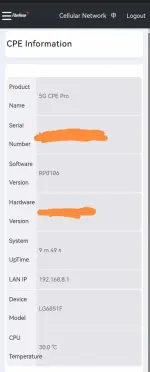


483528196_2072037193258748_5069908628396127278_n.webp
 
Hello mrbillones,

It seems like you are experiencing issues with your Fiberhome 5G CPE, where the WiFi connection randomly disconnects, and you are unable to access the admin page during these times. This can be quite frustrating, but let's try to troubleshoot the issue.

Here are a few steps you can take to try and resolve the problem:

1. Reboot the Fiberhome CPE: Sometimes, a simple reboot can fix connectivity issues. Try turning off the CPE, waiting for a few minutes, and then turning it back on. This can help reset the device and establish a stable connection.

2. Check for Firmware Updates: Make sure your Fiberhome CPE is running the latest firmware version. Sometimes, updates can fix bugs and improve connectivity issues. You can check for updates in the admin page of the CPE if you are able to access it.

3. Check WiFi Channels: If you have other WiFi networks nearby, they might be causing interference. Try changing the WiFi channels on your CPE to see if that improves the connection stability.

4. Check Cooling Fans: While it's great that you have a cooling fan installed, make sure it's not causing overheating issues or disrupting the device's operation. Ensure that the cooling fan is not obstructing any vents or airflow around the CPE.

5. Factory Reset: As a last resort, you can perform a factory reset on the Fiberhome CPE. This will reset all settings to default, so make sure to note down any important configurations before doing this.

If the issue persists after trying these steps, you may need to contact Fiberhome support for further assistance. They might be able to provide more specific troubleshooting steps or recommend a replacement if the device is faulty.

I hope these suggestions help you in resolving the connectivity issues with your Fiberhome 5G CPE. Let me know if you have any other questions or need further assistance!
 

About this Thread

  • 2
    Replies
  • 603
    Views
  • 2
    Participants
Last reply from:
plhbg1

Trending Topics

Online now

Members online
357
Guests online
6,161
Total visitors
6,518

Forum statistics

Threads
2,271,155
Posts
28,939,806
Members
1,240,211
Latest member
Frostydandelion
Back
Top