 PH
PHhaha... teka sir itanong ko kay google...Ayaw talaga boss hindi talaga ma open
-
Welcome to PHCorner Forums! Sign up for free to unlock full access and exclusive privileges, including:
- Asking questions about computer and mobile issues
- Discovering internet tips for your mobile network and computer
You are using an out of date browser. It may not display this or other websites correctly.
You should upgrade or use an alternative browser.
You should upgrade or use an alternative browser.
🔒 Closed 18mbps+ ph server for pc only+proxycap tutorial
- Thread starter Kyangi
- Start date
- Status
- Not open for further replies.
CyberReckon
Honorary Poster
Salamat sa tulong boss PUNKBYTEShaha... teka sir itanong ko kay google...
Click on appwiz.cpl and see if the main Control Panel window opens. If it does not, then from the WinX menu, open Run, type appwiz.cpl and hit Enter. Does the main Control Panel window open? If not, then it is quite possible that some .cpl file may have been damaged or got corrupted.haha... teka sir itanong ko kay google...
o kaya sir restart pc... safe mode ka press po f8....try mo kung makapasok ka ng control panel....Click on appwiz.cpl and see if the main Control Panel window opens. If it does not, then from the WinX menu, open Run, type appwiz.cpl and hit Enter. Does the main Control Panel window open? If not, then it is quite possible that some .cpl file may have been damaged or got corrupted.
CyberReckon
Honorary Poster
Click on appwiz.cpl and see if the main Control Panel window opens. If it does not, then from the WinX menu, open Run, type appwiz.cpl and hit Enter. Does the main Control Panel window open? If not, then it is quite possible that some .cpl file may have been damaged or got corrupted.
o kaya sir restart pc... safe mode ka press po f8....try mo kung makapasok ka ng control panel....
Teka lang boss ha saan ko makikita yang WinX sorry newbie pa kaseClick on appwiz.cpl and see if the main Control Panel window opens. If it does not, then from the WinX menu, open Run, type appwiz.cpl and hit Enter. Does the main Control Panel window open? If not, then it is quite possible that some .cpl file may have been damaged or got corrupted.
o kaya sir restart pc... safe mode ka press po f8....try mo kung makapasok ka ng control panel....

Run, type appwiz.cpl and hit Enter. Does the main Control Panel window open? If not, then it is quite possible that some .cpl file may have been damaged or got corrupted.Teka lang boss ha saan ko makikita yang WinX sorry newbie pa kase
CyberReckon
Honorary Poster
Run, type appwiz.cpl and hit Enter. Does the main Control Panel window open? If not, then it is quite possible that some .cpl file may have been damaged or got corrupted.
Wala talaga boss ni restart ko na nag safe mode na ako wala talaga salamat pala sa tulong boss ginawa ko lahat ng paraan ko tsaka yung sayo wala talagaRun, type appwiz.cpl and hit Enter. Does the main Control Panel window open? If not, then it is quite possible that some .cpl file may have been damaged or got corrupted.
re-format nalang po sir...tutal madali lang naman po un...(format)Wala talaga boss ni restart ko na nag safe mode na ako wala talaga salamat pala sa tulong boss ginawa ko lahat ng paraan ko tsaka yung sayo wala talaga
Banned4You
Fanatic
Boss Maraming Maraming Salamat... di ko alam kung tama ang ginawa ko pero connected na....
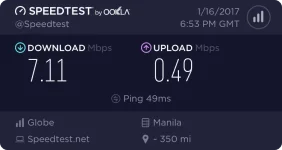
shadowskill17
Grasshopper
i don't think merong profile settings ung 936 ko, d pa to openline as i've said...sir palitan mo ung proile sa settings ni modem gawin mo prepaid
SyntaxEroR
Established
thanks for sharing 
Angelicamay
Enthusiast
thnx kahit hindi kpa nassubukan
shadowskill17
Grasshopper
hay... pag-tyaga.an ko na lang tong 3 mbps sa 3g broadband stick ko, d ko talaga mapagana sa 936 modem ko eh... thanks TS sa freenet... and sa mga nahihirapan sa pag register kay proxycap, it's easy lang naman po, just follow the instructions sa page1
Yes po pwede yan.Pde po ba to sa globe tattoo na stick? Ty

Try mo po. Pagka uninstall mo delete "Proxy Labs" folder sa "C:\Program Files". Then restart, install then restart ulit.Yes sir naka ilang restart na din ako
32bit ka po ba o 64bit?
Sa mga nag-feedback as of now working parin po ba?
Working na working pa po. Sa daming gumagamit ng free net ng globe from cp to pc normal na pong bumagal at kung minsan bagsak talaga. Ganyan din ang experience ko dito sa amin. Wala po tayong magagawa dyan, pasalamat nalang tayo at meron pa tayong nagagamit.May nakak gamit paba?
Di kona siya mapa gana ngayon kahit tama IP ko kayo ba?
Kapag naka kuha ka po ng tamang ip. Much better kung huwag mo nang ioff/disconnect yung pocket wifi mo. Para next na gamit mo hindi kana mag CDC kasi right ip na yung pocket wifi mo(tip lang). :happy:Working pa rin sya.. sa mga hindi maka connect.. check nyo unang post ni bossing about CDC and right ip address para maka connect.. ako after ko gumamit ng connection parati kong tinuturn off pc ko.. then kung gagamit na ako tinitingnan ko muna ip address ko if tama ba.. Globe pocket wifi ang gamit ko.. pag naka connect na ako sa pocket wifi punta agad ako sa pocket wifi page para check ip address.. if okay na ip address ayun connect ko na kaagad ang proxycap.. pero pag hindi okay ip address.. turn off-turn on lang pocket wifi hanggang okay yung ip address na makuha ko is okay na..
CDC ka po. Check mo po kung tama yung ip mo. Nasa first page po yung complete instructions. Then check mo sa proxycap kung meron ng logs at data ka nang nare-receive dun sa "Connectons" tab. Kapag meron na meaning connected kana po.MikaNara
Goodeve po
1. ask ko lang pano malalaman if connected kana ?
2. para san po ung machine.prs ?
3. both po bang ilload ung TM&Globe.prs at Machine.prs ?
sorry newbie lang po ako
Globe na pocket wifi lang gamit ko
Hope for your response
Yung "machine.prs" file. Meron pong sagot dito ==> https://phcorner.org/t/18mbps-ph-server-for-pc-only-proxycap-tutorial.224027/page-133#post-2882797
Natry mo na pong mag system restore?Wala talaga boss ni restart ko na nag safe mode na ako wala talaga salamat pala sa tulong boss ginawa ko lahat ng paraan ko tsaka yung sayo wala talaga
gorecho852
Leecher
Working pa siya nag loloko lng GLOBE siguro ^_^ kagabi din kala ko di na working
CyberReckon
Honorary Poster
Tama ka jan tol sumisipa paghatinggabiYes po pwede yan.
Try mo po. Pagka uninstall mo delete "Proxy Labs" folder sa "C:\Program Files". Then restart, install then restart ulit.
32bit ka po ba o 64bit?
Working na working pa po. Sa daming gumagamit ng free net ng globe from cp to pc normal na pong bumagal at kung minsan bagsak talaga. Ganyan din ang experience ko dito sa amin. Wala po tayong magagawa dyan, pasalamat nalang tayo at meron pa tayong nagagamit.
Kapag naka kuha ka po ng tamang ip. Much better kung huwag mo nang ioff/disconnect yung pocket wifi mo. Para next na gamit mo hindi kana mag CDC kasi right ip na yung pocket wifi mo(tip lang). :happy:
CDC ka po. Check mo po kung tama yung ip mo. Nasa first page po yung complete instructions. Then check mo sa proxycap kung meron ng logs at data ka nang nare-receive dun sa "Connectons" tab. Kapag meron na meaning connected kana po.
Yung "machine.prs" file. Meron pong sagot dito ==> https://phcorner.org/t/18mbps-ph-server-for-pc-only-proxycap-tutorial.224027/page-133#post-2882797
Natry mo na pong mag system restore?

Samarknown
Enthusiast
Boss bakit hindi na gumana sakin? samantala kanina lakas lakas at ang baba ng ping. Na reinstall kona sya. Ngayon pag mag iimport ako pag kiniclick ko yung LOAD bigla na syang nawawala. patulong naman pls. Salamat mga idol
Saan po yung video pag license pa turo naman. salamat
Saan po yung video pag license pa turo naman. salamat
PHC - Joshy
Eternal Poster
Salamat. Try ko mamaya.
- Status
- Not open for further replies.
About this Thread
-
3KReplies
-
200KViews
-
1KParticipants
Last reply from:
Apilapil
Apilapil
New Topics
-
-
Oct/12 low ping ph vless server
- Started by ace0486
- Replies: 20
- 🌐 Globe & TM
-
Unligo99 tiktok gawin nating unlimited sa ating ρáíd vpn 50 a month
- Started by amber vpn
- Replies: 2
- 🌐 Globe & TM
-
Oct/11 low ping ph vless server use netmod
- Started by ace0486
- Replies: 19
- 🌐 Globe & TM
-
Oct.11globe/GO99+unlitiktok/GOwatch/Android ios PC /ovpn/netmod/npv tunnel/
- Started by _-_-LhOnZ-_-_
- Replies: 21
- 🌐 Globe & TM
-
If anyone sell global eism send my for my telegram @NNNN2S
- Started by Nnnnn2s
- Replies: 1
- 🌐 Globe & TM
-
Globe load question
- Started by iPixx
- Replies: 1
- 🌐 Globe & TM
Trending Topics
-
-
Oct.11globe/GO99+unlitiktok/GOwatch/Android ios PC /ovpn/netmod/npv tunnel/
- _-_-LhOnZ-_-_
Replies: 21 -
-
-
-
Oct.6globe/GO99+unlitiktok/GOwatch/Android ios PC /ovpn/netmod/npv tunnel/
- _-_-LhOnZ-_-_
Replies: 12 -
-
-
-
Online now
- Members online
- 1,259
- Guests online
- 6,116
- Total visitors
- 7,375