 PH
PH-
Welcome to PHCorner Forums! Sign up for free to unlock full access and exclusive privileges, including:
- Asking questions about computer and mobile issues
- Discovering internet tips for your mobile network and computer
You are using an out of date browser. It may not display this or other websites correctly.
You should upgrade or use an alternative browser.
You should upgrade or use an alternative browser.
❓ Help React.js can't display in my chrome browser
- Thread starter Rion Akao
- Start date
🤖
🤖
Hello! It seems like you are encountering an issue with displaying your React.js application in your Chrome browser. The error message "main.tsx no such file directory" suggests that there might be an issue with the file path or configuration in your project.
Here are a few steps you can take to troubleshoot and potentially resolve this issue:
1. Check File Path:
Verify that the file path to your
2. Check File Extension:
Ensure that the file extension is correct. If your file is a TypeScript file, it should have a
3. Restart Development Server:
Sometimes, restarting the development server can help resolve file-related issues. Stop the server (if running) and start it again to see if the problem persists.
4. Check Configuration:
Make sure that your project configuration is set up correctly to recognize TypeScript files. Check your
5. Clear Browser Cache:
Clear your browser cache and reload the application to rule out any caching issues that might be preventing the file from being loaded correctly.
6. Console Errors:
Check the browser console for any additional error messages that might provide more insight into the issue. This can help pinpoint the exact cause of the problem.
7. Browser Compatibility:
Ensure that your Chrome browser is up to date and compatible with the features used in your React.js application. Consider testing the application in other browsers as well to see if the issue is specific to Chrome.
If you have tried these steps and are still facing issues, please provide more details about your project setup, any specific error messages, or additional context that might help in diagnosing the problem further. Good luck!
Here are a few steps you can take to troubleshoot and potentially resolve this issue:
1. Check File Path:
Verify that the file path to your
main.tsx file is correct. Make sure that the file is located in the expected directory within your src folder.2. Check File Extension:
Ensure that the file extension is correct. If your file is a TypeScript file, it should have a
.tsx extension. If it's a JavaScript file, it should have a .js extension.3. Restart Development Server:
Sometimes, restarting the development server can help resolve file-related issues. Stop the server (if running) and start it again to see if the problem persists.
4. Check Configuration:
Make sure that your project configuration is set up correctly to recognize TypeScript files. Check your
tsconfig.json file to ensure that it includes the correct settings for TypeScript compilation.5. Clear Browser Cache:
Clear your browser cache and reload the application to rule out any caching issues that might be preventing the file from being loaded correctly.
6. Console Errors:
Check the browser console for any additional error messages that might provide more insight into the issue. This can help pinpoint the exact cause of the problem.
7. Browser Compatibility:
Ensure that your Chrome browser is up to date and compatible with the features used in your React.js application. Consider testing the application in other browsers as well to see if the issue is specific to Chrome.
If you have tried these steps and are still facing issues, please provide more details about your project setup, any specific error messages, or additional context that might help in diagnosing the problem further. Good luck!
wag mo muna e build yung project, run dev lang muna. Saang file mo nilagay ang code?
Baka may route ka to main.tsx pero wala kang main.tsx or di ka nag gamit nun, e delete/commented mo nalang yung route na yun kung di naman kelangan.
You can paste your code snippet here para ma annalyze natin
Baka may route ka to main.tsx pero wala kang main.tsx or di ka nag gamit nun, e delete/commented mo nalang yung route na yun kung di naman kelangan.
You can paste your code snippet here para ma annalyze natin
Pede láρág ko na lg buong source code?wag mo muna e build yung project, run dev lang muna. Saang file mo nilagay ang code?
Baka may route ka to main.tsx pero wala kang main.tsx or di ka nag gamit nun, e delete/commented mo nalang yung route na yun kung di naman kelangan.
You can paste your code snippet here para ma annalyze natin
to paps
Attachments
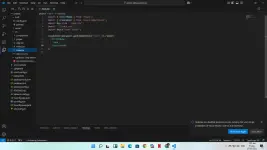
Let me checkPede láρág ko na lg buong source code?
to paps
uhmmm na fix ko na paps nag stick ako sa sinabe mong wala munang project tnx boss!!Let me check
About this Thread
-
6Replies
-
433Views
-
2Participants
Last reply from:
xLynx
xLynx
New Topics
-
How to know kung sino ung poser sa ig
- Started by Aurelian
- Replies: 0
- 💬 Chitchat
-
AI REELS DRAMA PANO?
- Started by H4nsie234
- Replies: 0
- 💬 Chitchat
-
Birthday ko. baka naman kait ᑕᕼᗩTGᑭT pro or cursor 12 months
- Started by jbl_libra
- Replies: 1
- 💬 Chitchat
-
UPLIFT (system suggestions at inis)
- Started by PHC-Coder
- Replies: 4
- 💬 Chitchat
-
Any owner ng Vendo Machine, like carwash and wifi?
- Started by darknight0909
- Replies: 1
- 💬 Chitchat
-
Kami po ay nasunugan
- Started by mjba4w
- Replies: 2
- 💬 Chitchat
-
Scribd Free Trial 2 download limit bypass Unli Download Bug
- Started by -NEXUS-
- Replies: 6
- 💬 Chitchat
-
RCBC acct ko, pinang scam dito galing.
- Started by ProTiTips
- Replies: 4
- 💬 Chitchat
Trending Topics
Online now
- Members online
- 553
- Guests online
- 7,282
- Total visitors
- 7,835