PH
PHMaskFi – WiFi Security Awareness & Testing Tool
MaskFi is an advanced penetration testing tool designed to simulate WiFi security vulnerabilities by leveraging techniques such as deauthentication attacks, rogue access points, and captive portals. By creating deceptive networks, it allows cybersecurity professionals and ethical häçkers to assess how attackers can exploit unsecured WiFi networks and s†éál sensitive information.
 MASKFI Features – WiFi Security & Penetration Testing Tool
 Captive Portal & Phishing Simulation
- Creates a fake WiFi login page to capture credentials.
- Customizable SSID – Impersonate real networks.
- Stores captured passwords securely in EEPROM.
- Webhook Integration – Send captured credentials to a remote server.
- Supports password validation before logging data.
 Deauthentication Attack Module
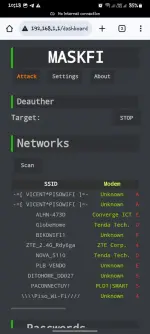
- Scan & list nearby WiFi networks with signal strength, MAC address, encryption type.
- One-click Deauth Attack – Disconnect users from a selected network.
- Status tracking – Live logs displayed in the dashboard.
- Stop Attack Option – Instantly halt deauth transmissions.
 Rogue Access Point (Evil Twin)
- Simulates a legitimate WiFi network to lure users in.
- Works with captive portal to s†éál credentials.
- SSID Cloning – Copies network names for a more convincing attack.
 Web Dashboard & User Interface
- Modern UI for controlling attacks & monitoring networks.
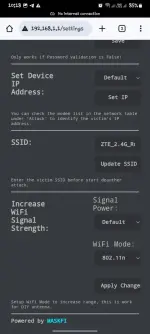
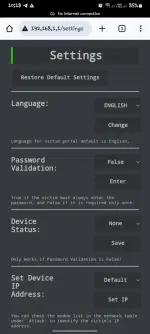
- Device Settings Panel – Modify SSID, enable/disable logging, adjust WiFi power.
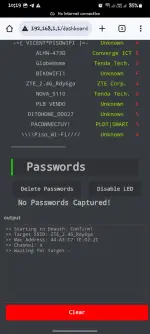
- Real-time Logs – View captured passwords, attack activity, and WiFi scans.
- Notification System – Displays updates using browser notifications.
 Disclaimer:
This project is strictly for educational and security awareness purposes. MaskFi is intended to help users understand the importance of WiFi security and how attackers exploit weak networks. Unauthorized use of this tool on networks you do not own or have explicit permission to test is îllégâl and unethical. The responsibility lies with the user to comply with ethical häçking laws and responsible disclosure policies.
Stay safe. Stay ethical. Learn to secure.
WORKING DEVICE
 ️ ANDROID️ iPhone️ Windows️ Mac
 Requirements
 Hardware:
 2x ESP8266 Modules (Compatible with your firmware) Dupont Female-to-Female Wires (for connection)
 Buy Two ESP8266: You do not have permission to view the full content of this post.
Log in or register now. Buy Female to Female Dupont Wires: You do not have permission to view the full content of this post.
Log in or register now. Software & Firmware: NodeMCU PyFlasher (Flashing tool) Firmware Files:
Buy Two ESP8266: You do not have permission to view the full content of this post.
Log in or register now. Buy Female to Female Dupont Wires: You do not have permission to view the full content of this post.
Log in or register now. Software & Firmware: NodeMCU PyFlasher (Flashing tool) Firmware Files:- main.bin (for ESP8266 MAIN)
- base.bin (for ESP8266 BASE)
USB Cable (for flashing)
 Step-by-Step Flashing Guide
Flash Using Android Phone?
You do not have permission to view the full content of this post. Log in or register now.
 1. Install NodeMCU PyFlasher Download and open PyFlasher on your PC. 2. Connect ESP8266 to Your Computer Use a USB-to-Serial adapter or a direct USB connection. If necessary, put ESP8266 in flashing mode:
- Hold the Flash button while pressing Reset (optional).
3. Open PyFlasher & Configure Settings Select the correct COM Port (e.g., COM3). Click Browse and select the firmware file:- main.bin → For ESP8266 MAIN
- base.bin → For ESP8266 BASE ( base.bin onetime flash only )
Set the following flashing configurations: - Baud Rate: 115200
- Flash Mode: Dual I/O (DIO)
- Erase Flash: no or Wipe All Data
4. Flash the Firmware Click Flash NodeMCU and wait for the process to complete. Once done, disconnect & reconnect your ESP8266. Default Access
 Login to the Web Interface:
 192.168.1.1/dashboard
Wifi name: MaskFi
Password: maskfi001
 How To Use
DOWNLOAD:
You do not have permission to view the full content of this post. Log in or register now. ( 5GHz support )
Videos
You do not have permission to view the full content of this post. Log in or register now.You do not have permission to view the full content of this post. Log in or register now.
Diagram Two ESp8266
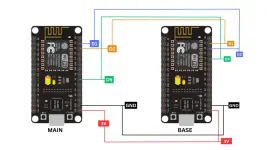
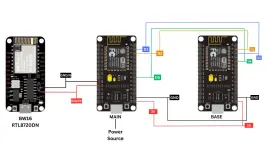
Diagram With BW16
Short Video for Demonstration using v4
You do not have permission to view the full content of this post. Log in or register now.
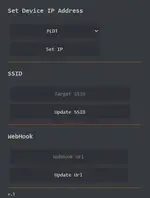
Screenshot using mobile phone