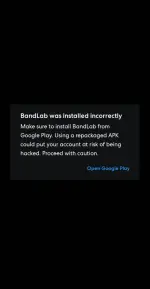
Hello, Kenjiyu773! It seems like you're a beginner in modding games. If you're encountering issues where an error message says you haven't installed the app from the Play Store when you try to install a modded version, it could be due to various reasons. Here are some common troubleshooting steps you can try:
1. Uninstall the original version: Before installing a modded version of an app, make sure to uninstall the original version from your device. This will help prevent conflicts between the two versions.
2. Enable installation from unknown sources: Go to your device's settings, then to Security or Privacy settings, and enable the option to install apps from unknown sources. This allows you to install apps that are not from the Play Store.
3. Download from a trusted source: Make sure you are downloading the modded version of the app from a reputable source. Avoid downloading from unknown or suspicious websites to prevent malware or other issues.
4. Clear cache and data: Sometimes, clearing the cache and data of the Play Store app can help resolve installation issues. Go to your device's settings, then to Apps or Application Manager, find the Play Store app, and clear its cache and data.
5. Try a different mod: If you're still encountering issues, try downloading a different modded version of the app from a different source. Sometimes, certain mods may not work correctly on specific devices.
Remember, modding apps may violate the terms of service of the original app and could potentially lead to issues with your device or account. Proceed with caution and always make sure to download mods from trusted sources. If you have any specific questions or need further assistance, feel free to ask!
 PH
PH