👨‍🏫 Tutorial Access Blocked Sites on Company WiFi

moonlightK

Forum Expert
📶 For those whose company's WiFi has a firewall and blocks the site we want to access.


Download :

🛜 WARP (available on the Play Store and App Store)


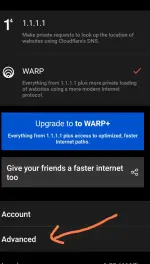
Step 1: Tap the three-line menu icon

Screenshot_2025-02-13-22-45-45-329_com.cloudflare.onedotonedotonedotone-edit.webp

Step 2: Click 'Advanced'.

Screenshot_2025-02-13-22-46-33-573_com.cloudflare.onedotonedotonedotone-edit.webp

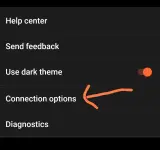
Step 3: Click 'Connection Options'.

Screenshot_2025-02-13-22-47-10-836_com.cloudflare.onedotonedotonedotone-edit.webp

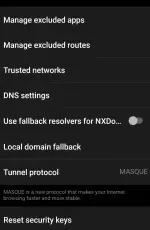
Step 4: Click 'DNS settings':

Screenshot_2025-02-13-22-47-59-444_com.cloudflare.onedotonedotonedotone.webp

Step 5: Click 'Protocol Options' and choose 'DNS over HTTPS'.
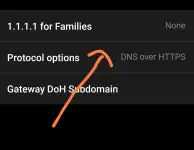
Screenshot_2025-02-13-22-48-35-200_com.cloudflare.onedotonedotonedotone-edit.webp

Step 6: Return to 'Connection Options,' select 'Tunnel Protocol,' and set it to 'MASQUE'.
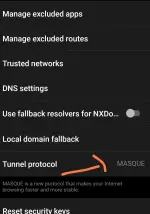
Screenshot_2025-02-13-22-50-29-891_com.cloudflare.onedotonedotonedotone-edit.webp


Hope this works for you. Thank you!
 

About this Thread

  • 11
    Replies
  • 2K
    Views
  • 11
    Participants
Last reply from:
kilatjr69

Online now

Members online
1,135
Guests online
1,867
Total visitors
3,002

Forum statistics

Threads
2,314,910
Posts
29,180,150
Members
1,183,350
Latest member
Magicman444
Back
Top