PH
PHEcneralC1973
Forum Guru
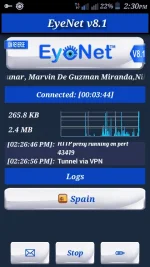
EyeNet v8.1 updated
For TNT subscriber only
register to any promo
Example:
COC10
VIBER10
WATTPAD10
FB10
Then send to 4545 good for three days unlimited internet
EyeNet settings:
Download and install then
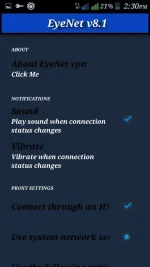
Select the pencil for option settings
launched until successfully connected
Injected settings
Use the CDC trick if after 10sec still selecting server
With Spain and India region
Default APN settings for TNT
APN Name: smart Inet
APN: http.smart.com.ph
Proxy: not set
Port: 80
User name: not set
Password: not set
Server: 3Gsmart.com.ph
MMSC: not set
MMS Proxy: 10.102.61.46
MMS Port: 80
MCC: 515
MNC: 03
Authentication type: PAP
APN Type: default
Modified by:
Jeson Garnica
Credit to:
John Vincent Diaz (DZEBB)
Psiphon inc.
Marvin De Guzman Miranda
Federico Barraza Larido Jr.
Cromwell delarmente
For TNT subscriber only
register to any promo
Example:
COC10
VIBER10
WATTPAD10
FB10
Then send to 4545 good for three days unlimited internet
EyeNet settings:
Download and install then
Select the pencil for option settings
launched until successfully connected
Injected settings
Use the CDC trick if after 10sec still selecting server
With Spain and India region
Default APN settings for TNT
APN Name: smart Inet
APN: http.smart.com.ph
Proxy: not set
Port: 80
User name: not set
Password: not set
Server: 3Gsmart.com.ph
MMSC: not set
MMS Proxy: 10.102.61.46
MMS Port: 80
MCC: 515
MNC: 03
Authentication type: PAP
APN Type: default
Modified by:
Jeson Garnica
Credit to:
John Vincent Diaz (DZEBB)
Psiphon inc.
Marvin De Guzman Miranda
Federico Barraza Larido Jr.
Cromwell delarmente
Download link:
You do not have permission to view the full content of this post. Log in or register now.
constructive criticism are accepted but thanks and likes are highly appreciated
clarencebilhera of phc