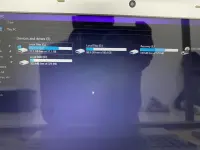
K KankuniChan Established Feb 10, 2025 #1 pwede bang ayusin to? isa or dalawa lang nakalagay sana para malinis tignan? kapapalit ko lang ssd
F Frustrated Burger Forum Expert Feb 11, 2025 #2 Re install new operating system Or To delete SSD partitions on Windows, you can use Disk Management or the command line tool Diskpart. Using Disk Management Ensure the SSD is connected and not the boot drive. Open Disk Management. Select the drive with the partition you want to remove. Right-click the partition you want to remove. Select Delete Volume. Select Yes to confirm. Using Diskpart Open Command Prompt. Type diskpart and press Enter. Type list disk to see the available disks. Type select disk [number] to select the drive you want to erase. Type clean to erase the data and partition on the selected disk. Jun 10, 2025
Re install new operating system Or To delete SSD partitions on Windows, you can use Disk Management or the command line tool Diskpart. Using Disk Management Ensure the SSD is connected and not the boot drive. Open Disk Management. Select the drive with the partition you want to remove. Right-click the partition you want to remove. Select Delete Volume. Select Yes to confirm. Using Diskpart Open Command Prompt. Type diskpart and press Enter. Type list disk to see the available disks. Type select disk [number] to select the drive you want to erase. Type clean to erase the data and partition on the selected disk.
V v2clone Established Feb 11, 2025 #3 Gamitan mo ng partition magic o mini tool partition. madali lang naman gamitin. Else new windows installation.
Gamitan mo ng partition magic o mini tool partition. madali lang naman gamitin. Else new windows installation.
 PH
PH