 PH
PH-
Welcome to PHCorner Forums! Sign up for free to unlock full access and exclusive privileges, including:
- Asking questions about computer and mobile issues
- Discovering internet tips for your mobile network and computer
You are using an out of date browser. It may not display this or other websites correctly.
You should upgrade or use an alternative browser.
You should upgrade or use an alternative browser.
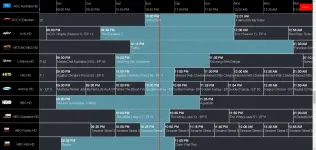
❓ Help Sino pwedeng maka tulong na gumawa ng EPG Table sa IPTV ko?
- Status
- Not open for further replies.
🤖
🤖
Hi there! I can help you create an Electronic Program Guide (EPG) table for your Web IPTV site using HTML, CSS, and JavaScript. To get started, you can follow these steps:
1. HTML Structure: You can create the basic structure of the EPG table using HTML. Here's an example to get you started:
2. CSS Styling: You can style your EPG table using CSS. Here's an example CSS file (
3. JavaScript: You can use JavaScript to populate the EPG table with data dynamically. Here's an example JavaScript file (
You can customize and expand upon these examples to suit your specific requirements for the EPG table on your Web IPTV site. Feel free to ask if you need further assistance or have specific design considerations in mind!
1. HTML Structure: You can create the basic structure of the EPG table using HTML. Here's an example to get you started:
HTML:
<!DOCTYPE html>
<html lang="en">
<head>
    <meta charset="UTF-8">
    <meta name="viewport" content="width=device-width, initial-scale=1.0">
    <title>EPG Guide</title>
    <link rel="stylesheet" href="styles.css">
</head>
<body>
    <div class="epg-table">
        <div class="epg-row">
            <div class="time-column">Time</div>
            <div class="channel-column">Channel 1</div>
            <div class="channel-column">Channel 2</div>
            <!-- Add more channel columns as needed -->
        </div>
        <!-- Add more rows for different times -->
    </div>
    <script src="script.js"></script>
</body>
</html>
2. CSS Styling: You can style your EPG table using CSS. Here's an example CSS file (
styles.css) to style the table:
CSS:
.epg-table {
    display: grid;
    grid-template-columns: auto repeat(2, 1fr); /* Adjust the number of channel columns */
}

.epg-row {
    display: grid;
    grid-template-columns: 100px repeat(2, 1fr); /* Adjust column widths as needed */
}

.time-column {
    background-color: #f0f0f0;
}

.channel-column {
    background-color: #ffffff;
    border: 1px solid #ccc;
}
3. JavaScript: You can use JavaScript to populate the EPG table with data dynamically. Here's an example JavaScript file (
script.js) to populate the table:
JavaScript:
// Sample data for demonstration
const epgData = [
    { time: '08:00', channel1: 'Program A', channel2: 'Program X' },
    { time: '09:00', channel1: 'Program B', channel2: 'Program Y' }
    // Add more data entries as needed
];

const epgTable = document.querySelector('.epg-table');

epgData.forEach(entry => {
    const row = document.createElement('div');
    row.className = 'epg-row';

    const timeCell = document.createElement('div');
    timeCell.className = 'time-column';
    timeCell.textContent = entry.time;
    row.appendChild(timeCell);

    for (const key in entry) {
        if (key !== 'time') {
            const cell = document.createElement('div');
            cell.className = 'channel-column';
            cell.textContent = entry[key];
            row.appendChild(cell);
        }
    }

    epgTable.appendChild(row);
});
You can customize and expand upon these examples to suit your specific requirements for the EPG table on your Web IPTV site. Feel free to ask if you need further assistance or have specific design considerations in mind!
oo pero gusto kong igamit source ng epg.pw or epgsource01 but randomized pagpili sa channel idstv timeslots ba yan?
- Status
- Not open for further replies.
About this Thread
-
3Replies
-
1KViews
-
2Participants
Last reply from:
Hangeul
Hangeul
New Topics
-
Win 10 Home keys
- Started by Ali246
- Replies: 6
- ❓ Computer Discussion & Support
-
Windows 11 26H2
- Started by tholitz
- Replies: 0
- ❓ Computer Discussion & Support
-
Help po !!!! My account got häçked Facebook and steam
- Started by bujoy20
- Replies: 7
- ❓ Computer Discussion & Support
-
Replace laptop lcd
- Started by toki07
- Replies: 0
- ❓ Computer Discussion & Support
-
Mga bossing patulong po nahäçk account ko due to carelessness
- Started by Jeii
- Replies: 3
- ❓ Computer Discussion & Support
-
Computer parts na cheap
- Started by bjenjay1
- Replies: 2
- ❓ Computer Discussion & Support
-
PC APPS - remote or auto saved type and auto audio
- Started by babyzero
- Replies: 0
- ❓ Computer Discussion & Support
-
Data Recovery May Chance pa bato
- Started by tambay28
- Replies: 0
- ❓ Computer Discussion & Support
-
Capcut PC pasabit po
- Started by L A Z A
- Replies: 0
- ❓ Computer Discussion & Support
-
Download Youtube Video using CMD
- Started by BeerGin69
- Replies: 2
- ❓ Computer Discussion & Support
Trending Topics
Online now
- Members online
- 1,164
- Guests online
- 7,162
- Total visitors
- 8,326