 PH
PH"This setting is managed by your administrator" (Window Security) Proven and Tested sa WINDOWS 11
error:
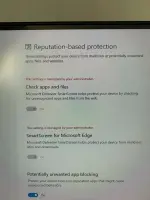
Ito ang sulusyon dapat wala kayong mamissed ni isa
1. Search mo sa search bar Edit group policy

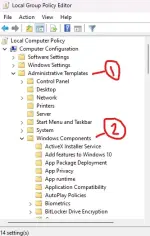
2. Click mo side arrow ng Administrative Templates the sa baba nya click mo din side arrow ng Windows Components
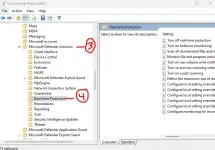
3. Click mo ulit ang side arrow ng Microsoft Defender Antivirus, then click mo na ang Real-Time Protection
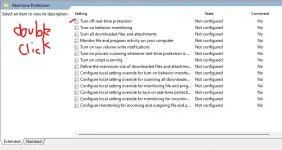
4. sa loob ng real-time protection may makikita kang "Turn off real-time protection" Double click mo yun
5. Click Enable tapos apply then OK mo na.
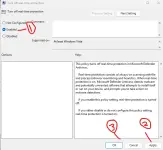
6. then BOOM! oks na par
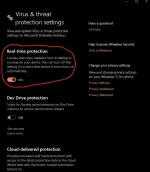
error:
Ito ang sulusyon dapat wala kayong mamissed ni isa
1. Search mo sa search bar Edit group policy
2. Click mo side arrow ng Administrative Templates the sa baba nya click mo din side arrow ng Windows Components
3. Click mo ulit ang side arrow ng Microsoft Defender Antivirus, then click mo na ang Real-Time Protection
4. sa loob ng real-time protection may makikita kang "Turn off real-time protection" Double click mo yun
5. Click Enable tapos apply then OK mo na.
6. then BOOM! oks na par