 PH
PHPublicAI Data Hunter is a seamless data collection tool for AI Builders that operates as a Google Chrome Extension.
You will need to You do not have permission to view the full content of this post. Log in or register now. before you start earning.
This seamless Chrome extension allows you to contribute to AI development while earning rewards effortlessly. Simply stay logged in, and your participation helps shape the future of AI. Check your daily gains in the You do not have permission to view the full content of this post. Log in or register now.! Users can choose to reply to high-quality tweets they come across while browsing X using the new You do not have permission to view the full content of this post. Log in or register now. feature in Data Hunter. Additionally, users can passively earn points by keeping their browser open with the extension installed.
For best results use the Chrome Desktop browser. Mobile browsers with extension support like Mises and Kiwi are not officially supported.
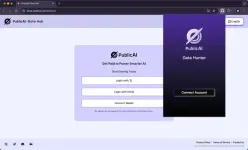
Next, click the "Connect Account" button. The extension will guide you to the PublicAI login page, where you can log in using your X account, Wallet address and Email. Once logged in, you can start using the Data Hunter extension.

Step 1: Click on "Earn More": Navigate to the social media page.
Step 2: Find Trending Posts: Look for popular posts, ideally those with over 1k views, to maximize your reach.

Step 3: Click "Reply": In the text box, select "PublicAI Reply" to automatically generate a promotional message. Post it to earn points for every valid invitation!

Link Here:
You do not have permission to view the full content of this post. Log in or register now.
You do not have permission to view the full content of this post. Log in or register now.
You do not have permission to view the full content of this post. Log in or register now.

You will need to You do not have permission to view the full content of this post. Log in or register now. before you start earning.
This seamless Chrome extension allows you to contribute to AI development while earning rewards effortlessly. Simply stay logged in, and your participation helps shape the future of AI. Check your daily gains in the You do not have permission to view the full content of this post. Log in or register now.! Users can choose to reply to high-quality tweets they come across while browsing X using the new You do not have permission to view the full content of this post. Log in or register now. feature in Data Hunter. Additionally, users can passively earn points by keeping their browser open with the extension installed.
Download
First, click You do not have permission to view the full content of this post. Log in or register now. to download the Data Hunter extension from the Chrome Web Store while using Chrome.For best results use the Chrome Desktop browser. Mobile browsers with extension support like Mises and Kiwi are not officially supported.
Sign up & Bind Account
After downloading the plugin, pin it to the top right of Chrome and click our logo in the top right to launch Data Hunter.Next, click the "Connect Account" button. The extension will guide you to the PublicAI login page, where you can log in using your X account, Wallet address and Email. Once logged in, you can start using the Data Hunter extension.
AI Tool for X
The PublicAI Data Hunter extension is a powerful AI agent tool for assisted posting.Step 1: Click on "Earn More": Navigate to the social media page.
Step 2: Find Trending Posts: Look for popular posts, ideally those with over 1k views, to maximize your reach.
Step 3: Click "Reply": In the text box, select "PublicAI Reply" to automatically generate a promotional message. Post it to earn points for every valid invitation!
Link Here:
You do not have permission to view the full content of this post. Log in or register now.
You do not have permission to view the full content of this post. Log in or register now.
You do not have permission to view the full content of this post. Log in or register now.