 PH
PH
File size: 16.1 MB
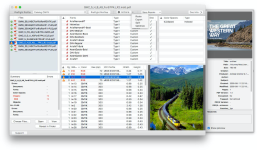
PDF Checkpoint automates PDF workflows with powerful batch processing: preflight, route by preflight results, export as images, split, convert colors, reduce file size and more.
• Preflight PDF files. Quickly preflight multiple PDF files using customizable preflight profiles and get detailed info on document fonts, color spaces, images and attributes.
• Export PDF as images. Batch export PDF files into various image formats, in RGB, CMYK, or grayscale color space. Specify desired image resolution and page scale.
• Convert colors. Convert PDF to the selected color profile (for example, convert RGB PDF to CMYK). You can convert the colors of images, text and graphic elements.
• Optimize images. Downsample and compress images to reduce file size. Specify image resolution for PDF's target usage. For example, repurpose a hi-res PDF for web and mobile devices.
• Split PDF files into single pages. Automatically split multiple PDF files into single page PDF documents.
• Route files by preflight results. PDF Checkpoint will automatically move or copy PDF files to specified success and error folders after preflighting. It can also generate a preflight report for each file.
Supported Operation Systems
macOS 10.9 or later
Screen :
What's New
Spoiler contents are visible only to Established Members.
HOMEPAGE
Code:
https://zevrix.com/
You do not have permission to view the full content of this post. Log in or register now.
You do not have permission to view the full content of this post. Log in or register now.
You do not have permission to view the full content of this post. Log in or register now.