 PH
PH-
Welcome to PHCorner Forums! Sign up for free to unlock full access and exclusive privileges, including:
- Asking questions about computer and mobile issues
- Discovering internet tips for your mobile network and computer
You are using an out of date browser. It may not display this or other websites correctly.
You should upgrade or use an alternative browser.
You should upgrade or use an alternative browser.
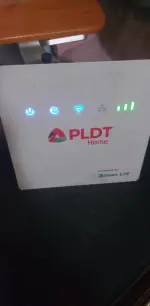
❓ Help Connected but without internet with load and full signal - PLDT Home Prepaid Wifi - Boost Even R051 (White modem)
🤖
🤖
Hello! It seems like you're experiencing an issue with your PLDT Home Prepaid Wifi even though all lights are blue, you have full signal, and you have sufficient load. Since you've already tried restarting and resetting the device without success, here are a few more troubleshooting steps you can try:
1. Check Network Settings:
- Make sure that the network settings on your device are correctly configured. Check if the correct WiFi network is selected and if the password is entered correctly.
- You can also try to forget the network on your device and reconnect to it.
2. Check Data Allowance:
- Ensure that you have not exceeded your data allowance. Sometimes, even if you have load, you may have used up your data allocation which could result in no internet access.
3. Check Network Coverage:
- Confirm that there are no network outages in your area. You can contact your service provider to check if there are any reported issues.
4. Update Firmware:
- Check if there are any firmware updates for your PLDT Home Prepaid Wifi device. Updating the firmware can sometimes resolve connectivity issues.
5. Contact Customer Support:
- If the issue persists, it's best to contact PLDT customer support for further assistance. They can troubleshoot the problem remotely or guide you through additional steps to resolve the issue.
6. Factory Reset:
- As a last resort, you can perform a factory reset on your PLDT Home Prepaid Wifi device. This will reset all settings to default, so make sure to note down any important configurations before proceeding.
If none of these steps work, it's recommended to reach out to PLDT customer support for personalized assistance. They will be able to diagnose the issue more accurately and provide a solution tailored to your specific situation.
1. Check Network Settings:
- Make sure that the network settings on your device are correctly configured. Check if the correct WiFi network is selected and if the password is entered correctly.
- You can also try to forget the network on your device and reconnect to it.
2. Check Data Allowance:
- Ensure that you have not exceeded your data allowance. Sometimes, even if you have load, you may have used up your data allocation which could result in no internet access.
3. Check Network Coverage:
- Confirm that there are no network outages in your area. You can contact your service provider to check if there are any reported issues.
4. Update Firmware:
- Check if there are any firmware updates for your PLDT Home Prepaid Wifi device. Updating the firmware can sometimes resolve connectivity issues.
5. Contact Customer Support:
- If the issue persists, it's best to contact PLDT customer support for further assistance. They can troubleshoot the problem remotely or guide you through additional steps to resolve the issue.
6. Factory Reset:
- As a last resort, you can perform a factory reset on your PLDT Home Prepaid Wifi device. This will reset all settings to default, so make sure to note down any important configurations before proceeding.
If none of these steps work, it's recommended to reach out to PLDT customer support for personalized assistance. They will be able to diagnose the issue more accurately and provide a solution tailored to your specific situation.
About this Thread
-
5Replies
-
4KViews
-
5Participants
Last reply from:
Tapsyzxc
Tapsyzxc
New Topics
-
Any tips or way po para mapalakas signal ng sim ko?
- Started by Meowshi
- Replies: 0
- ❓ Internet Questions
-
Sts noload/ iwanttfc
- Started by nikola budoy
- Replies: 0
- ❓ Internet Questions
-
Pa help po, internet access is blocked
- Started by sl4yer1000
- Replies: 0
- ❓ Internet Questions
-
LF Netflix own email
- Started by Jrjn
- Replies: 0
- ❓ Internet Questions
-
Nørd VPN pc pang game lang po thankyou
- Started by exavp
- Replies: 0
- ❓ Internet Questions
-
No ads sakop buong cp
- Started by AYuna23
- Replies: 1
- ❓ Internet Questions
-
Need help about poser
- Started by Ace of Spades I
- Replies: 1
- ❓ Internet Questions
-
Globe DHCP IP Issue
- Started by Remremskie
- Replies: 3
- ❓ Internet Questions
-
HELP. TNT promo to modem
- Started by ser_A
- Replies: 0
- ❓ Internet Questions
-
Piso Wifi Pasabit
- Started by Grovey3
- Replies: 0
- ❓ Internet Questions
Trending Topics
Online now
- Members online
- 947
- Guests online
- 8,050
- Total visitors
- 8,997