 PH
PH-
Welcome to PHCorner Forums! Sign up for free to unlock full access and exclusive privileges, including:
- Asking questions about computer and mobile issues
- Discovering internet tips for your mobile network and computer
You are using an out of date browser. It may not display this or other websites correctly.
You should upgrade or use an alternative browser.
You should upgrade or use an alternative browser.
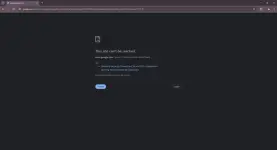
❓ Help Pa help po about sa Google Chrome ko
- Thread starter Krazy-
- Start date
- Status
- Not open for further replies.
Solution
try mo sa microsoft edge tingnan mo kung may internet connection talaga yung computer mo
kung may internet sa edge, subukan mo ito
kung may internet sa edge, subukan mo ito
- Access Chrome Settings:
- Open Google Chrome.
- Click the three-dot menu icon in the top right corner.
- Select "Settings."
- Navigate to Security:
- Scroll down and click on "Advanced" to expand additional settings.
- Find and click on "Security."
- Modify Secure DNS Settings:
- Under the "Security" section, locate the “Use secure DNS” option.
- Toggle it on if it's not already enabled.
- Select the “With” option and choose Cloudflare 1.1.1.1 or for Google DNS 8.8.8.8
🤖
🤖
Hello! Ang problemang yan sa Google Chrome mo ay maaaring may kinalaman sa ilang posibleng isyu. Narito ang ilang mga steps na maaari mong subukan upang maayos ang isyu:
1. Siguraduhin na ang iyong Google Chrome ay updated. Pumunta sa Settings > About Chrome at siguraduhing naka-update ang iyong browser sa pinakabagong bersyon.
2. Subukan i-clear ang cache at cookies ng iyong browser. Pumunta sa Settings > Privacy and Security > Clear browsing data at piliin ang cache at cookies bago mo i-clear.
3. I-check ang iyong internet connection at siguraduhing mabilis at maayos ang iyong koneksyon. Subukan i-restart ang modem o router mo.
4. I-disable ang mga extensions sa iyong Google Chrome. Pumunta sa chrome://extensions/ at i-disable ang lahat ng extensions bago mo subukan ulit mag-open ng website.
5. Subukan gamitin ang ibang browser tulad ng Firefox o Edge upang malaman kung ang problema ay nasa Google Chrome lamang.
Kung matapos mong gawin ang mga steps na ito ay hindi pa rin gumagana, maaaring may iba pang underlying issue ang iyong Google Chrome. Maaari mo rin itong i-reinstall para mareset ang lahat ng settings at maibalik sa default. Sana makatulong ito sa pag-aayos ng iyong problema. Salamat!
1. Siguraduhin na ang iyong Google Chrome ay updated. Pumunta sa Settings > About Chrome at siguraduhing naka-update ang iyong browser sa pinakabagong bersyon.
2. Subukan i-clear ang cache at cookies ng iyong browser. Pumunta sa Settings > Privacy and Security > Clear browsing data at piliin ang cache at cookies bago mo i-clear.
3. I-check ang iyong internet connection at siguraduhing mabilis at maayos ang iyong koneksyon. Subukan i-restart ang modem o router mo.
4. I-disable ang mga extensions sa iyong Google Chrome. Pumunta sa chrome://extensions/ at i-disable ang lahat ng extensions bago mo subukan ulit mag-open ng website.
5. Subukan gamitin ang ibang browser tulad ng Firefox o Edge upang malaman kung ang problema ay nasa Google Chrome lamang.
Kung matapos mong gawin ang mga steps na ito ay hindi pa rin gumagana, maaaring may iba pang underlying issue ang iyong Google Chrome. Maaari mo rin itong i-reinstall para mareset ang lahat ng settings at maibalik sa default. Sana makatulong ito sa pag-aayos ng iyong problema. Salamat!
CodeZeroPH
Forum Veteran
Punta ka sa settings sa Chrome then sa pinkabottom hanapin mo yung reset settings.
arsenal1205
Rarely opens PHC
try mo sa microsoft edge tingnan mo kung may internet connection talaga yung computer mo
kung may internet sa edge, subukan mo ito
kung may internet sa edge, subukan mo ito
- Access Chrome Settings:
- Open Google Chrome.
- Click the three-dot menu icon in the top right corner.
- Select "Settings."
- Navigate to Security:
- Scroll down and click on "Advanced" to expand additional settings.
- Find and click on "Security."
- Modify Secure DNS Settings:
- Under the "Security" section, locate the “Use secure DNS” option.
- Toggle it on if it's not already enabled.
- Select the “With” option and choose Cloudflare 1.1.1.1 or for Google DNS 8.8.8.8
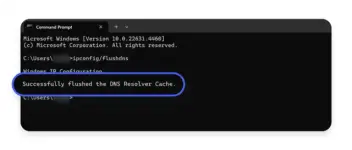
Already done this na po, kaso ganun pa din.Punta ka sa settings sa Chrome then sa pinkabottom hanapin mo yung reset settings.
Ito din po, na flush ko na still ganun pa din. Dati nagana naman siya sa youtube then ngayon ayaw na.
Try ko po ito, pero meron po talaga akong internet. Kasi nakakapag browse naman ako gamit brave browser at edge, sa chrome lang talaga ayaw. Nag uninstall and install na din ako pero still ganun pa din.try mo sa microsoft edge tingnan mo kung may internet connection talaga yung computer mo
kung may internet sa edge, subukan mo ito
- Access Chrome Settings:
- Open Google Chrome.
- Click the three-dot menu icon in the top right corner.
- Select "Settings."
- Navigate to Security:
- Scroll down and click on "Advanced" to expand additional settings.
- Find and click on "Security."
- Modify Secure DNS Settings:
- Under the "Security" section, locate the “Use secure DNS” option.
- Toggle it on if it's not already enabled.
- Select the “With” option and choose Cloudflare 1.1.1.1 or for Google DNS 8.8.8.8
arsenal1205
Rarely opens PHC
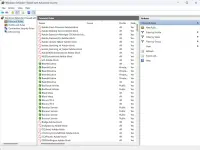
double check mo rin sa windows firewall with advanced security kung nandoon yung chrome app sa inbound at outbound rules. kung naka block tanggalin moTry ko po ito, pero meron po talaga akong internet. Kasi nakakapag browse naman ako gamit brave browser at edge, sa chrome lang talaga ayaw. Nag uninstall and install na din ako pero still ganun pa din.
Already done this na po, kaso ganun pa din.
Ito din po, na flush ko na still ganun pa din. Dati nagana naman siya sa YøùTùbé then ngayon ayaw na.
Try ko po ito, pero meron po talaga akong internet. Kasi nakakapag browse naman ako gamit brave browser at edge, sa chrome lang talaga ayaw. Nag uninstall and install na din ako pero still ganun pa din.
Hmm. Kakaibang case po yan.
NaTry niyo na din eto?
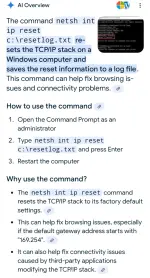
1. CMD (Run As admin)
2. netsh int ip reset c:\resetlog.txt
or -
netsh int ip reset
3. Reboot PC.
hindi pa po, pero try ko po ngayon. SalamatsHmm. Kakaibang case po yan.
NaTry niyo na din eto?
View attachment 3450860
1. CMD (Run As admin)
2. netsh int ip reset c:\resetlog.txt
or -
netsh int ip reset
3. Reboot PC.
double check mo rin sa windows firewall with advanced security kung nandoon yung chrome app sa inbound at outbound rules. kung naka block tanggalin mo
View attachment 3450840
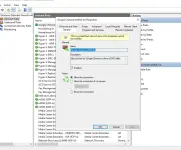
naka ganito po ba dapat sir?
arsenal1205
Rarely opens PHC
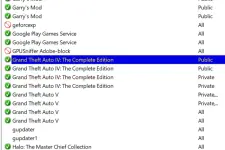
sakin kasi walang rule para sa google chrome try mo muna tanggalin yung lahat ng inbound at outbound rules para sa chrome.
Okay na po sir, eto lang pala kailangan gumamit ng DNS cloudfare gamit ko. Salaaaaaamat!Select the “With” option and choose Cloudflare 1.1.1.1 or for Google DNS 8.8.8.8
- Status
- Not open for further replies.
About this Thread
-
10Replies
-
784Views
-
4Participants
Last reply from:
Krazy-
Krazy-
New Topics
-
RCBC acct ko, pinang scam dito galing.
- Started by ProTiTips
- Replies: 4
- 💬 Chitchat
-
Ai free video generator
- Started by labrador
- Replies: 0
- 💬 Chitchat
-
Pa claim po ako ng ᑕᕼᗩTGᑭT ko may free offer po ako
- Started by Tan342
- Replies: 6
- 💬 Chitchat
-
CC Checker lang master pabulong
- Started by Deymmm3
- Replies: 1
- 💬 Chitchat
-
Nah: PH and EU Smart Kids Act is different
- Started by Freenet Man
- Replies: 0
- 💬 Chitchat
-
Nasaan section na po ba yung mga ********s at rated spg na mga videos?
- Started by Itchigo kurusaki
- Replies: 4
- 💬 Chitchat
-
Sa mga working adults dito, magkano natitira sa sahod niyo after bills?
- Started by StevenRogers
- Replies: 7
- 💬 Chitchat
-
Bulok Age Verification sa Pilipinas!
- Started by Freenet Man
- Replies: 3
- 💬 Chitchat
-
Tiktok Ai Affiliate
- Started by Johnny papa123
- Replies: 0
- 💬 Chitchat
Trending Topics
Online now
- Members online
- 1,167
- Guests online
- 3,447
- Total visitors
- 4,614