 PH
PHHello and Good Day!
Nahihirapan mag Hanap ng Movie? Games? Apps? Softwares?
Well Today is your Lucky Day, I'll teach you the Arts of Piracy, So Put on your pìrâ†é Hats! and Lets Board the pìrâ†é Ship!
First Download and Install the Following:
OperaGX or Any Browser that you have, But I Highly Suggest OperaGX Since It has a Built In Browser VPN.
Click You do not have permission to view the full content of this post. Log in or register now. to Download or Copy this Link and Paste to Browser: You do not have permission to view the full content of this post. Log in or register now.
UrbanVPN or Any VPN of your Choice, Again I Highly Suggest UrbanVPN Since it is a FreeMium VPN means No Payment, No Subscription, No Login, and No Hidden Fees, Etc.
Click You do not have permission to view the full content of this post. Log in or register now. to Download or Copy this Link and Paste to Browser: You do not have permission to view the full content of this post. Log in or register now.
Qbittorrent a More Safe and Secure Torrent App.
Click You do not have permission to view the full content of this post. Log in or register now. to Download or Copy this Link and Paste to Browser: You do not have permission to view the full content of this post. Log in or register now.
And After those files are Downloaded and Installed, Proceed Below:
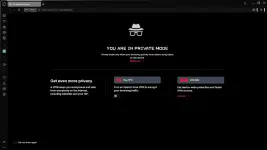
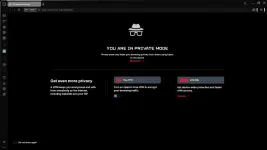
1. Launch OperaGX and Press Shift + Ctrl + N to Open a New Incognito Tab:
2. On the Upper-Left Click the One that says VPN:
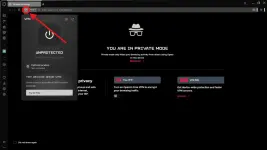
3. Click on the Big Power Symbol:
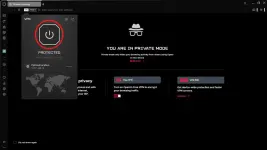
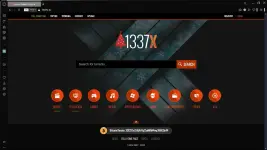
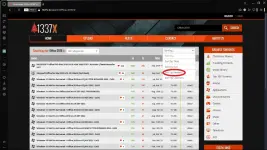
6. Open or Run UrbanVPN, Select Country then Click the Play Button ("The Big Red Button"), Wait Until It Connect and You are Ready to go.
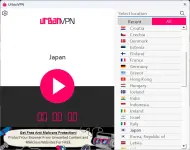
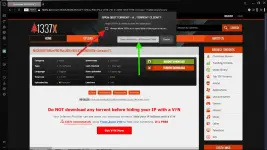
7. Click the Magnet Download ("First Tab to Open is an Ads, Close It") Twice if Needed, Then Check Allow ("Red Arrow") and Click Open Qbittorrent ("Green Arrow").
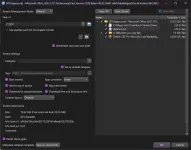
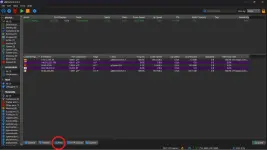
10. To Boost Download Speed Disable UrbanVPN. but for Security Purpose DON'T.
Don't forget to Seed and Have a Nice Day!
Your Friendly Neighbor Programmerman!
Nahihirapan mag Hanap ng Movie? Games? Apps? Softwares?
Well Today is your Lucky Day, I'll teach you the Arts of Piracy, So Put on your pìrâ†é Hats! and Lets Board the pìrâ†é Ship!
First Download and Install the Following:
OperaGX or Any Browser that you have, But I Highly Suggest OperaGX Since It has a Built In Browser VPN.
Click You do not have permission to view the full content of this post. Log in or register now. to Download or Copy this Link and Paste to Browser: You do not have permission to view the full content of this post. Log in or register now.
UrbanVPN or Any VPN of your Choice, Again I Highly Suggest UrbanVPN Since it is a FreeMium VPN means No Payment, No Subscription, No Login, and No Hidden Fees, Etc.
Click You do not have permission to view the full content of this post. Log in or register now. to Download or Copy this Link and Paste to Browser: You do not have permission to view the full content of this post. Log in or register now.
Qbittorrent a More Safe and Secure Torrent App.
Click You do not have permission to view the full content of this post. Log in or register now. to Download or Copy this Link and Paste to Browser: You do not have permission to view the full content of this post. Log in or register now.
And After those files are Downloaded and Installed, Proceed Below:
1. Launch OperaGX and Press Shift + Ctrl + N to Open a New Incognito Tab:
2. On the Upper-Left Click the One that says VPN:
3. Click on the Big Power Symbol:
- Wait for It to Connect or Say Protected,("You can Change your location by clicking on Optimal Location").
- CONGRATULATIONS you are Now a Surface Level pìrâ†é!
6. Open or Run UrbanVPN, Select Country then Click the Play Button ("The Big Red Button"), Wait Until It Connect and You are Ready to go.
7. Click the Magnet Download ("First Tab to Open is an Ads, Close It") Twice if Needed, Then Check Allow ("Red Arrow") and Click Open Qbittorrent ("Green Arrow").
- ALWAYS READ THE COMMENTS! on the Comments TAB Below as this is also a Community that Warns and Protect Each Other from Viruses, Malwares ETC.
- For Additional Safety Create 3 Folders Deep, Create a New Folder in Another Folder that is In Another Folder. Example: C://Desktop/New Folder/New Folder/ New Folder.
10. To Boost Download Speed Disable UrbanVPN. but for Security Purpose DON'T.
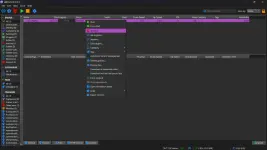
- After Downloading and you don't want to Seed, Right Click on your File, and Click Remove
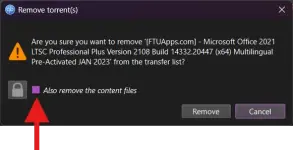
- Uncheck this if Checked, then Click Remove.
Don't forget to Seed and Have a Nice Day!
Your Friendly Neighbor Programmerman!