 PH
PH
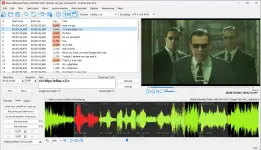
Download Subtitle Edit 2025 for free, a program to create, edit and manage subtitles (subtitles) in videos, edit and make SRT subtitles, the latest version, easy to download.
What is Subtitle Edit?
Subtitle Edit is a program for editing and creating subtitle files for videos, especially suitable for adjusting subtitles to match the audio or images in the video. The program supports several subtitle file formats, such as SRT, ASS, and SUB, allowing users to open these files and easily edit the timing, content, and format. It also comes with tools to help translate languages and check subtitle errors, such as checking for spelling errors or duplicate times in subtitles.The program stands out for its features that make subtitle work easier, such as syncing subtitles with audio via waveform and spectrogram, which allows for more precise timing adjustments. It also has the ability to convert subtitle files from one format to another, or even merge multiple subtitle files into one. It also supports integration with other programs, such as VLC Media Player, to preview the video with the edited subtitles.
Subtitle Edit is suitable for those who work on creating video content, such as subtitlers, translators, or those who want to edit subtitles for personal use, whether it's creating subtitles for movies, making subtitles for education, or translating subtitles into different languages. This program is free and open source, so users can download and use it without any cost. There is also a community of users who are ready to help and share knowledge about using the program effectively.
ability
- Subtitle Editing : Can open and edit subtitle files in various formats such as SRT, SUB, ASS, and VTT. The program has a user-friendly interface and supports previewing subtitles with the video.
- Subtitle Synchronization : Solves the problem of subtitles not matching the audio or video. It can automatically or manually adjust the subtitle timing.
- Creating new subtitles : You can create new subtitles from scratch, with tools to easily set the time and add text.
- Translation : Supports translation of subtitles from one language to another, with an interface to compare the original subtitles with the translation.
- Spell Checking : Multiple languages have spell checking functionality and can connect to external dictionaries for increased accuracy.
- Subtitle File Format Conversion : Easily convert subtitles between different file formats.
- Corrupted subtitle fix : There is a function to repair corrupted or incorrect subtitle files, allowing the file to continue to be used.
- Advanced customization support : Additional customization functions are available, such as adjusting text color, setting fonts, and using command tags in subtitles.
File information
- Operating system: Windows 11 / 10 / 8.1 / 7
- Language : Multilingual
- Size : 345 / 65 MB
- File type : *exe / *zip
- Password : mawto
- Updated on: 22/12/2024
You do not have permission to view the full content of this post. Log in or register now.