 PH
PH
File size: 10 MB
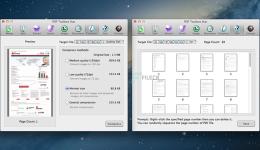
PDF Squeezer - PDF Toolbox is designed for operating PDF files and contains almost all operations you can imagine, such as: compress, merge, split, extract, insert, extract image, convert image, extract text, sequence, encrypt, etc. If you are worried about operating PDF files, download it, it's so fantastic!
FEATURES
1. Merge
You can easily merge various PDF files that you like into one which is convinent for managing and reading;
2. Split
You can arbitrarily split a PDF file at your convenience;
3. Extract
You can arbitrarily extract page number from one or more PDF files and merger into a new PDF file;
4. Insert
You can insert one PDF file into another;
5. Extract image
You can specify the page number of PDF file, and then extract the images or convert the whole page into any other image files in specified format(png,jpeg,bmp,tiff,gif);
6. Document
You can extract text in PDF and save as txt or rtfd format;
7. Compress
You can compress PDF files making files smaller to save your valuable disk space;
8. Sort
You can randomly sequence the page number of PDF file;
9. Encrypt
You can encrypt PDF files;
Top In-App Purchases: Full Version - included
Screen :
What's New
Spoiler contents are visible only to Established Members.
HOMEPAGE
Code:
https://apps.apple.com/us/app/pdf-compressor-pdf-toolbox/id635801950?mt=12&uo=4
You do not have permission to view the full content of this post. Log in or register now.
You do not have permission to view the full content of this post. Log in or register now.
You do not have permission to view the full content of this post. Log in or register now.