 PH
PH-
Welcome to PHCorner Forums! Sign up for free to unlock full access and exclusive privileges, including:
- Asking questions about computer and mobile issues
- Discovering internet tips for your mobile network and computer
You are using an out of date browser. It may not display this or other websites correctly.
You should upgrade or use an alternative browser.
You should upgrade or use an alternative browser.
❓ Help Pa help po paano po to
- Thread starter kitty08
- Start date
-
- Tags
- help pa help po paano
- Status
- Not open for further replies.

WraithKing0831
Elite
try mo linisin ram or change ng SSD hdd
punta ka sa safe mode. press mo lang F8 sa keyboard mo para lumabas yung option ng safe mode
You do not have permission to view the full content of this post. Log in or register now.
In this case, you can modify your Windows Registry in Safe Mode to solve the problem. Just follow the steps below:
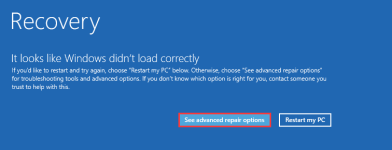
Step 1: Press and hold the power button for 10 seconds to turn off your computer, and press the power button again to turn on it. Repeat the process 3 times to enter the You do not have permission to view the full content of this post. Log in or register now. and then click See advanced repair options button.
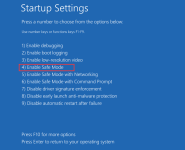
Step 2: Navigate to Troubleshoot > Advanced options > Startup Settings and click the Restart button. When you get the following interface, press 4 or F4 to select Enable Safe Mode option.
Step 3: After booting into the Safe Mode, press Windows + R to bring up Run window. Then, input regedit and click OK button to open Registry Editor.
Step 4: Now, input the following path in the address bar and press Enter key to locate the Memory Management folder quickly:
ComputerHKEY_LOCAL_MACHINESYSTEMCurrentControlSetControlSession ManagerMemory Management
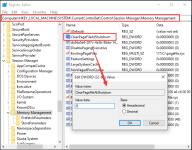
Step 5: In the right pane, double-click the ClearPageFileAtShutdown entry to edit it. Set its Value data to 1 and choose Hexadecimal. Click OK to save changes.
Once it’s done, you can restart your computer to see if the boot sequence can be completed successfully without the BlInitializeLibrary Failed 0xc00000bb error. If not, please move on to the next fix.
punta ka sa safe mode. press mo lang F8 sa keyboard mo para lumabas yung option ng safe mode
You do not have permission to view the full content of this post. Log in or register now.
Fix 3: Modify Windows Registry in Safe Mode
It has been proven that the BlInitializeLibrary Failed 0xc00000bb error could come up if the BIOS forgets which SSD/HDD is the primary bootable drive. This is because the computer will clear the Page File that may contain the current boot sequence information at every shutdown.In this case, you can modify your Windows Registry in Safe Mode to solve the problem. Just follow the steps below:
Step 1: Press and hold the power button for 10 seconds to turn off your computer, and press the power button again to turn on it. Repeat the process 3 times to enter the You do not have permission to view the full content of this post. Log in or register now. and then click See advanced repair options button.
Step 2: Navigate to Troubleshoot > Advanced options > Startup Settings and click the Restart button. When you get the following interface, press 4 or F4 to select Enable Safe Mode option.
Step 3: After booting into the Safe Mode, press Windows + R to bring up Run window. Then, input regedit and click OK button to open Registry Editor.
Step 4: Now, input the following path in the address bar and press Enter key to locate the Memory Management folder quickly:
ComputerHKEY_LOCAL_MACHINESYSTEMCurrentControlSetControlSession ManagerMemory Management
Step 5: In the right pane, double-click the ClearPageFileAtShutdown entry to edit it. Set its Value data to 1 and choose Hexadecimal. Click OK to save changes.
Once it’s done, you can restart your computer to see if the boot sequence can be completed successfully without the BlInitializeLibrary Failed 0xc00000bb error. If not, please move on to the next fix.
ito po lumalabas pag nag F8 akotry mo linisin ram or change ng SSD hdd
punta ka sa safe mode. press mo lang F8 sa keyboard mo para lumabas yung option ng safe mode
You do not have permission to view the full content of this post. Log in or register now.
Fix 3: Modify Windows Registry in Safe Mode
It has been proven that the BlInitializeLibrary Failed 0xc00000bb error could come up if the BIOS forgets which SSD/HDD is the primary bootable drive. This is because the computer will clear the Page File that may contain the current boot sequence information at every shutdown.
In this case, you can modify your Windows Registry in Safe Mode to solve the problem. Just follow the steps below:
Step 1: Press and hold the power button for 10 seconds to turn off your computer, and press the power button again to turn on it. Repeat the process 3 times to enter the You do not have permission to view the full content of this post. Log in or register now. and then click See advanced repair options button.
View attachment 3425639
Step 2: Navigate to Troubleshoot > Advanced options > Startup Settings and click the Restart button. When you get the following interface, press 4 or F4 to select Enable Safe Mode option.
View attachment 3425640
Step 3: After booting into the Safe Mode, press Windows + R to bring up Run window. Then, input regedit and click OK button to open Registry Editor.
Step 4: Now, input the following path in the address bar and press Enter key to locate the Memory Management folder quickly:
ComputerHKEY_LOCAL_MACHINESYSTEMCurrentControlSetControlSession ManagerMemory Management
Step 5: In the right pane, double-click the ClearPageFileAtShutdown entry to edit it. Set its Value data to 1 and choose Hexadecimal. Click OK to save changes.
View attachment 3425641
Once it’s done, you can restart your computer to see if the boot sequence can be completed successfully without the BlInitializeLibrary Failed 0xc00000bb error. If not, please move on to the next fix.
WraithKing0831
Elite
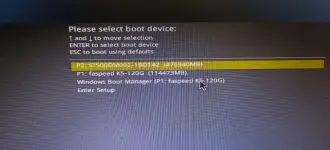
dalawa boot mo ?
choose mo yang windows boot manager, yan ata primary mo
choose mo yang windows boot manager, yan ata primary mo
ito lumabas pagka click ko sa windowsbootdalawa boot mo ?
choose mo yang windows boot manager, yan ata primary mo
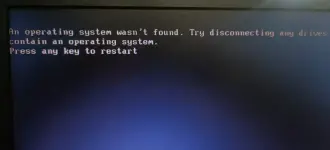
WraithKing0831
Elite
yan nalang p2.
ganun parin poyan nalang p2.
ti nry ko tanggalin og sdd, bumukas sya po..sdd siguro problema po. dalawa kasi nilagay ko dito sdd at hdd.
WraithKing0831
Elite
corrupted cguro ssd mo.ganun parin po
ti nry ko tanggalin og sdd, bumukas sya po..sdd siguro problema po. dalawa kasi nilagay ko dito sdd at hdd.
ma aayos pa kaya to?corrupted cguro ssd mo.
WraithKing0831
Elite
reformat nalang last step na naiisip ko para jan. in case may important file ka jan. ask ka sa iba. hehe. pero kung yan tlga problem kaya ayaw pag boot pc mo. much better. palit nalang para less stressma aayos pa kaya to?
wala naman pong important na file to, pang valorant ko lang kasi to.. okay lang siguro e reformat.hehehereformat nalang last step na naiisip ko para jan. in case may important file ka jan. ask ka sa iba. hehe. pero kung yan tlga problem kaya ayaw pag boot pc mo. much better. palit nalang para less stress
WraithKing0831
Elite
yup. reformat mo nalang kung wala naman.wala naman pong important na file to, pang valorant ko lang kasi to.. okay lang siguro e reformat.hehehe
sige po, salamat po.heheheyup. reformat mo nalang kung wala naman.
- Status
- Not open for further replies.
Similar threads
-
❓ Help Ka-PHC help po paano maconfigure Headless setup Wyse Mini PC 5070
- Started by hinokitaki
- Replies: 2
-
❓ Help Help po paano ma delete yung payment method ko?
- Started by PHC-Denmark
- Replies: 7
-
GOOD AFTER PO PAANO PO BA MAG INSTALL NG MOVIEBOX SA TV
- Started by Ichi2
- Replies: 2
-
❓ Help Patulong po mag mass report ng facebook. scammer po to
- Started by ckeeey17
- Replies: 0
About this Thread
-
14Replies
-
682Views
-
2Participants
Last reply from:
kitty08
kitty08
New Topics
-
PC APPS - remote or auto saved type and auto audio
- Started by babyzero
- Replies: 0
- ❓ Computer Discussion & Support
-
Data Recovery May Chance pa bato
- Started by tambay28
- Replies: 0
- ❓ Computer Discussion & Support
-
Capcut PC pasabit po
- Started by L A Z A
- Replies: 0
- ❓ Computer Discussion & Support
-
Download Youtube Video using CMD
- Started by BeerGin69
- Replies: 1
- ❓ Computer Discussion & Support
-
Taiwebs alternative websites
- Started by gigsta
- Replies: 0
- ❓ Computer Discussion & Support
-
Tropic Colour - Sino meron nito?
- Started by mikehacker182
- Replies: 0
- ❓ Computer Discussion & Support
-
WINDOWS PRODUCT KEY
- Started by jhengky22
- Replies: 0
- ❓ Computer Discussion & Support
-
Request : 2027 calendars with Holidays
- Started by the_jinx
- Replies: 0
- ❓ Computer Discussion & Support
-
Dapat ba akong maalarma dito? Nagback-up na paunti-unti ako.
- Started by Jeii
- Replies: 2
- ❓ Computer Discussion & Support
-
Realtek audio missing in device manager
- Started by PHC-MERCURIAL
- Replies: 4
- ❓ Computer Discussion & Support
Trending Topics
Online now
- Members online
- 1,175
- Guests online
- 3,931
- Total visitors
- 5,106