 PH
PH
Language: Multilingual | File size: 8.31 MB
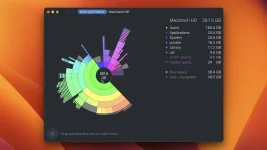
DaisyDisk allows you to visualize your disk usage and free up disk space by quickly finding and deleting big unused files. The program scans your disk and displays its content as a sector diagram where the biggest files and folders at once become obvious. To drill down to a folder, just click on a segment.
To bubble up, click in the center. Move the mouse over the diagram and see the name and path of each file, and enclosed files (if any).
Hit Space to quickly preview file content, without launching another application. In this way, walk around your disk and drag-and-drop all unneeded files into the "collector". Expand the collector to check its contents. When done, clean it up with a single click.
Supported Operation Systems
macOS 10.13 or later
Screen :
What's New
Spoiler contents are visible only to Established Members.
HOMEPAGE
Code:
https://daisydiskapp.com/
You do not have permission to view the full content of this post. Log in or register now.
You do not have permission to view the full content of this post. Log in or register now.
You do not have permission to view the full content of this post. Log in or register now.