 PH
PHvianca_001
Eternal Poster
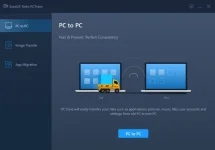
Features :
- In-Place Upgrade
Upgrade to Windows 10? EaseUS Todo PCTrans makes it possible to perform an in-place upgrade in Windows 10 without reinstalling all apps. This PC transfer software can move applications downloaded on the previous computer to a new PC before your Windows 10 update. - When the Windows 10 upgrade is done, it automates the configurations of apps on the Windows 10 PC without removing the old versions. To install Windows new updates, everything transferred remains the same as before.
- Transfer and Backup
Worry about data loss when switching to a new computer or upgrading to Windows 10?
Have to re-download all apps when you change a PC?
Reluctant to create a new account on a new PC?
EaseUS PC migration software copies the contents on one computer and backs up data, applications, or accounts along with the personalized settings to another PC. This approach reduces data loss to zero and allows you to restore everything back when something unexpected occurs. In particular, it creates images of all apps and makes them available on the new PC. - Optimize PC Performance
To upgrade your hard drives on an old PC, or replace a damaged disk, EaseUS Todo PCTrans can transfer applications locally between two disks, and move away from large programs which take up much disk space and slow down your PC. It’s widely applied to transfer apps stored on the system drive to other disks and makes much room for the Windows system. Thus, it speeds up the Windows system running and keeps your PC working at its best.
How To Install?
- Install the program from the given setup.
- Don’t run the application yet and close it from the system tray or task manager if running.
- Extract “keygen fix” to any directory.
- Use the keygen to generate the key.
- Paste the provided key into the program.
- Boom! Now you can use the program without any interruptions.
- That’s it, Enjoy now