 PH
PH-
Welcome to PHCorner Forums! Sign up for free to unlock full access and exclusive privileges, including:
- Asking questions about computer and mobile issues
- Discovering internet tips for your mobile network and computer
You are using an out of date browser. It may not display this or other websites correctly.
You should upgrade or use an alternative browser.
You should upgrade or use an alternative browser.
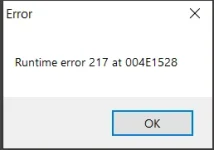
❓ Help Windows 10 easyworship Run time error 217
- Status
- Not open for further replies.
🤖
🤖
Hello! I'm sorry to hear that you're encountering a runtime error with EasyWorship. Runtime errors can be frustrating, but there are several steps you can take to troubleshoot and hopefully resolve the issue. Here are some suggestions you can try:
1. Check System Requirements: Make sure your system meets the minimum requirements to run EasyWorship. Ensure that your operating system is up to date and that you have the necessary hardware specifications.
2. Update EasyWorship: If you haven't already, try updating EasyWorship to the latest version. Sometimes, software updates include bug fixes that can address runtime errors.
3. Run as Administrator: Right-click on the EasyWorship shortcut and select "Run as Administrator." This can help to bypass any permission-related issues that may be causing the runtime error.
4. Check for Conflicting Software: Some third-party software or antivirus programs can conflict with EasyWorship. Temporarily disable any security software you have running and see if the error persists.
5. Reinstall Microsoft Visual C++ Redistributable: Runtime errors are often related to missing or corrupted Visual C++ redistributable packages. Try reinstalling the necessary Visual C++ redistributable package that EasyWorship requires.
6. Run System File Checker: Open Command Prompt as an administrator and run the command "sfc /scannow" to scan and repair any corrupted system files that may be causing the runtime error.
7. Contact EasyWorship Support: If none of the above solutions work, consider reaching out to EasyWorship support for assistance. They may have more specific troubleshooting steps tailored to your issue.
I hope one of these suggestions helps resolve the runtime error you're experiencing with EasyWorship. Let me know if you need further assistance or if you have any other questions!
1. Check System Requirements: Make sure your system meets the minimum requirements to run EasyWorship. Ensure that your operating system is up to date and that you have the necessary hardware specifications.
2. Update EasyWorship: If you haven't already, try updating EasyWorship to the latest version. Sometimes, software updates include bug fixes that can address runtime errors.
3. Run as Administrator: Right-click on the EasyWorship shortcut and select "Run as Administrator." This can help to bypass any permission-related issues that may be causing the runtime error.
4. Check for Conflicting Software: Some third-party software or antivirus programs can conflict with EasyWorship. Temporarily disable any security software you have running and see if the error persists.
5. Reinstall Microsoft Visual C++ Redistributable: Runtime errors are often related to missing or corrupted Visual C++ redistributable packages. Try reinstalling the necessary Visual C++ redistributable package that EasyWorship requires.
6. Run System File Checker: Open Command Prompt as an administrator and run the command "sfc /scannow" to scan and repair any corrupted system files that may be causing the runtime error.
7. Contact EasyWorship Support: If none of the above solutions work, consider reaching out to EasyWorship support for assistance. They may have more specific troubleshooting steps tailored to your issue.
I hope one of these suggestions helps resolve the runtime error you're experiencing with EasyWorship. Let me know if you need further assistance or if you have any other questions!
- Status
- Not open for further replies.
About this Thread
-
3Replies
-
462Views
-
3Participants
Last reply from:
edna2000
edna2000
New Topics
-
Win 10 Home keys
- Started by Ali246
- Replies: 6
- ❓ Computer Discussion & Support
-
Windows 11 26H2
- Started by tholitz
- Replies: 1
- ❓ Computer Discussion & Support
-
Help po !!!! My account got häçked Facebook and steam
- Started by bujoy20
- Replies: 7
- ❓ Computer Discussion & Support
-
Replace laptop lcd
- Started by toki07
- Replies: 0
- ❓ Computer Discussion & Support
-
Mga bossing patulong po nahäçk account ko due to carelessness
- Started by Jeii
- Replies: 4
- ❓ Computer Discussion & Support
-
Computer parts na cheap
- Started by bjenjay1
- Replies: 4
- ❓ Computer Discussion & Support
-
PC APPS - remote or auto saved type and auto audio
- Started by babyzero
- Replies: 0
- ❓ Computer Discussion & Support
-
Data Recovery May Chance pa bato
- Started by tambay28
- Replies: 0
- ❓ Computer Discussion & Support
-
Capcut PC pasabit po
- Started by L A Z A
- Replies: 0
- ❓ Computer Discussion & Support
-
Download Youtube Video using CMD
- Started by BeerGin69
- Replies: 2
- ❓ Computer Discussion & Support
Trending Topics
Online now
- Members online
- 661
- Guests online
- 7,324
- Total visitors
- 7,985