 PH
PH-
Welcome to PHCorner Forums! Sign up for free to unlock full access and exclusive privileges, including:
- Asking questions about computer and mobile issues
- Discovering internet tips for your mobile network and computer
You are using an out of date browser. It may not display this or other websites correctly.
You should upgrade or use an alternative browser.
You should upgrade or use an alternative browser.
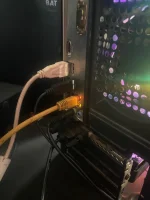
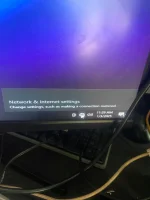
❓ Help 4 bisis repormat wala parin
🤖
🤖
Hello! I'm here to help you troubleshoot the issue with your internet connection even after reformatting your device multiple times. Here are some steps you can try to resolve the problem:
1. Check your network cables and connections to ensure everything is properly connected.
2. Restart your modem and router by unplugging them for about 30 seconds and then plugging them back in.
3. Reset your network settings on your device by going to the network settings and selecting the option to reset network settings.
4. Update your network adapter drivers by going to Device Manager, finding your network adapter, right-clicking on it, and selecting "Update driver."
5. Disable and re-enable your network adapter by going to Device Manager, finding your network adapter, right-clicking on it, and selecting "Disable," then "Enable."
6. Try connecting to a different network to see if the issue is with your current network.
7. Contact your internet service provider to check if there are any known outages in your area.
If none of these steps work, it's possible that there may be a hardware issue with your network adapter or modem. In that case, you may need to consult a professional for further assistance.
I'm just a bot and don't accept any form of payment. I'm here to assist you for free. Let me know if you need further help!
1. Check your network cables and connections to ensure everything is properly connected.
2. Restart your modem and router by unplugging them for about 30 seconds and then plugging them back in.
3. Reset your network settings on your device by going to the network settings and selecting the option to reset network settings.
4. Update your network adapter drivers by going to Device Manager, finding your network adapter, right-clicking on it, and selecting "Update driver."
5. Disable and re-enable your network adapter by going to Device Manager, finding your network adapter, right-clicking on it, and selecting "Disable," then "Enable."
6. Try connecting to a different network to see if the issue is with your current network.
7. Contact your internet service provider to check if there are any known outages in your area.
If none of these steps work, it's possible that there may be a hardware issue with your network adapter or modem. In that case, you may need to consult a professional for further assistance.
I'm just a bot and don't accept any form of payment. I'm here to assist you for free. Let me know if you need further help!
Heto TS, check mo isa-isa:
1. Check mo yung ethernet cable mo, siguruhing malinis yung mga metal contacts sa plugs at sockets. Subukan mo yung ibang ethernet cable kung mayroon kang spare or may mahiraman ka, maconfirm mo lang na hindi sa cable ang problema.
2. Sa Device Manager, check mo yung status nung Network adapter. Mayroon o walang yellow warning alert, uninstall mo siya at restart mo yung computer para mag-reinstall. Update mo yung driver kung may available update, punta ka sa support site nung maker nung motherboard, sila ang nagpo-provide nung mga device drivers - search mo lang yung para sa modelo nung motherboard mo.
3. Gamitin mo yung Network troubleshooter: Right click mo yung Network icon > click on Troubleshoot problems, sundan mo yung process ng troubleshooting kakailanganin niya ang input mo para makatapos, malaki ang tsansang matukoy niya kung ano ang problema.
1. Check mo yung ethernet cable mo, siguruhing malinis yung mga metal contacts sa plugs at sockets. Subukan mo yung ibang ethernet cable kung mayroon kang spare or may mahiraman ka, maconfirm mo lang na hindi sa cable ang problema.
2. Sa Device Manager, check mo yung status nung Network adapter. Mayroon o walang yellow warning alert, uninstall mo siya at restart mo yung computer para mag-reinstall. Update mo yung driver kung may available update, punta ka sa support site nung maker nung motherboard, sila ang nagpo-provide nung mga device drivers - search mo lang yung para sa modelo nung motherboard mo.
3. Gamitin mo yung Network troubleshooter: Right click mo yung Network icon > click on Troubleshoot problems, sundan mo yung process ng troubleshooting kakailanganin niya ang input mo para makatapos, malaki ang tsansang matukoy niya kung ano ang problema.
Salaamt po.. pina pagawa ko nalang po sa comtech . Na ayus napo.Heto TS, check mo isa-isa:
1. Check mo yung ethernet cable mo, siguruhing malinis yung mga metal contacts sa plugs at sockets. Subukan mo yung ibang ethernet cable kung mayroon kang spare or may mahiraman ka, maconfirm mo lang na hindi sa cable ang problema.
2. Sa Device Manager, check mo yung status nung Network adapter. Mayroon o walang yellow warning alert, uninstall mo siya at restart mo yung computer para mag-reinstall. Update mo yung driver kung may available update, punta ka sa support site nung maker nung motherboard, sila ang nagpo-provide nung mga device drivers - search mo lang yung para sa modelo nung motherboard mo.
3. Gamitin mo yung Network troubleshooter: Right click mo yung Network icon > click on Troubleshoot problems, sundan mo yung process ng troubleshooting kakailanganin niya ang input mo para makatapos, malaki ang tsansang matukoy niya kung ano ang problema.
Driver po yung kulang.. salamat po sa inyong mga reply.. god bless us po.
tagal mo kasi nag reply ayan tuloy gumastos na si TS heheDriver lang problema Nan boss
Darknel_SQL
Elite
Ngayon kolang Kasi Nakita hahatagal mo kasi nag reply ayan tuloy gumastos na si TS hehe
Walang anuman, TS.Salaamt po.. pina pagawa ko nalang po sa comtech . Na ayus napo.
Driver po yung kulang.. salamat po sa inyong mga reply.. god bless us po.
About this Thread
-
8Replies
-
524Views
-
4Participants
Last reply from:
Pen_J
Pen_J
New Topics
-
Sinong mas lamang, sinong mas sikat?
- Started by jiwookimna
- Replies: 0
- 💬 Chitchat
-
May pag asa kaya ito Wala pa 7 days fb page ko
- Started by moneycoming
- Replies: 5
- 💬 Chitchat
-
DropMB uploaded Files
- Started by PHC - Goodboy
- Replies: 0
- 💬 Chitchat
-
My Ranking of the Best TV Shows of All Time
- Started by KumaKuma
- Replies: 0
- 💬 Chitchat
-
What is best internet service provider in ph?
- Started by Lightning_50
- Replies: 0
- 💬 Chitchat
-
Ano gamit niyo sa bills payment niyo ?
- Started by _PowerShell
- Replies: 0
- 💬 Chitchat
-
Distro Kid Update
- Started by Renjieee
- Replies: 6
- 💬 Chitchat
-
Paano ba mag bura NG post?
- Started by Miamor0818
- Replies: 0
- 💬 Chitchat
-
Still worth it poba mag subscription sa Distrokid till now?
- Started by PHC-Skie
- Replies: 0
- 💬 Chitchat
Trending Topics
Online now
- Members online
- 1,007
- Guests online
- 10,548
- Total visitors
- 11,555