❓ Help Laging na disconnect need pa mag reset

Status
Not open for further replies.

darknight101

Forum Veteran
okay lang sana kung isang reset lang kaso minsan umaabot nh 6x bago bumalik yong internet,
pinaka mababa ay 3x reset sa modem


panu ayusin? oray way ba na maayos pa salamat
 
Hello darknight101,

I understand how frustrating it must be to have your internet connection disconnect multiple times before it stabilizes. Here are some steps you can take to try and resolve the issue:

1. Check your connections: Make sure all cables connecting your modem/router to the wall socket and your devices are secure and not damaged.

2. Reposition your modem/router: Sometimes the location of your modem/router can affect the signal strength and stability. Try placing it in a more central location in your home away from obstructions like walls or electronic devices that might interfere with the signal.

3. Update firmware: Check if there are any firmware updates available for your modem/router. Sometimes outdated firmware can cause connectivity issues.

4. Contact your ISP: If the problem persists, it might be an issue with your internet service provider. Contact them to check if there are any known outages in your area or if they can troubleshoot the issue remotely.

5. Replace your modem/router: If all else fails, it might be time to consider replacing your modem/router with a newer model that is more reliable and compatible with your internet service.

I hope these suggestions help you resolve your internet connectivity issues. Let me know if you need further assistance.
 
after reset wait mo 5-10 mins kasi nanghihingi pa yan ng configuration from server kaya take time talaga. Yung iba naman na ISP need pa manual activation/Config yung modem from server after reset - ganito dito samin local telco
 
darknight101
Bakit lagi nagrereset? O restart? At yang device mo lang ba nagkakaproblema?
Try mo other device. Baka yang device mo problema.
Kung di parin maayos sa ibang device baka madami may WiFi connection dyan sa location mo.
Madalas tug of war yan sa signal dahil baka pareparehas kayo ng frequency.
Pwede mo rin paayos sa Telco mo baka modem o linya mo may sira.
 
ah bali nawawala siya regularly? kapag ganyan baka may problem sa ρá†ch cord or ftth cable.
sa lang gamit lods, bali nawawala talaga internet d maopen gcash at ML pero sa YT okay naman, kaya need mag reset para maka gamit ng Gcash 3 - 6x daily nawawala . hassle pag nag tratransact or naglalaro sa gcash

darknight101
Bakit lagi nagrereset? O restart? At yang device mo lang ba nagkakaproblema?
Try mo other device. Baka yang device mo problema.
Kung di parin maayos sa ibang device baka madami may WiFi connection dyan sa location mo.
Madalas tug of war yan sa signal dahil baka pareparehas kayo ng frequency.
Pwede mo rin paayos sa Telco mo baka modem o linya mo may sira.
may piso wifi naman dito same din Globe pero di naman nawawala signal, ito lang talaga sakin, yong simcard din nga pala ininsert ko sa phone same lang din di nakaka connect ng internet need pa mag airplane mode ng ilang beses bago maka connect,
yong sim ba ang sira or yong modem
 
may piso wifi naman dito same din Globe pero di naman nawawala signal, ito lang talaga sakin, yong simcard din nga pala ininsert ko sa phone same lang din di nakaka connect ng internet need pa mag airplane mode ng ilang beses bago maka connect,
yong sim ba ang sira or yong modem
Teka lang... Need more info pa. Ano connection setup mo?
Naka-Fiber ka ba ng Globe? O modem with sim lang?
Medyo magulo eh. Di tugma yung replies dito.
 
Yun lang. Dapat nasa labas yan o sa bintana na nakatapat sa pinakamalpit na satellite/cell site ng Globe.
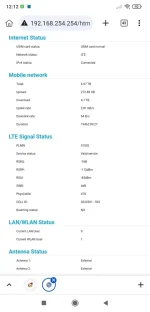
Try mo tignan yung dashboard kung stable yung signal.
Screenshot_2025-01-07-00-12-40-104_com.kiwibrowser.browser.webp

eto lods , yan na pinaka malakas na pwesto na nasubukan ko XD
 
Status
Not open for further replies.

About this Thread

  • 10
    Replies
  • 707
    Views
  • 3
    Participants
Last reply from:
darknight101

Trending Topics

Online now

Members online
1,139
Guests online
1,345
Total visitors
2,484

Forum statistics

Threads
2,273,431
Posts
28,949,480
Members
1,235,747
Latest member
_usteng_
Back
Top