 PH
PH-
Welcome to PHCorner Forums! Sign up for free to unlock full access and exclusive privileges, including:
- Asking questions about computer and mobile issues
- Discovering internet tips for your mobile network and computer
You are using an out of date browser. It may not display this or other websites correctly.
You should upgrade or use an alternative browser.
You should upgrade or use an alternative browser.
- Status
- Not open for further replies.
🤖
🤖
Hello! It seems like you are experiencing some issues with your factory unlocked iPhone 8 Plus from Japan. If your TNT SIM card has signal but you are unable to use cellular data, there are a few steps you can try to troubleshoot the issue:
1. Check APN Settings: Make sure that the Access Point Name (APN) settings on your iPhone are correctly configured for TNT. You can usually find this in the Cellular Data settings. The correct APN settings for TNT should be available on their website or you can contact their customer support for assistance.
2. Restart Your iPhone: Sometimes a simple restart can help resolve connectivity issues. Try restarting your iPhone to see if that helps in getting the data indicator to show up.
3. Reset Network Settings: You can also try resetting your network settings on your iPhone. This will remove all saved Wi-Fi networks, Bluetooth connections, and VPN settings, so make sure you have those details saved elsewhere before proceeding. To reset network settings, go to Settings > General > Reset > Reset Network Settings.
4. Update iOS: Ensure that your iPhone is running the latest version of iOS. Sometimes software updates contain fixes for connectivity issues.
5. Contact TNT Customer Support: If none of the above steps work, it might be a good idea to reach out to TNT customer support. They can provide specific guidance for their network settings and may be able to troubleshoot the issue further.
I hope these suggestions help you get your cellular data working on your iPhone 8 Plus. Let me know if you have any other questions or if you need further assistance!
1. Check APN Settings: Make sure that the Access Point Name (APN) settings on your iPhone are correctly configured for TNT. You can usually find this in the Cellular Data settings. The correct APN settings for TNT should be available on their website or you can contact their customer support for assistance.
2. Restart Your iPhone: Sometimes a simple restart can help resolve connectivity issues. Try restarting your iPhone to see if that helps in getting the data indicator to show up.
3. Reset Network Settings: You can also try resetting your network settings on your iPhone. This will remove all saved Wi-Fi networks, Bluetooth connections, and VPN settings, so make sure you have those details saved elsewhere before proceeding. To reset network settings, go to Settings > General > Reset > Reset Network Settings.
4. Update iOS: Ensure that your iPhone is running the latest version of iOS. Sometimes software updates contain fixes for connectivity issues.
5. Contact TNT Customer Support: If none of the above steps work, it might be a good idea to reach out to TNT customer support. They can provide specific guidance for their network settings and may be able to troubleshoot the issue further.
I hope these suggestions help you get your cellular data working on your iPhone 8 Plus. Let me know if you have any other questions or if you need further assistance!
adenovirus10
Forum Veteran
try mo muna reboot
Nirestart kona ayaw lumabas datatry mo muna reboot
adenovirus10
Forum Veteran
pa drop ako serial number check ko kung naka factory unlocked naba yanNirestart kona ayaw lumabas data
adenovirus10
Forum Veteran
try mo ibang sim kung mag oon ba data
pa drop ako serial number check ko kung naka factory unlocked naba yan
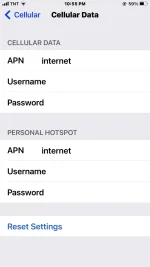
Yan apn ko
adenovirus10
Forum Veteran
off mo muna wifi check mo kung mag oon ba syaView attachment 3358486
Yan apn ko
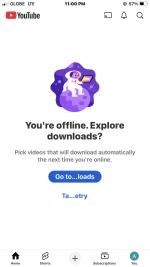
Nag on data sya sa globe eto kasing tnt sim na ginamit ito yung na block pero bumalik yung signal at data nagagamit ko sa android sa ios ayaw mag data pero lumabas data sa globeoff mo muna wifi check mo kung mag oon ba sya
adenovirus10
Forum Veteran
Wala pa ako idea sa ganto dapat mag oon na dapat data nyan kung nag oon sa androidNag on data sya sa globe eto kasing tnt sim na ginamit ito yung na block pero bumalik yung signal at data nagagamit ko sa android sa ios ayaw mag data pero lumabas data sa globeView attachment 3358494
Yun nga sir eto yung sim ko na tnt nablock na kahit gamitin ko sa no load kahit anony configuration hindi na sya na ba block kahit gaano kalaki data usage ko sa no load configuration hindi sya na ba block ayaw lang magdata sa ios pero sa android meron data indicator
uWala pa ako idea sa ganto dapat mag oon na dapat data nyan kung nag oon sa android
- Status
- Not open for further replies.
Similar threads
About this Thread
-
10Replies
-
728Views
-
2Participants
Last reply from:
Jamin
Jamin
New Topics
-
Pahelp mabypass oppo a18
- Started by Akaneee22
- Replies: 1
- ❓ Mobile Discussion & Support
-
Cαиνα pasabit po!
- Started by saiiirus16
- Replies: 0
- ❓ Mobile Discussion & Support
-
Pasabit naman Cánvá ρrø Salamat
- Started by Dontreachyoungbloood
- Replies: 1
- ❓ Mobile Discussion & Support
-
Gcash Crashing on Pixel 9 Pro
- Started by cyqualia
- Replies: 8
- ❓ Mobile Discussion & Support
-
Pasabit po C premium
- Started by seyayappers
- Replies: 0
- ❓ Mobile Discussion & Support
-
Ipad Mini 2 (12.5.8 ios version) (Forgot password)
- Started by poshi09
- Replies: 1
- ❓ Mobile Discussion & Support
-
-
Mod for loklok or hitv
- Started by OBAN22ST
- Replies: 0
- ❓ Mobile Discussion & Support
-
Pa help sa TransMac
- Started by Sheilo_marvin
- Replies: 0
- ❓ Mobile Discussion & Support
-
Songhub question that im so curious abt
- Started by Kyupal
- Replies: 5
- ❓ Mobile Discussion & Support
Trending Topics
Online now
- Members online
- 980
- Guests online
- 3,419
- Total visitors
- 4,399