❓ Help File Problems

Status
Not open for further replies.

Ishigami

Forum Guru
1735070164599.webp
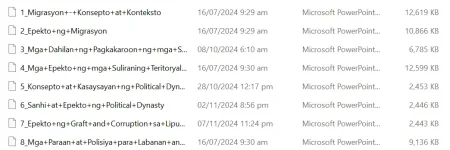
Baka alam nyo mga boss pano to i-fix lahat ng file ko nagkaganto hindi na sya madetect word/ppt/xlx
 
Mukhang may problema sa file associations ng iyong mga dokumento. Maaaring subukan mong i-associate ulit ang mga file types na Word, PowerPoint, at Excel sa kanilang mga corresponding applications. Narito ang mga steps kung paano gawin ito sa Windows:

1. Right-click on any Word document (file with .docx extension) and select "Open with" > "Choose another app."
2. Sa susunod na window, piliin ang Microsoft Word bilang default application. Make sure to check the box that says "Always use this app to open .docx files."
3. Gawin mo rin ito para sa PowerPoint at Excel files, piliin ang tamang application para sa bawat file type.

Kung hindi mo pa rin maayos ang isyu, maaari mong subukan ang mga sumusunod na steps:
1. Buksan ang Control Panel > Default Programs > Set Associations. Dito, maaari mong i-check at baguhin ang mga default file associations.
2. Maaari mo ring subukan ang "File Association Fixer" tool mula sa third-party sources para maayos ang mga file association issues.

Kung ang mga nabanggit na solusyon ay hindi gumana, maaari mong i-repair ang Microsoft Office installation sa pamamagitan ng Control Panel > Programs and Features > Microsoft Office > Repair.

Sana makatulong ito sa iyong isyu! Kung may iba pang katanungan, huwag mag-atubiling magtanong.
 
Mukhang may problema sa file associations ng iyong mga dokumento. Maaaring subukan mong i-associate ulit ang mga file types na Word, PowerPoint, at Excel sa kanilang mga corresponding applications. Narito ang mga steps kung paano gawin ito sa Windows:

1. Right-click on any Word document (file with .docx extension) and select "Open with" > "Choose another app."
2. Sa susunod na window, piliin ang Microsoft Word bilang default application. Make sure to check the box that says "Always use this app to open .docx files."
3. Gawin mo rin ito para sa PowerPoint at Excel files, piliin ang tamang application para sa bawat file type.

Kung hindi mo pa rin maayos ang isyu, maaari mong subukan ang mga sumusunod na steps:
1. Buksan ang Control Panel > Default Programs > Set Associations. Dito, maaari mong i-check at baguhin ang mga default file associations.
2. Maaari mo ring subukan ang "File Association Fixer" tool mula sa third-party sources para maayos ang mga file association issues.

Kung ang mga nabanggit na solusyon ay hindi gumana, maaari mong i-repair ang Microsoft Office installation sa pamamagitan ng Control Panel > Programs and Features > Microsoft Office > Repair.

Sana makatulong ito sa iyong isyu! Kung may iba pang katanungan, huwag mag-atubiling magtanong.
Do This Suggestion! ... ;)
 
Status
Not open for further replies.

About this Thread

  • 2
    Replies
  • 306
    Views
  • 2
    Participants
Last reply from:
PHC - Raijin-X

Trending Topics

Online now

Members online
1,281
Guests online
1,708
Total visitors
2,989

Forum statistics

Threads
2,273,480
Posts
28,949,767
Members
1,235,763
Latest member
Kamotekahoy
Back
Top