PH
PHOG-PHC_Jerux
Forum Veteran
Join here: You do not have permission to view the full content of this post. Log in or register now.
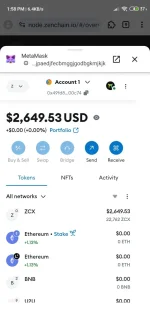
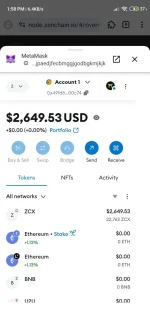
Connect wallet use metamask ext at kiwi/mises browser
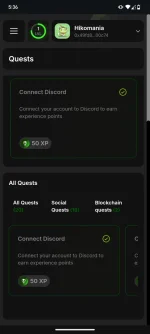
Connect social accounts do the task earn XP points soon convert to ZXC Tokens.
Testnet link: You do not have permission to view the full content of this post. Log in or register now.
Faucet link: You do not have permission to view the full content of this post. Log in or register now. Claim every 24 hours you need to do this to be able to complete the Transfer ZXC token task at zenquest and also for the Creating smart contract.
Done!
Follow me for more
How to stake?
ZenChain Logo
How to StakeStake with ZenChain Station
On this page
Stake with ZenChain Station
ZenChain Station is a dApp that makes staking ZCX or running your own node simple. This guide will take you through the steps to get started and begin earning rewards.
Connect Your Wallet
Head over to You do not have permission to view the full content of this post. Log in or register now..
Click the "Connect Wallet" button in the top-right corner and link your Ethereum wallet.
Once connected, navigate to the "Staking" page to begin.
Stake ZCX
On the staking page, click "Stake" to open the staking modal.
Set Your Reward Destination
Decide where your staking rewards should go. You have three options:
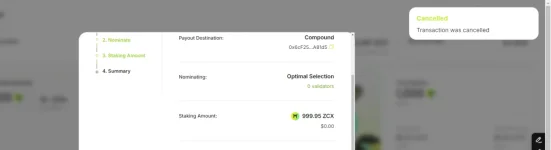
Automatically restake (compound) your rewards.
Send rewards to your account
Send rewards to another account (you’ll need to enter the recipient’s address)
Choose Your Nomination Strategy
Pick a nomination strategy:
Optimal Strategy (recommended).
Low Commission Strategy (for minimizing validator fees).
New strategies may be added later.
Alternatively, you can become a validator by setting your desired commission rate. However, you can't nominate and validate at the same time.
NOTE
Becoming a validator requires you to run a node. For more details, check out our Become a Validator.
Select the Amount to Stake
Enter how much ZCX you want to stake. The more you stake, the higher your potential rewards.
You need to bond a minimum amount of ZCX to take part in consensus. For more info, see our Staking Guide.
Review Your Choices
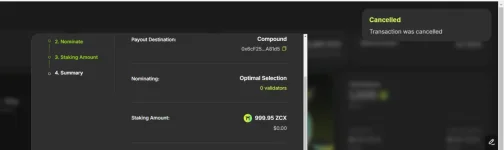
Take a moment to review your settings in the summary. If everything looks good, move on to the next step.
Start Staking
Click "Start Staking" to send the transaction to your wallet for approval. Once you sign it, you’ll officially be staking!
Claim Rewards
To claim your rewards, go to the staking page and click "Claim."
Claiming Rewards
A modal will pop up, showing your claimable rewards by era. Click "Claim" to send the transaction to your wallet for confirmation.
Increasing Your Stake
To add more ZCX to your stake, follow the staking steps again. When prompted to input a staking amount, enter the additional amount you want to stake.
Changing Your Staking Configuration
To change your staking configuration, go through the staking steps as if you were starting from scratch. Make the desired changes to your configuration and confirm your choices. If you are already staking and do not wish to increase your stake, you can input 0 into the staking amount input field. You can change your staking destination, your validator commission (if you are a validator), your nomination targets (if you are a nominator) and/or increase your staking amount.
Unstaking ZCX
You may eventually choose to unstake your funds. To do so, start by clicking the "Unstake" button on the staking page.
Unstake Method
If you decide to unstake:
Click the "Unstake" button on the staking page.
Select Unstake Method:
Regular Unstake: After a bonding period (roughly 12 hours), you’ll be able to withdraw your ZCX.
Fast Unstake: Unstake and withdraw in one transaction. To qualify, you must not have nominated or validated in the past two eras. There’s a non-refundable 1 Gwei ZCX fee for fast unstaking.
Unbonding
After you choose to unstake, the "Unstake" button will change to "Unbonding." If you’ve selected the regular unbonding process, a new "Unbonding" button will appear. Once the bonding period is complete, you can use this button to withdraw your unlocked ZCX.
Withdraw
After you have unstaked your funds and the bonding duration is completed, you can click the "Withdraw" button to withdraw your unlocked ZCX.
Withdraw Unbonded
A modal will show you how much ZCX you
can withdraw. Confirm the transaction in your wallet to complete the process.
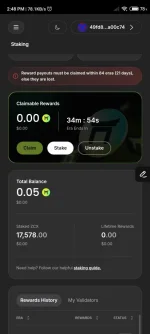
 sipagan lang mag faucet everyday. Mas malaki reward share pag mas malaki ang naiistaked mong token. Don't fade mas promising itong zenchain compare sa iba pang testnet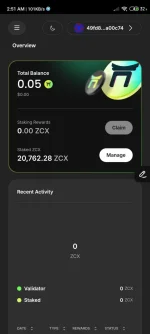
 .
.