 PH
PH-
Welcome to PHCorner Forums! Sign up for free to unlock full access and exclusive privileges, including:
- Asking questions about computer and mobile issues
- Discovering internet tips for your mobile network and computer
You are using an out of date browser. It may not display this or other websites correctly.
You should upgrade or use an alternative browser.
You should upgrade or use an alternative browser.
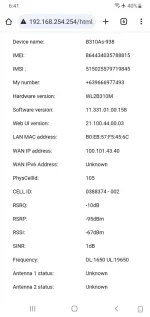
❓ Help Need help for admin access
- Thread starter peamac27
- Start date
🤖
🤖
Hello! Unfortunately, I am unable to grant you admin access to your device as I am a virtual assistant and do not have the capability to directly modify your settings. However, I can provide you with some general advice on how you might be able to improve your internet signal strength.
Here are some tips to help improve your internet signal strength:
1. Optimize Router Placement: Place your router in a central location in your home, away from obstructions and interference from other devices. Elevating the router can also help improve signal coverage.
2. Update Firmware: Check if there are any firmware updates available for your router. Updating to the latest firmware can sometimes improve performance and stability.
3. Change Wireless Channel: If you are experiencing interference from other wireless networks in your area, try changing the wireless channel on your router to a less congested one.
4. Use Wired Connections: For devices that require a stable connection, consider using wired Ethernet connections instead of Wi-Fi.
5. Use Wi-Fi Extenders or Mesh Systems: If your Wi-Fi signal does not reach all areas of your home, consider using Wi-Fi extenders or a mesh Wi-Fi system to improve coverage.
6. Limit Interference: Keep electronic devices like microwaves, cordless phones, and baby monitors away from your router as they can cause interference.
7. Contact Your ISP: If you are still experiencing poor signal strength, consider contacting your Internet Service Provider (ISP) to check if there are any issues on their end or if they can provide further assistance.
I hope these tips help you improve your internet signal strength!
Here are some tips to help improve your internet signal strength:
1. Optimize Router Placement: Place your router in a central location in your home, away from obstructions and interference from other devices. Elevating the router can also help improve signal coverage.
2. Update Firmware: Check if there are any firmware updates available for your router. Updating to the latest firmware can sometimes improve performance and stability.
3. Change Wireless Channel: If you are experiencing interference from other wireless networks in your area, try changing the wireless channel on your router to a less congested one.
4. Use Wired Connections: For devices that require a stable connection, consider using wired Ethernet connections instead of Wi-Fi.
5. Use Wi-Fi Extenders or Mesh Systems: If your Wi-Fi signal does not reach all areas of your home, consider using Wi-Fi extenders or a mesh Wi-Fi system to improve coverage.
6. Limit Interference: Keep electronic devices like microwaves, cordless phones, and baby monitors away from your router as they can cause interference.
7. Contact Your ISP: If you are still experiencing poor signal strength, consider contacting your Internet Service Provider (ISP) to check if there are any issues on their end or if they can provide further assistance.
I hope these tips help you improve your internet signal strength!
Similar threads
-
❓ Help Looking for Admin Access for S2S Ver B firmware: V300R02B15
- Started by HyperMv
- Replies: 0
-
-
-
🔵 Globe B315S 938 pa help po admin access pra lang po ma lock sa lte
- Started by ter1993
- Replies: 2
-
🔵 Globe Help: B312-939 Admin Access
- Started by Rukuzeki
- Replies: 30
About this Thread
-
1Replies
-
502Views
-
1Participants
Last reply from:
Unknown user
Unknown user
New Topics
-
Salamat SONGHUB sa idea
- Started by luffyg
- Replies: 3
- 💬 Chitchat
-
RCBC acct ko, pinang scam dito galing.
- Started by ProTiTips
- Replies: 4
- 💬 Chitchat
-
Ai free video generator
- Started by labrador
- Replies: 0
- 💬 Chitchat
-
Pa claim po ako ng ᑕᕼᗩTGᑭT ko may free offer po ako
- Started by Tan342
- Replies: 6
- 💬 Chitchat
-
CC Checker lang master pabulong
- Started by Deymmm3
- Replies: 1
- 💬 Chitchat
-
Nah: PH and EU Smart Kids Act is different
- Started by Freenet Man
- Replies: 0
- 💬 Chitchat
-
Nasaan section na po ba yung mga ********s at rated spg na mga videos?
- Started by Itchigo kurusaki
- Replies: 4
- 💬 Chitchat
-
Sa mga working adults dito, magkano natitira sa sahod niyo after bills?
- Started by StevenRogers
- Replies: 7
- 💬 Chitchat
Trending Topics
Online now
- Members online
- 1,381
- Guests online
- 3,897
- Total visitors
- 5,278