 PH
PH
Language: Multilingual | File size: 330 MB
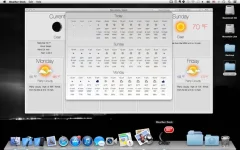
Weather Dock puts the weather right on your desktop. With a glance at the dock icon, you can see the current weather conditions, today's or tomorrow's forecast. With a single click you can access detailed current conditions and 7-day weather forecast.
Detailed weather forecast
• Access the detailed current conditions and 7-day weather forecast window with a single click
• Detailed 3-day two hourly forecast
• Multiple forecast location support
• Forecast window has animated icons
• Imperial or Metric units
• Weather updates every 60 minutes.
• Updates Weather automatically if update was missed due to sleep or lack of internet connection
Animated Customizable Dock Icon
• Icon badge shows: Current temp, wind or feels like temp or today's/tomorrow's min/max temp
• Displayed weather can be: Current Conditions, Today's or Tomorrow's forecast
• Weather Conditions text color: Black, White or White with Gray background
• Adjustable animation speed (can be turned off)
In-App Purchases: Full Version - included
Supported Operation Systems
macOS 10.13 or later
Screen :
What's New
Spoiler contents are visible only to Established Members.
HOMEPAGE
Code:
https://apps.apple.com/de/app/wetter-dock-wettervorhersage/id886290397?mt=12&uo=4
You do not have permission to view the full content of this post. Log in or register now.
You do not have permission to view the full content of this post. Log in or register now.
You do not have permission to view the full content of this post. Log in or register now.