 PH
PH-
Welcome to PHCorner Forums! Sign up for free to unlock full access and exclusive privileges, including:
- Asking questions about computer and mobile issues
- Discovering internet tips for your mobile network and computer
You are using an out of date browser. It may not display this or other websites correctly.
You should upgrade or use an alternative browser.
You should upgrade or use an alternative browser.
🔒 Closed .
- Thread starter Arjienx
- Start date
- Status
- Not open for further replies.
ianbwakanangsheet
Enthusiast
Thank you boss. Saan pala makikita HWID?
makikita yan pag bukas ng menu, first time.Thank you boss. Saan pala makikita HWID?
meron generated hwid.
ianbwakanangsheet
Enthusiast
Done na bossmakikita yan pag bukas ng menu, first time.
meron generated hwid.
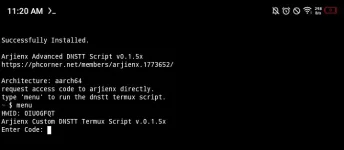
acces code : 530304
ianbwakanangsheet
Enthusiast

thanks, may nakapag install na rin.
set sleep time to 0. para all goods na. add dns, nameservers.
welcome, may complete guide naman mga users dito.Thank you master d nga lang Ako marunong ginamit ng termux
para jan. pwede din naman hindi na.
Master still kicking pa naman mga config mo kahit walang termux gusto ko lang po sana natutunan gamitinwelcome, may complete guide naman mga users dito.
para jan. pwede din naman hindi na.
madali lang to gamitin, add dns, nameservers.Master still kicking pa naman mga config mo kahit walang termux gusto ko lang po sana natutunan gamitin
mostly yan lang steps. then enter to start.
para sa full guide.
'Installation Completed' will appear in the logs, If it's installed correctly.
for any unexpected errors, please capture and send full screenshots of the logs.
Usage:
type 'menu' and press enter to access the script interface.
to add a DNS or Nameserver, input the corresponding number from the menu and press enter.
to return to the 'main menu' simply press Enter.
in the main menu, pressing enter will immediately start query testing.
to stop DNS testing, press ctrl + c.
HTTP Custom:
tap the three dots in the top left corner of HTTP Custom, then go to 'Proxified Apps'.
enable both 'Proxified Apps' and 'Bypass Mode'.
ensure the 'Termux' app is selected to exclude it from the vpn tunnel.
run the 'Termux' app in the background to enhance stability.
enable/disable airplane mode, then test internet connection.
madali lang to gamitin, add dns, nameservers.
mostly yan lang steps. then enter to start.
para sa full guide.
'Installation Completed' will appear in the logs, If it's installed correctly.
for any unexpected errors, please capture and send full screenshots of the logs.
Usage:
type 'menu' and press enter to access the script interface.
to add a DNS or Nameserver, input the corresponding number from the menu and press enter.
to return to the 'main menu' simply press Enter.
in the main menu, pressing enter will immediately start query testing.
to stop DNS testing, press ctrl + c.
HTTP Custom:
tap the three dots in the top left corner of HTTP Custom, then go to 'Proxified Apps'.
enable both 'Proxified Apps' and 'Bypass Mode'.
ensure the 'Termux' app is selected to exclude it from the vpn tunnel.
run the 'Termux' app in the background to enhance stability.
enable/disable airplane mode, then test internet connection.
madali lang to gamitin, add dns, nameservers.
mostly yan lang steps. then enter to start.
para sa full guide.
'Installation Completed' will appear in the logs, If it's installed correctly.
for any unexpected errors, please capture and send full screenshots of the logs.
Usage:
type 'menu' and press enter to access the script interface.
to add a DNS or Nameserver, input the corresponding number from the menu and press enter.
to return to the 'main menu' simply press Enter.
in the main menu, pressing enter will immediately start query testing.
to stop DNS testing, press ctrl + c.
HTTP Custom:
tap the three dots in the top left corner of HTTP Custom, then go to 'Proxified Apps'.
enable both 'Proxified Apps' and 'Bypass Mode'.
ensure the 'Termux' app is selected to exclude it from the vpn tunnel.
run the 'Termux' app in the background to enhance stability.
enable/disable airplane mode, then test internet connection. Thank you master try ko po pag aralan saan po pwede makuha mga server iinput
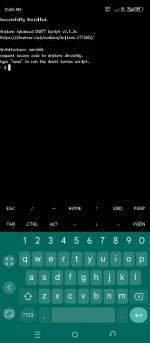
wala po tayo sts config, preferred vpn apps gamitin para jan.May pang STS ka po boss Arjienx ?
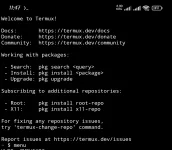
type 'menu' para mabuksan na.
para saan yung HWID paps ?
pass po ako sa inyo, better build more trust and background.paps penge codeView attachment 3320013
yung hwid para sa access code yan.
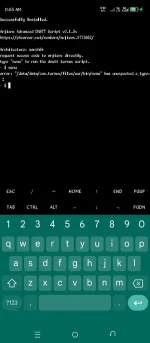
may error po sa termux nyo. better reinstall try again.Eto po nakalagay?
View attachment 3320023
baka maayos pa. make sure pala naka allow yung storage permission ng device.
- Status
- Not open for further replies.
Similar threads
-
-
-
🎲 Just for Fun Birthday ko. baka naman kait ᑕᕼᗩTGᑭT pro or cursor 12 months
- Started by jbl_libra
- Replies: 1
-
-
❓ Help Any owner ng Vendo Machine, like carwash and wifi?
- Started by darknight0909
- Replies: 2
About this Thread
-
407Replies
-
14KViews
-
88Participants
Last reply from:
secretkiller
secretkiller
New Topics
-
Hosting po na pinakastable
- Started by weew2211A
- Replies: 0
- 💬 Chitchat
-
DTR-BIOMETRIC 1 Device ONLY
- Started by burigo_08
- Replies: 0
- 💬 Chitchat
-
Sino meron tutorial root redmi note 9 pro
- Started by nobitapugi
- Replies: 0
- 💬 Chitchat
-
Pa advice po ano maganda mini fan , pang gift lang po
- Started by Ze_Ro
- Replies: 0
- 💬 Chitchat
-
Mga pasensya na hihingi sana ako tulong
- Started by xrawr16
- Replies: 0
- 💬 Chitchat
-
Out of Project idea
- Started by Artimatrix
- Replies: 0
- 💬 Chitchat
-
Hi pwede mag ask?
- Started by Pghusmith
- Replies: 1
- 💬 Chitchat
-
Pas a bit po Netflix
- Started by samone
- Replies: 0
- 💬 Chitchat
-
RIP sa mga Distrokid paldoggers out there
- Started by ChatGPT
- Replies: 2
- 💬 Chitchat
-
LF CGPT Account Premium willing to pay
- Started by VvCvLvvEy
- Replies: 0
- 💬 Chitchat
Trending Topics
Online now
- Members online
- 1,190
- Guests online
- 9,609
- Total visitors
- 10,799