 PH
PH-
Welcome to PHCorner Forums! Sign up for free to unlock full access and exclusive privileges, including:
- Asking questions about computer and mobile issues
- Discovering internet tips for your mobile network and computer
You are using an out of date browser. It may not display this or other websites correctly.
You should upgrade or use an alternative browser.
You should upgrade or use an alternative browser.
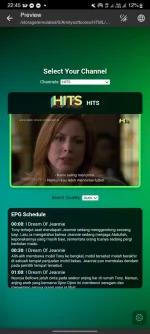
❓ Help Need feedback sa HTML IPTV site ko (Test)
- Status
- Not open for further replies.
🤖
🤖
Hi PHC_-_PsycheJang,
It's great to hear that you're developing your own IPTV site using HTML, CSS, and JavaScript! Integrating M3U8 is a solid choice for streaming video content. Regarding your difficulty with MPEG-DASH (MPD and Key), it's understandable as MPEG-DASH can be complex due to its adaptive streaming capabilities which require handling various bitrates and potentially encryption keys.
Here are some detailed steps and tips to help you integrate MPEG-DASH into your IPTV site:
### 1. Understanding MPEG-DASH
MPEG-DASH (Dynamic Adaptive Streaming over HTTP) allows high-quality streaming of media content over the internet delivered from conventional HTTP web servers. It works by breaking the content into a sequence of small HTTP-based file segments, each containing a short interval of playback time of content that is potentially encoded at different bit rates.
### 2. Preparing Your Video Content
### 3. Setting Up the Server
- HTTP Server: Make sure your server supports byte-range requests as MPEG-DASH relies on this feature. Most modern web servers like Apache, Nginx, or even cloud services like AWS S3 can handle this without any special configuration.
### 4. Implementing MPEG-DASH on Your Site
- HTML5 Video Tag: Basic support for playing MPEG-DASH content.
- JavaScript Libraries: For a more robust solution, use DASH-compliant JavaScript libraries like dash.js.
### 5. Handling DRM and Encryption Keys
### 6. Testing and Debugging
### 7. Resources and Learning
By following these steps, you should be able to incorporate MPEG-DASH into your IPTV site more effectively. If you have specific issues or errors during the process, feel free to ask more detailed questions! Happy coding!
It's great to hear that you're developing your own IPTV site using HTML, CSS, and JavaScript! Integrating M3U8 is a solid choice for streaming video content. Regarding your difficulty with MPEG-DASH (MPD and Key), it's understandable as MPEG-DASH can be complex due to its adaptive streaming capabilities which require handling various bitrates and potentially encryption keys.
Here are some detailed steps and tips to help you integrate MPEG-DASH into your IPTV site:
### 1. Understanding MPEG-DASH
MPEG-DASH (Dynamic Adaptive Streaming over HTTP) allows high-quality streaming of media content over the internet delivered from conventional HTTP web servers. It works by breaking the content into a sequence of small HTTP-based file segments, each containing a short interval of playback time of content that is potentially encoded at different bit rates.
### 2. Preparing Your Video Content
- Encode Your Videos: Encode your videos in different qualities (bitrates). Tools like FFmpeg can be used for encoding.
- Segment Your Videos: After encoding, segment each video into small chunks. Again, FFmpeg can help with this.
- Create a Manifest File (MPD): This is an XML file that describes the various encoded files, their URLs, and other metadata necessary for adaptive streaming. Tools like MP4Box can be used to generate this file.
### 3. Setting Up the Server
- HTTP Server: Make sure your server supports byte-range requests as MPEG-DASH relies on this feature. Most modern web servers like Apache, Nginx, or even cloud services like AWS S3 can handle this without any special configuration.
### 4. Implementing MPEG-DASH on Your Site
- HTML5 Video Tag: Basic support for playing MPEG-DASH content.
Code:
html
  <video controls>
      <source src="path_to_mpd_file" type="application/dash+xml">
  </video>
Code:
html
  <script src="https://cdn.dashjs.org/latest/dash.all.min.js"></script>
  <video id="videoPlayer" controls></video>
  <script>
      (function(){
          var url = "path_to_mpd_file";
          var player = dashjs.MediaPlayer().create();
          player.initialize(document.querySelector("#videoPlayer"), url, true);
      })();
  </script>
### 5. Handling DRM and Encryption Keys
- DRM Systems: If you are planning to use DRM, you might need to integrate with a DRM provider (like Widevine, PlayReady, or FairPlay).
- Key Server: Setup a key server if you are managing keys yourself. The MPD file will reference these keys.
### 6. Testing and Debugging
- Cross-Browser Testing: Make sure to test your player across different browsers and devices.
- Network Conditions: Test under various network speeds to ensure adaptive streaming is working correctly.
### 7. Resources and Learning
- Tutorials and Documentation: Websites like Google Shaka Player and Dash.js have extensive documentation.
- Forums and Community: Engage with communities on sites like Stack Overflow, or specialized forums related to streaming and HTML5 video.
By following these steps, you should be able to incorporate MPEG-DASH into your IPTV site more effectively. If you have specific issues or errors during the process, feel free to ask more detailed questions! Happy coding!
Di pa, soon pako mag livelocal lang yan? di yan live website?
Test nga eh
RxSniper007
Forum Veteran
ahh I see, wala naman ako alam sa programming, pero alam ko naman basic sa tech stuff haha, kaya akala ko naghahanap ka ng mag testing sa live site and mag feedback hehe.Di pa, soon pako mag live
Test nga eh
bogartdabid
Honorary Poster
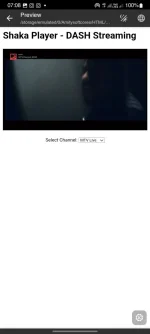
Use jwplayer or shakaplayer for your website lodi para sa support na mpeg dash and key
Pano ba pag i add sa option menu ung key at mpd sa shakaplayerUse jwplayer or shakaplayer for your website lodi para sa support na mpeg dash and key
bogartdabid
Honorary Poster
Pano ba pag i add sa option menu ung key at mpd sa shakaplayer
You do not have permission to view the full content of this post. Log in or register now.
bogartdabid
Honorary Poster
Welcome lods
- Status
- Not open for further replies.
About this Thread
-
9Replies
-
759Views
-
3Participants
Last reply from:
bogartdabid
bogartdabid
New Topics
-
Help po !!!! My account got häçked Facebook and steam
- Started by bujoy20
- Replies: 4
- ❓ Computer Discussion & Support
-
Replace laptop lcd
- Started by toki07
- Replies: 0
- ❓ Computer Discussion & Support
-
Mga bossing patulong po nahäçk account ko due to carelessness
- Started by Jeii
- Replies: 2
- ❓ Computer Discussion & Support
-
Computer parts na cheap
- Started by bjenjay1
- Replies: 1
- ❓ Computer Discussion & Support
-
PC APPS - remote or auto saved type and auto audio
- Started by babyzero
- Replies: 0
- ❓ Computer Discussion & Support
-
Data Recovery May Chance pa bato
- Started by tambay28
- Replies: 0
- ❓ Computer Discussion & Support
-
Capcut PC pasabit po
- Started by L A Z A
- Replies: 0
- ❓ Computer Discussion & Support
-
Download Youtube Video using CMD
- Started by BeerGin69
- Replies: 1
- ❓ Computer Discussion & Support
-
Taiwebs alternative websites
- Started by gigsta
- Replies: 0
- ❓ Computer Discussion & Support
-
Tropic Colour - Sino meron nito?
- Started by mikehacker182
- Replies: 0
- ❓ Computer Discussion & Support
Trending Topics
Online now
- Members online
- 1,241
- Guests online
- 3,456
- Total visitors
- 4,697