 PH
PHhakuzaki18
Fanatic
Sana my mk tulong po..
Para sa app na ma unlocked ang premiumPara san nyo po gagamitin yung Lucky pâtcher?
Opo rooted.. Kingroot gamit koRooted...

Ginamit ko sya sa nova launcher paro ayaw nya po..ohh, in-app purchases ba sir? Take note lang po, mga offline games at apps lang sya gagana.
Click mo lang yung app na gusto mo ipâtch. Select mo lang yung Custom pâtches para makita yung mga available na pâtches para sa app
Ok po.. Pwde po ba ma google nova launcher unlochednapk?Di na yata supported ng custom pâtch yung bagong version ng Nova Launcher sir. ako kasi, Nova Launcher din gamit ko, yung unlocked apk na dinownload ko kesa pahirapan ko pa sarili ko, diba? hahahahaha
yes ma'am. kahit siguro sa ApkMania meron nonOk po.. Pwde po ba ma google nova launcher unlochednapk?
nalimutan ko na kung saan ko nidownload yung akin eh.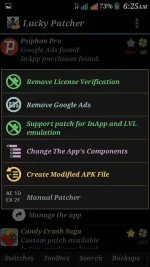
Ok po.. Pwde
Thankz poIn order for lucky pâtcher to work properly
consider this:
Rooted phone for root permission
Exposed installer .apk for additional features of lucky pâtcher
Just download and install then launched
How to pâtched application to avail pro version
Go to main page click the app you wan't to pâtch if itvis available yo pâtch such as in-app purchase, custom pâtch available,
Then click support pâtch for in app level emulation
View attachment 101239
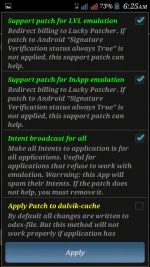
Followed by
View attachment 101240
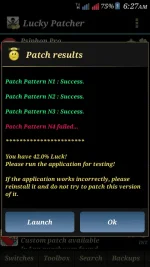
Success then launched
View attachment 101241
Hope this might help you
Depends on how you use it ρá†ch a game,application etc.para saan po yung lucky pâtcher mo ?