❓ Help D2K-FT10 NO INTERNET (HELP)

-Bypass-

Fanatic
Need help guys sana may maka tulong, yong D2K-FT10 ko kasi NO INTERNET na

bali okay naman sana nong una walang issue pero nong nag expire yong load don na nag simula na walang net bali nong nag expire yong load tinanggal ko ang Sim sa D2K at sinalpak sa CP ko para loadan ng UNLI DATA 90DAYS nong binalik kuna sa Modem(D2K) wala na syang net naka ilaw lahat ng signal bar

Nag try na ako mag BandLocking, Cell Locking, Reboot, Restart modem back to default pero wala parin

Take note na naka super admin din ako ano kaya possible issue nito? halos kinalikot kuna lahat wala paring net

Pero nong sinalpak ko sa CP ang Simcard okay naman

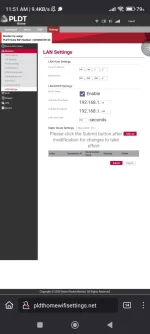
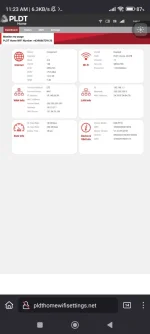
Please see attached Picture for reference:


IMG_20241207_114538.webp

Screenshot_2024-12-07-11-51-15-549_org.mozilla.firefox.webp
 
Hello! It sounds like you've already done quite a few troubleshooting steps on your D2K-FT10 device after experiencing a "NO INTERNET" issue post-expiry of your load. I'll try to help you sort this out with a few more suggestions:

1. Check APN Settings: Since the SIM card works fine in your cellphone with an internet connection, there might be an issue with the APN (Access Point Name) settings in your modem. Sometimes, when you switch SIM cards between devices, the APN settings might not automatically update or might revert to defaults that do not match your carrier’s requirements.

- Access your modem's interface.
- Navigate to the network settings or similar section.
- Check the APN settings and make sure they match exactly with what your mobile carrier uses.
- If you're unsure of the APN, you can usually find this information on your carrier’s website, or you can call their customer service.

2. SIM Card Reorientation: Although it seems simple, sometimes reinserting the SIM card can resolve the issue. Make sure the SIM card is properly aligned and securely placed in the modem.

3. Firmware Update: Check if there is a firmware update available for your modem. Sometimes, bugs or issues are fixed in newer firmware versions.

- Go to the system settings in your modem’s interface.
- Look for a section labeled ‘Firmware Update’ or similar.
- Follow the instructions to check for and install firmware updates.

4. Network Operator Settings: Since you have super admin access, check if there is any network operator-specific setting that needs to be configured or was changed.

- Look for options under a menu like ‘Network settings’ or ‘Operator settings’.
- Ensure that the settings there are configured to automatically select the network or manually select the network that corresponds to your SIM card.

5. Check for Service Outages: Make sure there is no temporary service outage in your area that might be affecting the connectivity.

6. Try a Different SIM Card: If possible, try a different SIM card in your modem that you know works with another device. This can help determine if the issue is with the SIM card or the modem itself.

7. Contact Support: If none of the above steps work, there might be a more complex issue at play. Contacting customer support for your modem or your network provider might be the best next step. They can provide more specific guidance based on their systems and your account details.

I hope one of these steps helps resolve your issue! Let me know how it goes or if there’s anything else you might need help with.
 

Similar threads

About this Thread

  • 4
    Replies
  • 1K
    Views
  • 3
    Participants
Last reply from:
PHC - yowzed

Trending Topics

Online now

Members online
483
Guests online
5,379
Total visitors
5,862

Forum statistics

Threads
2,271,128
Posts
28,939,720
Members
1,240,205
Latest member
strjelac86
Back
Top