PH
PH
Description
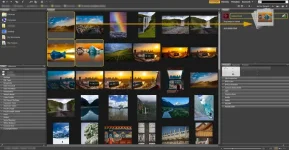
It is always a blessing for photographers and designers to have a regular archive and archive of images and other graphic documents and to help them get accurate and accurate access to the document at hand. Adobe Bridge is one of the Digital Asset Management programs, and the “bridge” between Adobe software for displaying and organizing their outputs, ranging from common photo and video formats to proprietary outputs of Adobe products such as the Photoshop PSD format includes.
Features and Features of Adobe Bridge Software :
– View a variety of multimedia formats in a simple and engaging environment
– Manage, classify and sort all kinds of documents
– Ability to rename bulk documents
– Ability to create panoramic or fullscreen images
– Ability to rate and sort by color spectrum of photos
– Add watermark to images
– Perform initial edits on images such as rotate, resize, etc.
– Advanced search by types of file properties; for example, search by digital camera images by camera type, lens type, aperture type, etc.
– Full integration with Photoshop and Camera Raw
System Requirements
Windows
Operating system:
2022
Microsoft Windows 10 (64-bit) version 1909 or later; LTSC versions are not supported
2021
Microsoft Windows 10 (64-bit) version 1903 or later
2020
Microsoft® Windows® 7 with Service Pack 1 or Windows 10 above v1709
2019
Microsoft® Windows® 7 with Service Pack 1 or Windows 10 above v1607
2018 | 2017 | 2015
Windows 7 with Service Pack 1 (64 bit)
Windows 8-8.1 (64 bit)
Windows 10 (64 bit) (2018: above 1507)
Processor:
2022 | 2021:
Intel® 5thGen or newer CPU – or AMD equivalent Required;
Intel® 7thGen or newer CPU – or AMD equivalent Recommended
2020 & Earlier:
Intel® Core™2 Duo or AMD Athlon® 64 processor; 2 GHz or faster processor Required;
RAM:
2022 | 2021:
4 GB of RAM Required; 16 GB of RAM for HD media and Substance 3D workflows & 32 GB for 4K media or higher Recommended
2020 & Earlier:
Minimum 2 GB of RAM (8 GB recommended)
GPU:
2022 | 2021:
2 GB of GPU VRAM + DirectX 9.0-capable system (DirectX 11.0 for Substance 3D workflows) Required. 4 GB of GPU VRAM Recommended.
2020:
Minimum 512 MB of VRAM (1 GB recommended) + DirectX 9.0-capable system
2019 & Earlier:
Minimum 512 MB of VRAM (1 GB recommended) + OpenGL 2.0–capable system
Storage:
2 GB of available hard-disk space for 64-bit installation; plus additional free space required during installation (cannot install on removable flash storage devices) Required;
Fast internal SSD for app installation and cache Recommended
Display:
1280 x 800 Required (2020 & Earlier: 1024×768);
1920 x 1080 or greater Recommended
Installation guide
Read the Readme.txt file in the Crack folder.
Download Links
You do not have permission to view the full content of this post.
Log in or register now.