Anong codm gamit mo po ung garena or activision?
For the interest of helping the TS of this post. You may use this step nalang po:
GLOBAL AND GARENA
1. Get the Zarchiver and Shizuku app from the Playstore app.
1.a. If you have Android 10 and above, please use Shizuku for non-rooted phones.
1.b Go to the Shizuku app and follow ADB START instructions by connecting to a computer.
2. Extract the ZIP file and go directly to the extracted zip file location.
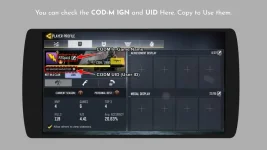
3. Go to the extracted file folder location and rename the JSON files inside the HUD and JOYSTICK to your CODM UID.
3.a. You may get your CODM UID NUMBER via your CODM profile
View attachment 3331325
4. Login to your Garena/Activision CODM game.
5. Go to practice shooting room and wait till the countdown timer of the game is loaded.
6. Switch to Zarchiver app and navigate to your extracted ZIP file location and copy the files.
7. Go to ANDROID/DATA/ and find the folder for Activision OR Garena.
8. Paste the file folder CONFIG and disable_smart.dat to the Activision/Garena CONFIG folder
9. Go back to the game and play.
10. Repeat the steps if ever you relogin or quit the app so that it will reactivate the config files. The app has a tendency to redownload the original files, therefore losing the configs.
 PH
PH