 PH
PH-
Welcome to PHCorner Forums! Sign up for free to unlock full access and exclusive privileges, including:
- Asking questions about computer and mobile issues
- Discovering internet tips for your mobile network and computer
You are using an out of date browser. It may not display this or other websites correctly.
You should upgrade or use an alternative browser.
You should upgrade or use an alternative browser.
❓ Help Windows 11 OS
- Thread starter zabby07
- Start date
-
- Tags
- os windows windows 11
- Status
- Not open for further replies.
🤖
🤖
Kung pinag-iisipan mo kung ang Windows 11 OS ay maayos na gagana sa isang laptop na may 4GB ng RAM, mahalagang isaalang-alang ang ilang mga puntos. Ang Windows 11 ay may mas mataas na minimum na kinakailangan sa system kumpara sa Windows 10, at ito ay dinisenyo para sa mas modernong hardware.
### Minimum na Rekisitos para sa Windows 11:
### Pag-usapan natin ang ilang mahahalagang aspeto:
#### 1. Performance:
- Sa 4GB ng RAM, maaaring makaranas ka ng mga limitasyon lalo na kapag maraming aplikasyon ang bukas o kung gumagamit ka ng mga resource-heavy applications tulad ng mga video editing software o mga modernong laro. Ang Windows 11 mismo ay gumagamit ng part ng RAM para sa mga basic operations nito, kaya ang natitirang available na RAM para sa ibang mga aplikasyon ay maaaring hindi sapat para sa smooth na multitasking.
#### 2. Multitasking:
- Limitado ang multitasking capabilities sa 4GB ng RAM. Madalas, kapag maraming tabs ang bukas sa browser o maraming applications ang sabay-sabay na ginagamit, maaaring magkaroon ng noticeable lag o mabagal na response time.
#### 3. Future Proofing:
- Habang tumatagal, ang pangangailangan para sa mas mataas na RAM ay tumataas dahil sa mas complex na software updates at applications. Ang 4GB RAM ay maaaring hindi sapat sa long-term, lalo na para sa mga updates sa hinaharap.
#### 4. Alternatibo:
- Kung mag-uupgrade ka sa Windows 11 sa isang laptop na may 4GB ng RAM, maaaring isaalang-alang mo rin ang pag-upgrade ng RAM kung posible ito sa iyong device. Ang pagkakaroon ng dagdag na RAM ay makakatulong sa overall performance at mabawasan ang risk ng pagbagal ng system.
### Konklusyon:
Bagama't technically posible na patakbuhin ang Windows 11 sa isang laptop na may 4GB ng RAM, hindi ito optimal para sa pinakamahusay na user experience, lalo na sa mga demanding na tasks. Kung nagpaplano kang mag-upgrade o bumili ng bagong laptop, mas mainam na pumili ng device na may mas mataas na specifications para sa mas maayos na performance at mas mahabang lifespan ng device.
### Minimum na Rekisitos para sa Windows 11:
- Processor: 1 GHz o mas mabilis na processor na may 2 o higit pang cores sa isang compatible 64-bit processor o System on a Chip (SoC)
- RAM: 4GB
- Storage: 64GB o mas malaki
- System Firmware: UEFI, Secure Boot capable
- TPM: Version 2.0
- Graphics Card: Compatible with DirectX 12 or later with WDDM 2.0 driver
- Display: High definition (720p) display na may sukat na greater than 9” diagonally, 8 bits per color channel
### Pag-usapan natin ang ilang mahahalagang aspeto:
#### 1. Performance:
- Sa 4GB ng RAM, maaaring makaranas ka ng mga limitasyon lalo na kapag maraming aplikasyon ang bukas o kung gumagamit ka ng mga resource-heavy applications tulad ng mga video editing software o mga modernong laro. Ang Windows 11 mismo ay gumagamit ng part ng RAM para sa mga basic operations nito, kaya ang natitirang available na RAM para sa ibang mga aplikasyon ay maaaring hindi sapat para sa smooth na multitasking.
#### 2. Multitasking:
- Limitado ang multitasking capabilities sa 4GB ng RAM. Madalas, kapag maraming tabs ang bukas sa browser o maraming applications ang sabay-sabay na ginagamit, maaaring magkaroon ng noticeable lag o mabagal na response time.
#### 3. Future Proofing:
- Habang tumatagal, ang pangangailangan para sa mas mataas na RAM ay tumataas dahil sa mas complex na software updates at applications. Ang 4GB RAM ay maaaring hindi sapat sa long-term, lalo na para sa mga updates sa hinaharap.
#### 4. Alternatibo:
- Kung mag-uupgrade ka sa Windows 11 sa isang laptop na may 4GB ng RAM, maaaring isaalang-alang mo rin ang pag-upgrade ng RAM kung posible ito sa iyong device. Ang pagkakaroon ng dagdag na RAM ay makakatulong sa overall performance at mabawasan ang risk ng pagbagal ng system.
### Konklusyon:
Bagama't technically posible na patakbuhin ang Windows 11 sa isang laptop na may 4GB ng RAM, hindi ito optimal para sa pinakamahusay na user experience, lalo na sa mga demanding na tasks. Kung nagpaplano kang mag-upgrade o bumili ng bagong laptop, mas mainam na pumili ng device na may mas mataas na specifications para sa mas maayos na performance at mas mahabang lifespan ng device.
mrdonutbai
Honorary Poster
Di na advisable 4GB RAM sa panahon ngayon pero tatakbo pa dapat yan... Just take note na mas mabigat kumain ng resource si Windows 11 kesa sa Windows 10...
san po galing yang source mo na yan? im using 4y/o SSD DRAMless and 24H2 for a month now.di rin advisable 11 24h2 sa dramless sasakit lang ulo nyu pag tinuloy nyu lang update kaya mas ok stay pa rin sa 23h2
sa nasira kong dramless nvme colorful wla pa 1 yr clean upgrade 24h2san po galing yang source mo na yan? im using 4y/o SSD DRAMless and 24H2 for a month now.
that might have something to do with your SSD itself. clean upgrade means you got that software somewhere else outside Asian Microsoft update. specially kung galing US yung version na ginamit mo since sobrang dami ng bugs sa 24H2. Oct.1,2024 nag release ang 24H2 pero ang asian Update last month pa nag release ng stable version. so if you did a clean install before that official asian release malamang unstable tlaga yun. it can cause indirect damage by wearing your SSD lifespan due to unstable performance. pero its almost 0% that a corrupted/unstable OS can brick your SSD.sa nasira kong dramless nvme colorful wla pa 1 yr clean upgrade 24h2
never had problem with mine. from 23h2 straight update to 24h2.
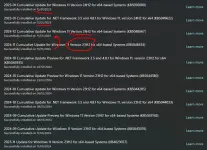
DRAM or DRAMless SSD has nothing to do with the issue.. the only reason DRAM is preferred over DRAMless in OS is because DRAMless burns its lifespan faster than DRAM ones because of lack cache.
kung creator ka and mostly nasa PC ang hanap buhay mo (important files, etc.) then better get SSD with DRAM since need mo longevity and safe PC. but for average users. it doesnt matter. since you can format it anytime without worrying about important files whatsoever. again OS issues or whatever corrupted your PC cannot damage the SSD directly.
Gantong brand pinaka una kong sata ssd, wala pang 1 yr din sira na. Kaya iwas na ko dyan hahasa nasira kong dramless nvme colorful wla pa 1 yr clean upgrade 24h2
same din boss sa kingston nv1 kaya tinigilan ko muna ska ko nag stay sa 23h2 then stop receiving 24h2 sa win up. using incontroll ayun wala nmn na problema 24h2 lang tlagaGantong brand pinaka una kong sata ssd, wala pang 1 yr din sira na. Kaya iwas na ko dyan haha
umaabot ng 200+ mb boss hmb cache ng win 24h2 kaya nag cacause ng countless blue screen ewan ko lang bat dramless nvme lang naapektuhan kahit anung clean or update since mapipili m naman update loc sa settings region ganun pa rin or baka naka prebuild pc or laptop kthat might have something to do with your SSD itself. clean upgrade means you got that software somewhere else outside Asian Microsoft update. specially kung galing US yung version na ginamit mo since sobrang dami ng bugs sa 24H2. Oct.1,2024 nag release ang 24H2 pero ang asian Update last month pa nag release ng stable version. so if you did a clean install before that official asian release malamang unstable tlaga yun. it can cause indirect damage by wearing your SSD lifespan due to unstable performance. pero its almost 0% that a corrupted/unstable OS can brick your SSD.
never had problem with mine. from 23h2 straight update to 24h2.
View attachment 3425542
DRAM or DRAMless SSD has nothing to do with the issue.. the only reason DRAM is preferred over DRAMless in OS is because DRAMless burns its lifespan faster than DRAM ones because of lack cache.
kung creator ka and mostly nasa PC ang hanap buhay mo (important files, etc.) then better get SSD with DRAM since need mo longevity and safe PC. but for average users. it doesnt matter. since you can format it anytime without worrying about important files whatsoever. again OS issues or whatever corrupted your PC cannot damage the SSD directly.
clean upgrade means direct from ms win. media crestion using usb stick not on windows update but nov. last year ko pa ginawa yun i think kalagitnaan ng nov then nasira dahil ilang beses ko na paulit ulit na clean and update then pagkatapos ng pasko nag upgrade nako ng gpu ska bumili ulit kingston nv1 sa ngayun wla pa prob. kaso nag stay muna ko sa 23h2 then stop receiv. for 1 year 24h2 using incontroll wla pa naman bluescreen kahit isa next time nalang muna siguro mag up. pag may win. 12 na or ayaw din siguro ng multiple drives ng win 24h2 idk basta for my system madaming bugs 24h2 current sys. ko now ryzen 5 5500 + rtx 3070ti + a320m + 2 1tb hdd + 1 dramless nvme dati naka rx 580 lang wla pa pang up mobo inuna muna gpu hahathat might have something to do with your SSD itself. clean upgrade means you got that software somewhere else outside Asian Microsoft update. specially kung galing US yung version na ginamit mo since sobrang dami ng bugs sa 24H2. Oct.1,2024 nag release ang 24H2 pero ang asian Update last month pa nag release ng stable version. so if you did a clean install before that official asian release malamang unstable tlaga yun. it can cause indirect damage by wearing your SSD lifespan due to unstable performance. pero its almost 0% that a corrupted/unstable OS can brick your SSD.
never had problem with mine. from 23h2 straight update to 24h2.
View attachment 3425542
DRAM or DRAMless SSD has nothing to do with the issue.. the only reason DRAM is preferred over DRAMless in OS is because DRAMless burns its lifespan faster than DRAM ones because of lack cache.
kung creator ka and mostly nasa PC ang hanap buhay mo (important files, etc.) then better get SSD with DRAM since need mo longevity and safe PC. but for average users. it doesnt matter. since you can format it anytime without worrying about important files whatsoever. again OS issues or whatever corrupted your PC cannot damage the SSD directly.
buggy OS na download mo. since november mo na download. that was the US version of 24h2. Dec.12 pa nag release ng 24H2 ang asia. sobrang dami ng issue sa US version since October release. understandable kung ayaw mo mag up sa 24h2 base sa experience mo. pero sakin since nag update ako tru windows update last month. never naman ako ngka problema. 3x na din panay update ang system latest update kahapon.same din boss sa kingston nv1 kaya tinigilan ko muna ska ko nag stay sa 23h2 then stop receiving 24h2 sa win up. using incontroll ayun wala nmn na problema 24h2 lang tlaga
umaabot ng 200+ mb boss hmb cache ng win 24h2 kaya nag cacause ng countless blue screen ewan ko lang bat dramless nvme lang naapektuhan kahit anung clean or update since mapipili m naman update loc sa settings region ganun pa rin or baka naka prebuild pc or laptop k
clean upgrade means direct from ms win. media crestion using usb stick not on windows update but nov. last year ko pa ginawa yun i think kalagitnaan ng nov then nasira dahil ilang beses ko na paulit ulit na clean and update then pagkatapos ng pasko nag upgrade nako ng gpu ska bumili ulit kingston nv1 sa ngayun wla pa prob. kaso nag stay muna ko sa 23h2 then stop receiv. for 1 year 24h2 using incontroll wla pa naman bluescreen kahit isa next time nalang muna siguro mag up. pag may win. 12 na or ayaw din siguro ng multiple drives ng win 24h2 idk basta for my system madaming bugs 24h2 current sys. ko now ryzen 5 5500 + rtx 3070ti + a320m + 2 1tb hdd + 1 dramless nvme dati naka rx 580 lang wla pa pang up mobo inuna muna gpu haha
also using Kingston NV1. and have multiple drives.
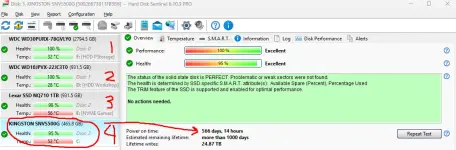
nice too hear kung ganun lods pero btw san nakaka dl ng asia v. ng 24h2 kung pang us. ver. nasa ms.buggy OS na download mo. since november mo na download. that was the US version of 24h2. Dec.12 pa nag release ng 24H2 ang asia. sobrang dami ng issue sa US version since October release. understandable kung ayaw mo mag up sa 24h2 base sa experience mo. pero sakin since nag update ako tru windows update last month. never naman ako ngka problema. 3x na din panay update ang system latest update kahapon.
also using Kingston NV1. and have multiple drives.
View attachment 3426977
by default pag punta mo sa site ng microsoft. usually ang link is microsoft.com/en-us/nice too hear kung ganun lods pero btw san nakaka dl ng asia v. ng 24h2 kung pang us. ver. nasa ms.
pra mkuha mp asian/ph version microsoft.com/en-ph/
thanks for the tips now i knowby default pag punta mo sa site ng microsoft. usually ang link is microsoft.com/en-us/
pra mkuha mp asian/ph version microsoft.com/en-ph/

- Status
- Not open for further replies.
Similar threads
-
-
🔗 Direct Link Windows 11 AIO 16in1 26H2 Build 26300.9550 (Insider Preview) TPM Bypassed & Pre-Activated October 2026
- Started by Carlos2026
- Replies: 2
-
🔗 Direct Link Windows 11 All Editions (24H2/25H2/26H2) AIO 48in1 TPM Bypassed & Pre-Activated September 2026
- Started by Carlos2026
- Replies: 3
-
🔗 Direct Link Windows 11 AIO Pre-activated - September 18, 2026
- Started by Your Fellow PHC
- Replies: 19
-
❓ Help Sobrang tagal na Update sa Win 11
- Started by nholdz90
- Replies: 2
About this Thread
-
13Replies
-
928Views
-
5Participants
Last reply from:
jerald912
jerald912
New Topics
-
INTERNATIONAL WEBINAR AND 2 LOCAL SEMINAR
- Started by PHC-JIA
- Replies: 0
- ❓ Computer Discussion & Support
-
Pa req po AtmosFX for Halloween
- Started by YowGaming
- Replies: 0
- ❓ Computer Discussion & Support
-
Door Lock Keycard SDK
- Started by Porky Chao Fan
- Replies: 0
- ❓ Computer Discussion & Support
-
Counter strike sa mac
- Started by AYuna23
- Replies: 0
- ❓ Computer Discussion & Support
-
Booting Issue - FA506NFR
- Started by Impossible
- Replies: 0
- ❓ Computer Discussion & Support
-
Acrobat Pro DC ρá†ch. Need Help
- Started by skullkrasher99
- Replies: 3
- ❓ Computer Discussion & Support
-
Enlighten me please with these two
- Started by Jeii
- Replies: 4
- ❓ Computer Discussion & Support
-
Win 10 Home keys
- Started by Ali246
- Replies: 6
- ❓ Computer Discussion & Support
Trending Topics
Online now
- Members online
- 999
- Guests online
- 8,106
- Total visitors
- 9,105