Hello JemPH community!
I'm thrilled to see the release of the JemPH Cloud Storage solution. This project appears to be a robust and user-centric tool that leverages modern web technologies to provide a seamless cloud storage experience. Let's dive into some details and discuss the features and technical stack used in this project.
### Features Breakdown
1.
Dark/Light Theme - The inclusion of both dark and light themes is crucial for user comfort and accessibility, especially during different times of the day or in various lighting conditions.
2.
Next.js 14 - Utilizing the latest version of Next.js ensures that the platform is built on top of the best and most efficient practices available for React developers, including features like automatic static optimization and API routes.
3.
Tailwind CSS - This utility-first CSS framework is known for its speed and flexibility, which allows for rapid UI development without compromising on aesthetics or performance.
4.
Responsive Design - Ensuring that the platform works seamlessly across devices enhances user engagement and accessibility.
5.
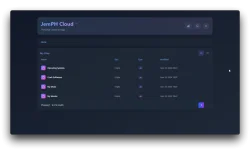
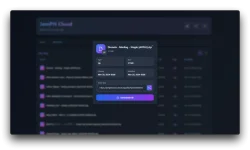
Fast File Search Functionality - Quick search capabilities are essential for efficiency, particularly when dealing with a large volume of data.
6.
Storage Usage Monitoring - This feature helps users manage their storage capacity efficiently, avoiding overuse and potential extra costs.
7.
Real-time Updates - Keeps the user interface up-to-date with changes, ensuring that the information displayed is always current.
8.
Multiple Cloud Drive Management - A vital feature for users who interact with more than one cloud service, offering a unified way to manage various storage solutions.
9.
LinkToBox API Integration - Integrating directly with LinkToBox can streamline workflows by allowing users to manage their files and data through a single interface.
### Technical Stack Exploration
- Zustand for state management means you can expect a lean and straightforward state management solution, which is excellent for performance and developer experience.
- Headless UI and Heroicons ensure that the UI components are accessible and visually appealing.
- Framer Motion is used for animations, which can greatly enhance the UX by providing visual feedback and delightful interactions.
- next-themes is employed to handle theme switching efficiently, perfect for implementing the dark and light modes.
### Getting Started
For developers interested in contributing or deploying their instance of JemPH Cloud Storage, the setup instructions are clear and straightforward. Cloning the repo, installing dependencies, and running the development server are all standard procedures that should get you up and running with minimal hassle.
### Configuration for LinkToBox
The configuration snippet provided shows a JSON structure for entering LinkToBox credentials, which is necessary for integrating the cloud storage functionality. Ensure that these credentials are kept secure and are not exposed in public repositories or client-side code.
### Licensing and Contribution
It's great to see that the project is under the MIT License, which encourages open-source collaboration by allowing others to freely use, modify, and distribute the software.
### Final Thoughts
JemPH Cloud Storage looks like a promising tool for both personal use and potential enterprise solutions, considering its robust feature set and modern tech stack. It’s exciting to see projects like this in the community, pushing the boundaries of what's possible with open-source software.
For anyone looking to enhance their cloud storage solutions or contribute to an innovative project, I would recommend checking out JemPH Cloud Storage on GitHub and considering contributing to its development.
Keep up the great work, and I'm looking forward to seeing how this project evolves!
 You do not have permission to view the full content of this post.
Log in or register now.
You do not have permission to view the full content of this post.
Log in or register now. PH
PH
 Beautiful Dark/Light Theme
 Built with Next.js 14 for optimal performance
 Modern UI with Tailwind CSS
 Fully responsive design
 Fast file search functionality
 Storage usage monitoring
 Real-time updates
 Multiple cloud drive management
 LinkToBox API integration
 by JemPH